
 HostArmada

 ScalaHosting
 SiteGround


















On This Page: [hide]
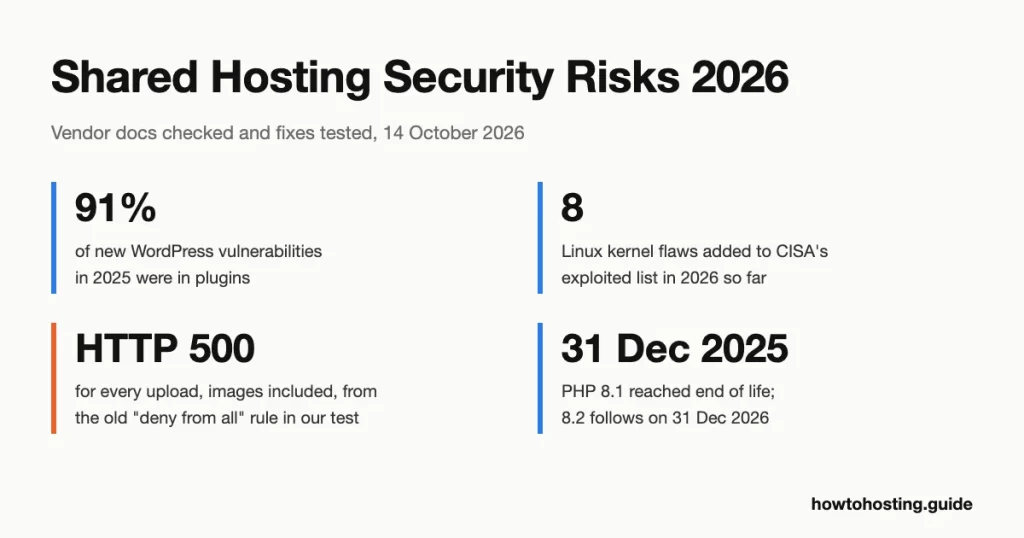
On a current shared host, the account next to yours is rarely how a site gets hacked. Patchstack counted 11,334 new WordPress vulnerabilities in 2025, and 91% of them were in plugins. Your own plugins are the open door. The server you share is usually the smaller worry.
Short answer: Three risks from sharing a server are real today. A shared IP can land on an email blocklist, and a DDoS on a neighbour can reach you. Neighbours can also slow you, though resource limits cap it. A neighbour reading your files is rare on hosts that isolate accounts. The “one shared directory” model is outdated wherever PHP runs as your own account. The fixes you control, tested below, matter more than any of these.
Checked October 2026 against CloudLinux and cPanel documentation. Every snippet was run on a disposable WordPress 7.1.3 site on 14 October 2026.
Which shared hosting risks are still real?
Here is each risk the old advice repeats, graded against how current shared servers separate accounts. The sections after the table explain each grade and what you can do about it.
| Risk | Status in 2026 | What decides it | Your move |
|---|---|---|---|
| All sites sit in one shared directory | Outdated on hosts with per-account PHP | Whether PHP runs as your account or as the shared “nobody” user | Ask the host; check from SSH |
| A hacked neighbour reads or edits your files | Rare | Account cages, symlink protection, kernel patching | Tight file permissions, backups stored off the server |
| A neighbour slows your site | Real, but capped | Per-account CPU, memory and disk limits | Watch your own usage; a 508 error is your own limit |
| Shared IP lands on a blocklist | Real for email; not how browser warnings work | Email blocklists check IPs; browser warnings check URLs | Send mail through a separate service or IP |
| A DDoS aimed at a neighbour | Real | Attack traffic hits the shared IP and network | Put a CDN or proxy in front of the site |
| A kernel exploit breaks out of the cage | Rare, but severe | How fast the host patches the kernel | Ask about live kernel patching; keep your own backups |
| Your own plugins, logins and old PHP | The most common cause | You | Updates, the four tested fixes below |
How we checked these claims
We read the isolation documentation from two vendors that much of shared hosting runs on. From CloudLinux: CageFS, LVE limits and SecureLinks. From cPanel: PHP handlers, PHP-FPM pools and symlink protection. For blocklists we used Spamhaus’s own SBL pages and Google’s Safe Browsing API documentation. Kernel figures come from CISA’s Known Exploited Vulnerabilities catalogue, read on 14 October 2026.
The fixes were tested, not just described. We ran WordPress 7.1.3 with PHP 8.3.35 and Apache 2.4.68 in a local Docker site, using WP-CLI 2.12.0, on 14 October 2026. Every command in this guide was run there, and the output shown is the real output.
One limit matters. Isolation between customer accounts can’t be tested on a single local machine, because it needs a real multi-tenant server. Those parts come from the vendors’ documentation, and we say so where it applies. We didn’t run attacks or load tests against any host.
“All sites share one directory”: outdated, with one exception
The old picture is one big folder holding every site, so a hacker who gets in can walk into all of them. That was close to true on servers that ran PHP as a single shared user. cPanel’s own documentation still describes that setup. With its DSO handler, PHP runs as the “nobody” user, and cPanel warns that “unauthorized users can view your data” when scripts run that way.
Current shared hosting mostly breaks that model in two ways. First, PHP runs as your own account. cPanel’s PHP-FPM pools default to user = [% username %], so each account gets its own PHP processes. Its suEXEC option does the same for CGI. Other sites’ PHP no longer runs as the same user as yours. Whether it can still read your files comes down to permissions, which fix 2 below handles.
Second, many hosts add CloudLinux’s CageFS. CloudLinux says it isolates “each user in their own ‘cage.'” According to its documentation, caged users can’t see other users or their usernames. They can’t read server configuration files, and they can’t see other users’ processes.
The exception is a host that still runs PHP as “nobody”. You can’t fix that yourself, so it’s a reason to leave. How do you tell? Ask support directly whether PHP runs as your account user. If you have SSH, CloudLinux’s documentation gives a quick sign: inside a cage, /etc/passwd is cut down. So list the usernames and look for other customers:
cut -d: -f1 /etc/passwd | wc -l
cut -d: -f1 /etc/passwd
We couldn’t run this on a real shared server, so treat it as the vendor’s method, not our test result. A list of dozens of unfamiliar usernames suggests no cage. A short list of system accounts plus yours points the other way.
“A hacked neighbour can take over your site”: rare, through two routes
Cross-account attacks on isolated servers need a hole in the isolation itself. Two routes remain on record. Neither is common, but both explain why good hosts patch fast.
Symlink tricks. A symlink is a file that points to another file. cPanel warns that Apache’s FollowSymlinks option lets a malicious user “serve files from anywhere on a server.” Without a fix, only strict file permissions limit what it can reach. Its safer SymLinksIfOwnerMatch option has a race condition (a timing gap an attacker can exploit). cPanel lists three fixes. CageFS is the one it “strongly” recommends; the others are CloudLinux SecureLinks and a modified Bluehost patch. Note one detail from CloudLinux’s docs: its separate Link Traversal Protection is disabled by default.
Kernel exploits. Every account on a shared server runs on the same Linux kernel. A cage limits what a user can see, but a kernel bug that grants root bypasses the cage entirely. These bugs aren’t theoretical. CISA added 8 Linux kernel flaws to its catalogue of actively exploited vulnerabilities between 1 January and 13 October 2026. The yearly counts since its first full year are 8 (2022), 3 (2023), 4 (2024), 7 (2025) and 8 (2026 so far).
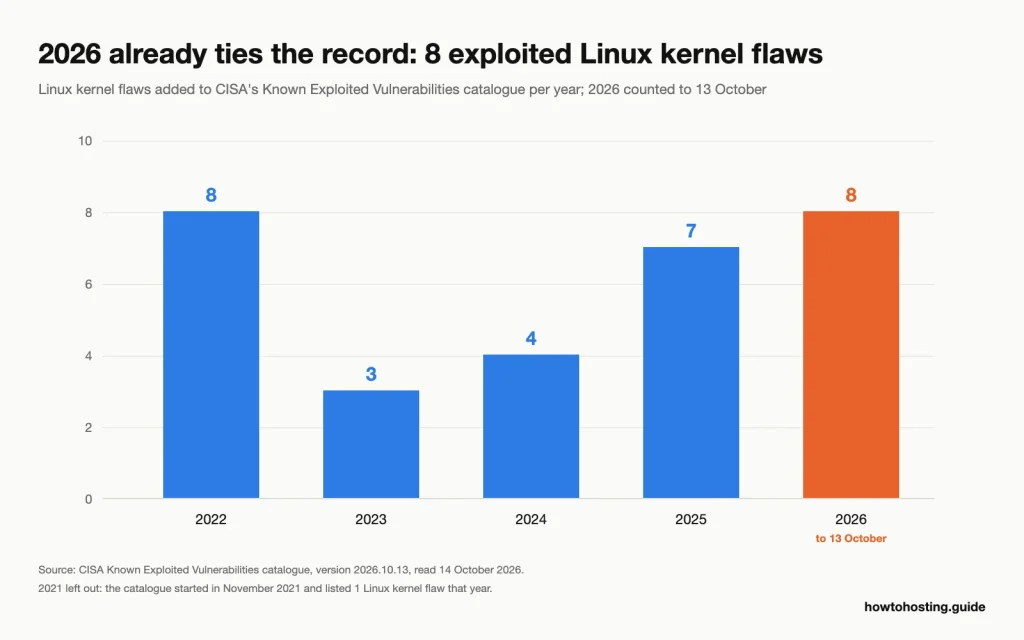
With more than two months left, 2026 has already matched 2022, the highest full year since the catalogue began in November 2021 (it listed 1 Linux kernel flaw that year). Source: CISA Known Exploited Vulnerabilities catalogue, version 2026.10.13, read 14 October 2026.
One 2026 addition is close to home for shared hosting. CVE-2022-0492, a privilege escalation through the cgroups v1 “release_agent” feature, was added on 2 June 2026. CloudLinux’s LVE limits are built on cgroups. That doesn’t mean a given host is exposed. It means the kernel patch schedule decides your isolation. So ask support whether they patch kernels without waiting for a reboot.
Your side of this is simple. Keep file permissions tight, so a breach of the web server user doesn’t hand over your config. Keep a backup somewhere the server can’t reach.
“A neighbour slows your site”: real, but capped
This one survives, in a weaker form. CloudLinux’s LVE (Lightweight Virtual Environment) puts each account inside its own limits for CPU, memory, disk input/output and processes. CloudLinux states the goal plainly: “no single web site can bring down your web server.”
The limits work on the busy account, not on you. At its entry-process limit, a site starts returning error 508 “without affecting other users,” per CloudLinux. At its disk limit, its processes are “put to sleep” until usage drops. So a hacked neighbour running heavy scripts mostly throttles itself.
Two gaps remain. Limits divide a server; they don’t add capacity, so an overloaded machine still feels slow for everyone. And CloudLinux’s documentation says its disk limits “will have no effect on network.” Network floods are a separate problem, covered below.
The flip side catches more owners out. If your site shows a 508 error, that’s almost always your own account at its limit, not a neighbour. Check the resource usage page in your control panel before blaming the server.
“A shared IP gets you blacklisted”: true for email, wrong for browser warnings
The old advice blends two different systems. The difference decides what you should do.
Email blocklists: these do work on IP addresses. Spamhaus describes its SBL as a list of IPs seen sending spam or “hosting malicious content.” Mail servers check it against the connecting IP. They also check it “by looking up IP addresses hosting resources” in the message, such as the links. So if a neighbour gets your shared IP listed, mail sent from that IP can bounce. Links to your site in someone’s email can trip filters too. Spamhaus’s removal rules even carve out an exception for virtual and shared servers, which tells you shared servers get listed too.
Browser warnings: these work differently. The red “deceptive site” screen comes from Google Safe Browsing. Its documentation says clients check URLs against Google’s lists, matching hashes of the address. A neighbour’s malware puts the neighbour’s URLs on that list, not your domain. Your site gets the red screen when your own pages serve malware, which is one more reason to watch your own plugins.
What to do: don’t send important mail from the shared web server. Use a separate email service, or an outgoing mail relay with its own reputation, and set up SPF, DKIM and DMARC records. If mail is already bouncing, our steps for getting a shared IP delisted walk through the lookup and the request.
“A DDoS on a neighbour takes you down”: still real
This is the shared-server risk that resource limits do the least about. A DDoS (distributed denial of service) floods a target with traffic. When the target shares your IP address and network link, the flood reaches your site too. LVE limits can’t help much. They cap CPU, memory and disk per account. CloudLinux’s optional network control only shapes outgoing traffic, and a flood comes in.
Hosts handle this upstream, with network filtering. Some null-route a targeted IP, dropping all traffic to it, which stops the attack and takes your site offline with it. Ask your host which it does.
Your best move is a CDN or reverse proxy in front of the site. Visitors then reach the proxy’s network, not your server’s IP directly. A dedicated IP narrows the problem a little. Attacks on a neighbour’s IP no longer land on yours, though you still share the network link. Our guide to adding a dedicated IP to a shared plan covers when that upgrade earns its fee.
The risk that’s actually yours: plugins, logins and old PHP
Patchstack’s 2026 report found 91% of new WordPress vulnerabilities in plugins and 9% in themes. Only 6 turned up in WordPress core, all low priority. Of the 11,334 total, 1,966 (17%) were rated high severity, the kind used in automated mass attacks. None of that depends on who else shares your server.
Old PHP is the second gap, and the dates are fixed. PHP 8.1 reached end of life on 31 December 2025, so php.net no longer ships fixes for it. Sites still on 8.1 run code with no upstream security fixes. PHP 8.2 follows on 31 December 2026. CloudLinux servers add a wrinkle. CloudLinux says it ships end-of-life PHP builds “with security patches applied” after cPanel’s support stops. Even so, moving to PHP 8.3 or newer is the cleaner fix. Your control panel shows which version the site runs.
Then there’s your own computer. Malware that records keystrokes or steals saved passwords hands over your hosting and WordPress logins without touching the server at all. Scan the machine you log in from with an anti-malware tool, such as SpyHunter for Windows or Mac. Turn on two-factor login for your hosting account and WordPress.
Before changing anything, it helps to know where you stand. Our walkthrough on testing your WordPress site’s security covers the free outside-in checks; the fixes below handle the server side.
Four server-side fixes we tested
Each fix below was run on the Docker test site described above. Run commands over SSH from your site’s root folder (where wp-config.php lives). Take a backup first; two of these can break a site if your server differs from ours.
1. Block PHP in the uploads folder
The uploads folder should only hold images and documents. Attackers who find an upload hole drop a PHP file there and run it from the browser. A small .htaccess file stops that. It works on Apache and LiteSpeed, which read .htaccess; Nginx ignores the file, so on Nginx the host must add the rule.
First we confirmed the problem. We put a one-line test script that prints “PHP RAN” into wp-content/uploads/2026/10/, next to an image. With no rule, curl showed the script ran:
test.php    HTTP 200
photo.jpg   HTTP 200
Then we created wp-content/uploads/.htaccess with this Apache 2.4 rule:
<FilesMatch "(?i)\.(php\d*|phtml|phar)$">
    Require all denied
</FilesMatch>
Result after saving it:
test.php    HTTP 403
test.phtml  HTTP 403
photo.jpg   HTTP 200
Images still loaded. A new upload through WP-CLI (wp media import) also worked and served with HTTP 200. WordPress handles uploads with its own scripts, which sit outside this folder. The pattern also covers .phtml and .phar, which some servers run as PHP; our test image didn’t, but the rule costs nothing.
Watch out for the older snippet many guides still print:
<Files *.php>
deny from all
</Files>
That’s Apache 2.2 syntax. It only works if the server loads Apache’s mod_access_compat module. We switched that module off and requested the same files:
test.php    HTTP 500
photo.jpg   HTTP 500

.htaccess: Invalid command 'deny', perhaps misspelled or defined
by a module not included in the server configuration
Every file in uploads failed, images included. With the module on, it blocked test.php but let test.phtml through. That gap matters on servers that run .phtml as PHP. Use the 2.4 rule. After adding any rule, open one image from your media library to confirm it still loads.
2. Set file and folder permissions
Permissions decide which system users can read a file. On a shared server that’s your defence if isolation ever slips. The usual targets are 755 for folders, 644 for files, and 600 for wp-config.php, which holds your database password.
find . -type d -exec chmod 755 {} +
find . -type f -exec chmod 644 {} +
chmod 600 wp-config.php
We tested the effect with a second system user standing in for a neighbour account. Before the change, that user read the password line straight out of wp-config.php:
644 www-data:www-data wp-config.php
define( 'DB_PASSWORD', getenv_docker('WORDPRESS_DB_PASSWORD', 'example password') );
After the change, the same command failed, and the site kept working:
600 www-data:www-data wp-config.php
grep: /var/www/html/wp-config.php: Permission denied
home HTTP 200
wp-login HTTP 200
Check one thing first: 600 only works when PHP runs as the file’s owner. That’s the per-account setup described earlier. On a host that runs PHP as “nobody”, PHP can’t read the file either. We simulated that by giving the file to a different user. The site returned HTTP 500 with this error:
PHP Warning: require_once(/var/www/html/wp-config.php): Failed to open stream:
Permission denied in /var/www/html/wp-load.php on line 50
In our test the site kept loading until Apache restarted, likely because PHP’s code cache still held the old file. So a wrong setting can break your site later, once that cache clears. If that happens, set wp-config.php back to 644 and ask your host how PHP runs. No SSH? In cPanel’s File Manager, select the file, click Permissions in the toolbar, type the number and click Change Permissions.
3. Turn off the dashboard file editor
WordPress lets admins edit theme and plugin code from the dashboard. A stolen admin password then becomes code running on your server in a few clicks. One line in wp-config.php removes the editor. With WP-CLI:
wp config set DISALLOW_FILE_EDIT true --rawWe checked the admin’s capabilities before and after with this command:
wp eval 'wp_set_current_user(1); var_dump(current_user_can("edit_themes"), current_user_can("edit_plugins"));'Before, both came back bool(true). The wp config set command replied:
Success: Added the constant 'DISALLOW_FILE_EDIT' to the 'wp-config.php' file with the raw value 'true'.After it, the same check returned:
bool(false)
bool(false)
Without WP-CLI, add define( 'DISALLOW_FILE_EDIT', true ); above the line that says to stop editing. Plugin installs and updates still work; only the code editor disappears.
4. Find changed core files and stray PHP
Prevention fails sometimes, so learn to spot a break-in. WP-CLI compares your core files with the official checksums from WordPress.org:
wp core verify-checksums
wp plugin verify-checksums --all
On the clean site, both passed:
Success: WordPress installation verifies against checksums.
Success: Verified 2 of 2 plugins.
Then we added one line to wp-includes/functions.php. We also planted wp-feed.php, a file name the old version of this page listed as a sign of a hack:
Warning: File doesn't verify against checksum: wp-includes/functions.php
Warning: File should not exist: wp-includes/wp-feed.php
Error: WordPress installation doesn't verify against checksums.
Both changes were caught. Our run also flagged wp-config-docker.php, a file the Docker image adds itself, so expect a host’s own extra files to show up too. Plugin checks only cover plugins from the WordPress.org directory.
For uploads, list any PHP-like file. A clean uploads folder returns nothing:
find wp-content/uploads -type f -iname "*.ph*"Ours listed the two test files we planted. Run both checks after any warning from your host, and once a month as routine.
What HostArmada, ScalaHosting and SiteGround publish
You can’t test a host’s isolation from outside, but you can read what it commits to. Here’s what each of these three hosts states on its own shared hosting pages, read on 14 October 2026.
| Host | Account isolation | Malware scanning | Firewall | Backups |
|---|---|---|---|---|
| HostArmada | CloudLinux with CageFS, listed on all three shared plans | Virus and malware scanning, malware removal | Network firewall, WAF, Imunify360 firewall | Daily, offsite: 7, 14 or 21 copies by plan |
| ScalaHosting | Not stated on its shared plan pages | SShield real-time monitoring (SPanel plans only) | “Advanced Firewall Protection”, brute-force limits | 7 daily copies on a remote server |
| SiteGround | “Isolated account containers”; technology not named | Daily scans with free removal | Custom firewall rules, updated several times a day | Daily, up to 30 days, stored across locations |
HostArmada is the only one of the three that names its isolation technology, so its claim can be checked against CloudLinux’s documentation. SiteGround promises the outcome, “its own isolated space,” without saying how. ScalaHosting’s shared page promises only “the best security practices” for shared hosting. Its terms say it “doesn’t guarantee the existence of backups at all times.” Customers are told to keep their own.
That last line applies everywhere. A host backup sits on infrastructure the host controls. Keep at least one copy you control.
Five questions that sort hosts quickly
These replace a long checklist. Each answer maps to a risk above, and a vague reply is itself an answer.
- Does PHP run as my account user? Anything other than yes means the old shared-directory risk still applies.
- Do you use CageFS or another per-account file system cage? A named technology can be checked; “we isolate accounts” can’t.
- How fast are kernel security patches applied, and do they need a reboot? This decides the rare but severe escape route.
- Does outgoing mail leave from the same IP as my website? If yes, a neighbour’s spam can bounce your invoices.
- Where are backups stored, and for how many days? Off the server, with at least a week of copies, is the floor.
Frequently Asked Questions
Can a hacked website on my shared server infect mine?
On a host that runs PHP as each account and adds CageFS, it’s rare. The attacker needs a hole in the isolation, such as an unpatched kernel bug. On a host running PHP as “nobody”, it’s realistic, because every site’s PHP can read every other site’s files. Ask support which setup they use.
Why does my shared hosting site show a 508 error?
Error 508 usually means your own account hit its entry-process limit. CloudLinux’s LVE returns it when too many requests run at once for one account. Check your resource usage page, then look at caching or a heavy plugin. It’s rarely a neighbour’s fault.
Do I need a dedicated IP on shared hosting?
Only if you send email from the server or keep getting hit by attacks on neighbours. Email blocklists such as Spamhaus SBL work on IP addresses, so a dedicated IP isolates your mail reputation. Browser malware warnings work on URLs, so a dedicated IP doesn’t change those.
How do I know if my shared host isolates accounts?
Look for a named technology on the plan page, such as CloudLinux CageFS, and ask whether PHP runs as your user. With SSH, CloudLinux’s documented check is to look at /etc/passwd. Other customers’ usernames shouldn’t appear inside a cage.
Bottom line
Shared hosting in 2026 isn’t the open-plan office the old warnings describe. Per-account PHP and file system cages have closed the shared directory on any host that uses them. Resource limits keep a noisy neighbour mostly in its own lane. What’s left from sharing is the IP and the network: email reputation and DDoS spillover. Kernel bugs remain the rare way through a cage.
The rest is on your side of the line, and it’s where the documented vulnerabilities sit. Block PHP in uploads with the 2.4 rule. Set permissions only after you know how PHP runs. Turn off the file editor, and run the checksum check monthly. Then pick a host that names its isolation, not one that only promises it.
Related reading: if mail from your server is already bouncing, start with the blocklist fix linked in the shared IP section. If you’re weighing a dedicated IP, the upgrade guide linked in the DDoS section covers the cost side. For a full outside-in audit of your WordPress site, the security testing walkthrough pairs with the server-side fixes here.
Could/would you please provide a list of the specific questions we should ask to potential host providers? Then we could compare the answers to this article which would make it easier for us non-techy gurus to ensure we know what we’re getting. This article contains helpful info, but I’m not sure what I need to specifically ask to get the info you say we are entitled to from a host provider.
Thank you!
Dear Andrea, Thank you you request, please find above our updates.