
On This Page: [hide]
When mail from shared hosting bounces with a blocklist error, the listed IP is usually one you share with every other account on the server. That puts most of the fix in your host’s hands. These six steps get you through it in order:
- Copy the rejection line from the bounce. Note the IP address it names and the list or provider behind the block, such as zen.spamhaus.org or Microsoft’s 5.7.606 code.
- Confirm that IP is the one your mail leaves from. It often isn’t your website’s IP, as the section on sending IPs below explains.
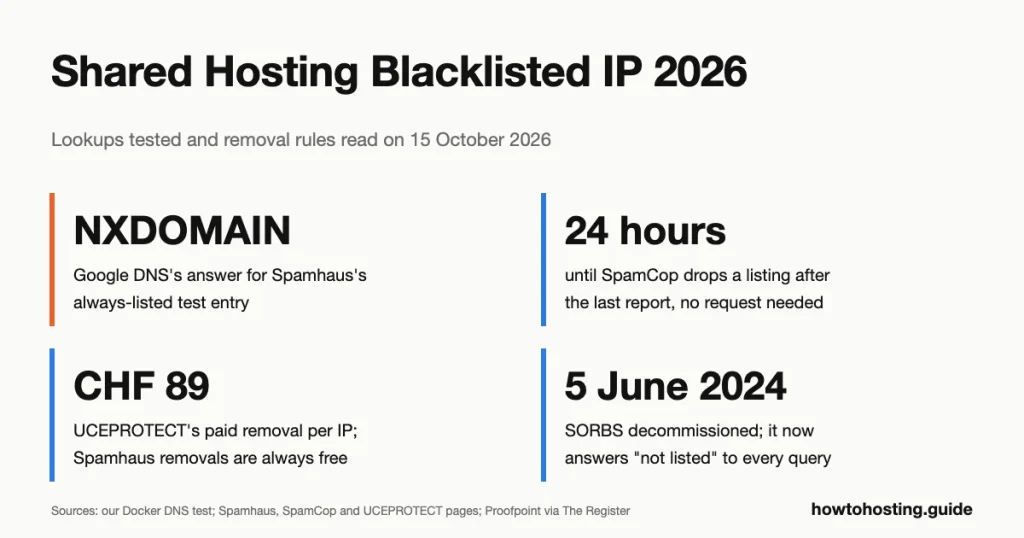
- Check the IP with a lookup you have tested first. Two popular public DNS resolvers gave us wrong Spamhaus answers on 15 October 2026.
- Open a ticket with your host. Give the IP, the list, the bounce text and the time. Ask them to stop the source and request removal, because for Spamhaus’s SBL only they can.
- Send important mail another way until the listing clears. A sending service moves your site’s mail off the listed IP as soon as it’s set up.
- Ask what stops the next listing. If the answer is “nothing”, move your sending off the shared IP for good.
Tested: every lookup below was run on 15 October 2026 in a disposable Docker container (Alpine Linux 3.20.10, DiG 9.18.49, Unbound 1.20.0). We queried only the test entries the lists publish for this purpose, never a real customer IP. Removal steps come from each list operator’s own documentation; we sent no mail and filed no removal requests. Last reviewed: October 2026.
Read the Bounce Before You Run a Single Lookup
The rejection message usually names the list that blocked you. That matters more than any checker result, because a listing only hurts you where the receiving server actually uses that list. Here’s how to read the common ones.
| The bounce mentions | Who blocked you | What it means |
|---|---|---|
| zen.spamhaus.org, sbl, xbl, pbl, or a check.spamhaus.org link | A server that uses Spamhaus | Look up the listing type; it decides who can act |
| bl.spamcop.net | A server that uses SpamCop | Recent spam reports; it expires 24 hours after they stop |
| b.barracudacentral.org or barracudanetworks.com/reputation | A Barracuda filter | Barracuda reputation listing; removal by web form |
| uceprotect.net | A server that uses UCEPROTECT | Level 1 is your IP; Levels 2 and 3 are your host’s range or network |
| 550 5.7.606-649 Access denied, banned sending IP | Microsoft 365 | Microsoft’s own block list; self-service delist portal |
| 550 5.7.511 Access denied, banned sender | Microsoft 365 | Needs an email to Microsoft; the portal won’t work |
| 550 OU-001 or 550 DY-001 | Outlook.com, Hotmail, Live | Microsoft points both codes to Spamhaus’s lists |
| 421 4.7.28 … your IP Netblock | Gmail | Gmail is rate-limiting your host’s whole address block |
| 550 5.7.1 … very low reputation of the sending IP | Gmail | Gmail’s own IP reputation; no public list involved |
Two lines in that table deserve a closer look. Outlook.com’s postmaster site lists the code OU-001. Its advice reads: “For more information about this block and to request removal please go to: Spamhaus.” So a Spamhaus listing can block mail to Hotmail and Outlook.com addresses, not just to small mail servers. Gmail works differently. Its sender guidelines warn that “Messages sent from IP addresses on a blocklist are more likely to be marked as spam.” But Gmail’s own bounces cite its reputation data, not a public list.
Put together, the big mailbox providers split three ways. Outlook.com and Hotmail lean on Spamhaus. Microsoft 365 and Gmail bounces cite their own block lists and reputation data. Smaller business servers use whatever their admin switched on. On cPanel servers, WHM (the admin panel behind cPanel) offers two ready-made lists, SpamCop and Spamhaus ZEN, and cPanel’s documentation says both default to off. Barracuda’s list matters wherever a Barracuda filter guards the mailbox. UCEPROTECT says its statistics come from the mail flow of several authorities in Germany, Austria and Switzerland.
If the bounce names your domain rather than an IP, or mentions dbl.spamhaus.org, you have a different problem. Spamhaus’s DBL lists domains by their own reputation, not by the IP they share. If it mentions authentication, a full mailbox or a sending cap, it isn’t a blocklist at all. Our guide to fixing the other shared hosting email failures covers those cases.
One thing you can stop worrying about: your website. Mail blocklists are checked by mail servers deciding whether to accept a message, and browsers don’t consult them. Spamhaus even warns admins against using its PBL to block website visitors. The one Spamhaus list built to block all traffic is DROP, and it covers criminal networks. Spamhaus says “IP address space under the control of any legitimate network will never be listed.”
Find the IP Your Mail Actually Leaves From
Checking your website’s IP is an easy mistake. On shared hosting, your site and your mail often use different addresses.
cPanel’s documentation is plain about the default. “By default, Exim sends mail from the server’s primary IPv4 address.” Exim is the program that sends mail on cPanel servers. Some hosts go further and pass all outgoing mail through a separate set of gateways. HostGator says shared mail is “routed through common gateways shared by the entire server,” and Bluehost describes the same setup. Others relay outgoing mail through a filtering service, so it leaves from that service’s addresses.
So take the IP from the evidence, not from your DNS settings. The bounce usually prints it. If it doesn’t, send yourself a message at an outside mailbox and open its full headers. Find the Received line that the receiving server added. The address there, usually in square brackets, is the one the world sees.
Check the Lists Yourself, and Test the Lookup First
Every public list in this guide answers plain DNS queries. That’s the standard design: you reverse the IP’s four numbers and put the list’s zone after them. To check 192.0.2.25 against Spamhaus, you’d query 25.2.0.192.zen.spamhaus.org. An answer in the 127.0.0.x range means listed. “NXDOMAIN”, the DNS answer for a name that doesn’t exist, means not listed.
The weak point is your DNS resolver, which may not pass the question along honestly. A resolver is the server your computer asks to look up names. So test it before you trust it. RFC 5782, the standard for these lists, requires every IPv4 list to contain 127.0.0.2 as a test entry and never to list 127.0.0.1. Run both:
dig +short 2.0.0.127.zen.spamhaus.org
host 1.0.0.127.zen.spamhaus.org
We ran them through a resolver inside our test container. The listed entry returned three codes and the unlisted one returned NXDOMAIN, as Spamhaus’s FAQ says it should:
127.0.0.10
127.0.0.4
127.0.0.2
Host 1.0.0.127.zen.spamhaus.org not found: 3(NXDOMAIN)
Then we asked the big public resolvers the same question, three times, 20 seconds apart. Cloudflare’s 1.1.1.1 returned an error code instead of an answer:
dig +short @1.1.1.1 2.0.0.127.zen.spamhaus.org
127.255.255.254
Spamhaus’s DNSBL FAQ documents 127.255.255.254 as “Query via public/open resolver.” It isn’t a listing, but it looks like one. Spamhaus’s FAQ warns that “some mail servers mistakenly reject all mail” because of it. Cloudflare returned that same code for 127.0.0.1, which is never listed. A checker that reads any 127 address as “listed” would report every IP as listed.
Google Public DNS failed the other way, which is worse:
host 2.0.0.127.zen.spamhaus.org 8.8.8.8
Using domain server:
Name: 8.8.8.8
Address: 8.8.8.8#53
Aliases:

Host 2.0.0.127.zen.spamhaus.org not found: 3(NXDOMAIN)
That’s “not listed” for an entry Spamhaus keeps listed permanently. Both of Google’s addresses, 8.8.8.8 and 8.8.4.4, gave that answer in all three runs. If your computer uses Google’s DNS, a listed IP will look clean. (We measured the answer, not the reason for it.) Quad9 and OpenDNS returned the correct codes from our connection, though Spamhaus’s FAQ names Quad9 among the resolvers it blocks. Whatever you use, run the two test lines first.
Where you run the check matters too. Spamhaus’s terms say “Queries originating from large shared hosting environments are not accepted.” So don’t run these from your hosting account’s terminal. Run them on your own computer, where macOS and Linux include dig. On Windows, Spamhaus’s documentation uses nslookup 2.0.0.127.zen.spamhaus.org instead; we didn’t test Windows.
Once the test passes, check every list at once. Replace 127.0.0.2 with your sending IP:
ip=127.0.0.2
rev=$(echo "$ip" | awk -F. '{print $4"."$3"."$2"."$1}')
for bl in zen.spamhaus.org bl.spamcop.net b.barracudacentral.org dnsbl-1.uceprotect.net dnsbl-2.uceprotect.net dnsbl-3.uceprotect.net; do
  printf '%-24s %s\n' "$bl" "$(dig +short "$rev.$bl" | tr '\n' ' ')"
done
With the test address, through a working resolver, it printed:
zen.spamhaus.org         127.0.0.4 127.0.0.2 127.0.0.10
bl.spamcop.net           127.0.0.2
b.barracudacentral.org   127.0.0.2
dnsbl-1.uceprotect.net   127.0.0.2
dnsbl-2.uceprotect.net   127.0.0.2
dnsbl-3.uceprotect.net   127.0.0.2
A blank line after a list name means not listed. With the container pointed at 8.8.8.8, the Spamhaus line came back blank and the other five still showed 127.0.0.2. That’s the whole trap, in six lines of output. The same loop ran unchanged in the macOS terminal (zsh 5.9).
For the reason behind a listing, ask for the TXT record, a short text note each list attaches to its entries. Each list answers in its own words:
dig +short TXT 2.0.0.127.zen.spamhaus.org"Listed by PBL, see https://check.spamhaus.org/query/ip/127.0.0.2"
"Listed by XBL, see https://check.spamhaus.org/query/ip/127.0.0.2"
"Listed by SBL, see https://check.spamhaus.org/sbl/query/SBL2"Spamhaus’s codes tell you which of its lists you’re on:
| Answer from zen.spamhaus.org | Meaning |
|---|---|
| 127.0.0.2 | SBL, Spamhaus’s researched spam list |
| 127.0.0.3 | CSS, automatic spam detections (part of the SBL) |
| 127.0.0.4 | XBL, compromised or infected machines |
| 127.0.0.9 | DROP, criminal networks (returned with 127.0.0.2) |
| 127.0.0.10 or 127.0.0.11 | PBL, address ranges that shouldn’t send mail directly |
| 127.255.255.252, .254 or .255 | An error (typo in the zone, public resolver, too many queries), not a listing |
Prefer clicking to typing? Spamhaus’s IP and Domain Reputation Checker does the same lookup and shows the removal path for each listing. Spamhaus says it is meant for manual lookups only.
One list you can drop from your checks: SORBS. Proofpoint decommissioned the SORBS blocklist on 5 June 2024, and its zones now answer “not listed” for every address. Our query for the test entry at dnsbl.sorbs.net returned NXDOMAIN, and the sorbs.net domain no longer resolves at all. A multi-list checker that still shows a green SORBS row is reporting on an empty list.
One IP or a Whole Range: What Each Listing Means
The lists differ in two ways that decide your next move: how much address space they cover, and who is allowed to ask for removal.
| List | What it lists | Who can request removal | How it ends |
|---|---|---|---|
| Spamhaus SBL | Single IPs and ranges, escalating to a whole network | Only the ISP or host in charge of the IP | Host’s abuse team emails the SBL team; no stated time |
| Spamhaus CSS | Single IPv4 addresses; IPv6 by /64 block | Self-service in Spamhaus’s checker, after the fix | Expires about 3 days after the last detection |
| Spamhaus XBL | Single IPs showing signs of compromise | Self-service in Spamhaus’s checker, after cleanup | Expires some time after activity stops; allow 24 hours after removal |
| Spamhaus PBL | Ranges, often home broadband | Only whoever the IP is assigned to | About 15 minutes after a valid removal |
| SpamCop | Single IPs | Nobody; it asks you not to request early removal | 24 hours after the last spam report |
| Barracuda BRBL | Single IPs | Anyone, by web form | “Typically” within 12 hours of a valid request |
| UCEPROTECT Level 1 | Single IPs | Wait, or pay CHF 89 per IP | 7 days after the last spamtrap hit |
| UCEPROTECT Level 2 | Your host’s whole allocation | Only the host, by stopping the abuse | No stated time; follows the host’s cleanup |
| UCEPROTECT Level 3 | Every IP in your host’s network (ASN) | Only the host | No stated time; follows the host’s cleanup |
| Microsoft 365 | Sending IPs it flags | The sender who got the bounce | “Up to 24 hours or longer” after the portal request |
Scale tells you how common each type is. Spamhaus says its SBL holds 30,000 to 40,000 listings, compiled by researchers. Its automatic CSS holds 2 to 4 million and adds 300,000 to 400,000 a day. Those numbers suggest a neighbour’s spam run is more likely to land your shared IP on the CSS than on the SBL. That’s the better outcome, because the CSS clears itself within days.
The range listings are where shared hosting really hurts. On 15 October 2026, UCEPROTECT’s counter for the previous 7 days showed 67,295 single IPs at Level 1. It also showed 11,892 whole allocations at Level 2 and 935 networks at Level 3. Its Level 2 rule is mechanical. An allocation smaller than a /27 (fewer than 32 addresses) gets listed after a single hit. A /24 (256 addresses) takes four. Spamhaus can escalate too, “to extended ranges of that network, or even to that entire network.” And Gmail’s error codes include a rate limit on “your IP Netblock,” not just your address.
On a range listing, UCEPROTECT’s removal page is plain: “It makes no sense for you to try to fix your service provider’s problems.” Complain to the host. Nothing you submit will clear it.
Getting Removed, List by List
Work through only the lists your bounce or lookup actually showed. For each, the operator’s own rules decide whether you act, your host acts, or everyone waits.
Spamhaus: start with the listing type
Spamhaus usually matters most. Outlook.com points to it, and it’s one of the two lists built into WHM on cPanel servers. Look your IP up in the checker and read which of the four datasets it’s on.
SBL: hands off. Spamhaus’s FAQ says “Removal requests must be sent by the Internet Service Provider in charge of the listed IP address(es).” When Spamhaus makes an SBL listing, it emails the network or hosting company responsible, so your host may already know. Your job is a ticket that quotes the SBL record number. There’s a second reason not to dawdle. Spamhaus’s checker says it cannot remove the IP from any of its other lists until the SBL listing is gone.
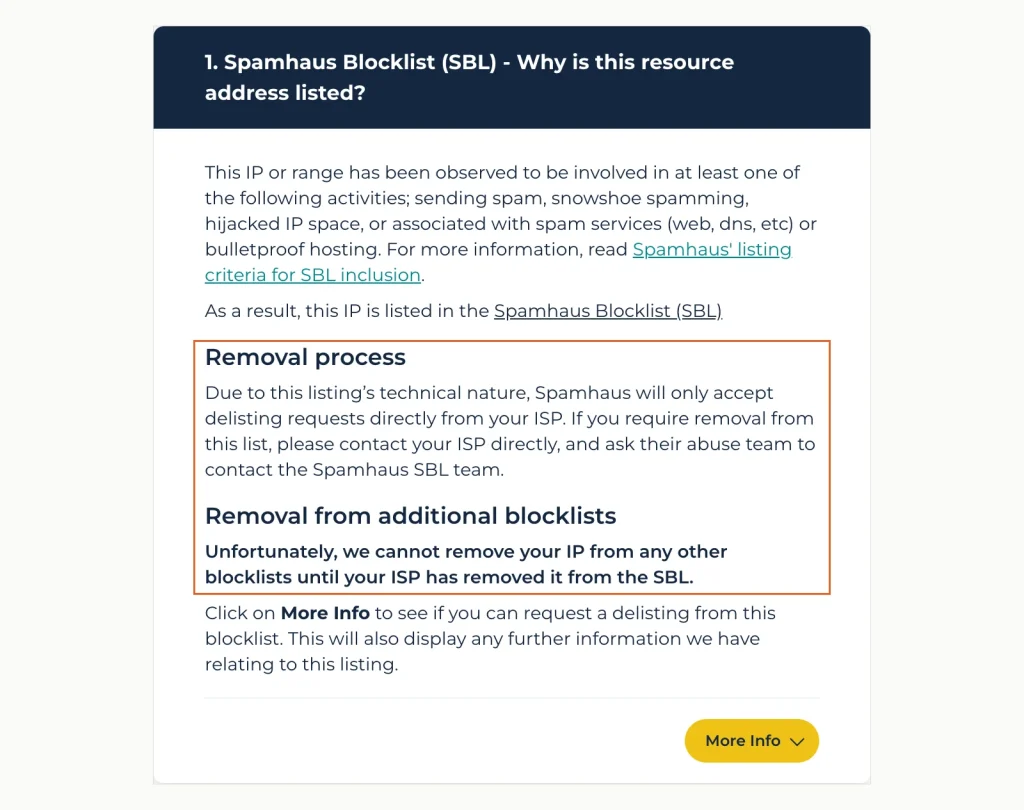
Spamhaus’s checker, showing its test address 127.0.0.2. The outlined part says only your ISP can request SBL removal, and other Spamhaus lists wait for it. Source: check.spamhaus.org, captured 15 October 2026.
CSS: this one clears fast. Listings “normally” expire three days after the last spam detection, and the checker allows quick removals. But Spamhaus warns that the cause “MUST be identified and corrected before removing an IP.” It re-lists at once if the spam continues. On a shared IP you can’t see the cause, so let your host confirm it’s fixed before anyone clicks remove.
XBL: this list means a machine using the IP shows signs of infection. On a web server, a hacked site is a likely cause. Spamhaus names WordPress, Joomla and Drupal as popular targets and calls plugins “especially vulnerable.” Removal happens only in the checker, and Spamhaus asks you to allow 24 hours for other networks to pick it up.
PBL: this is a policy list, not a spam verdict. It covers more than 1.4 billion IPv4 addresses, almost 40% of the routable total, often home broadband ranges. A properly run shared mail server has no reason to be on it. If it is, removal requires the IP to be “Assigned to the individual or company performing the removal.” That’s your host, not you.
SpamCop: wait 24 hours
SpamCop lists an IP when its users and spamtraps (addresses that exist only to catch spam) report mail from it, and drops it automatically. Its dispute FAQ is blunt: “Please do not write us to tell us that you have fixed the problem and ask for early delisting.” Listings expire 24 hours after the last report, and the removal can take up to four more hours to reach every server. If the listing keeps returning, someone on your IP is still sending reported mail, which makes it your host’s ticket.
Barracuda: one form, once
Barracuda’s removal request form asks for the mail server’s IP, an email address, a phone number and an optional reason. Barracuda says requests are “typically investigated and processed within 12 hours” when the explanation is valid. It also warns that “Multiple requests will also be ignored.” Since a shared IP isn’t yours to vouch for, let your host file it. If you file it yourself, wait until the host confirms the cause is gone, and file only once.
UCEPROTECT: free in 7 days, or CHF 89 now
Level 1 entries expire automatically 7 days after the last spamtrap hit. UCEPROTECT also sells immediate removal, and the price sits on its Level 1 removal page as an image rather than text. On 15 October 2026 that image read CHF 89 per IP address.
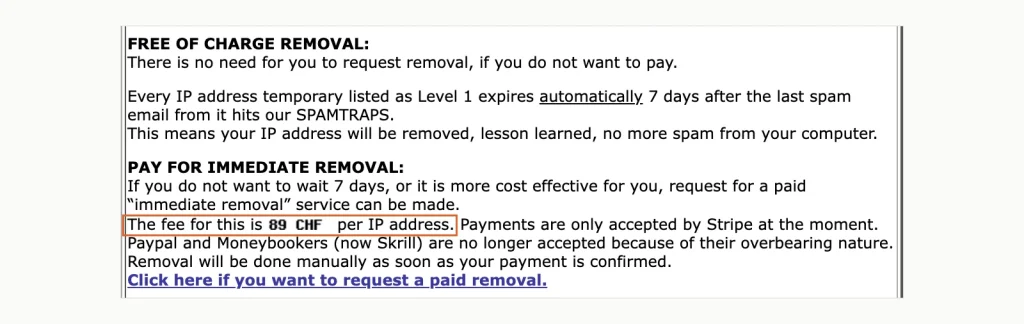
UCEPROTECT’s Level 1 removal page offers two routes: wait 7 days for free, or pay per IP. The outlined fee, CHF 89, appears on the page as an image. Source: uceprotect.net, captured 15 October 2026.
Don’t pay it for a shared IP. The next spamtrap hit from a neighbour can list the address again, and you’d have paid to save a few days. Levels 2 and 3 can’t be bought off at all; only your host’s cleanup ends them. How much any of this matters depends on who you’re mailing. UCEPROTECT describes Level 3 as “created for HARDLINERS.” It recommends using Level 3 as a score in a spam filter, not as an outright block.
Microsoft 365: the delist portal
Microsoft 365 keeps its own blocked senders list. A bounce reading “550 5.7.606-649 Access denied, banned sending IP” sends you to Microsoft’s delist portal. You enter the email address that received the bounce and the IP from the error, confirm by email, then select Delist IP. Microsoft says results “might take up to 24 hours or longer.”
This is the one big-provider removal you can do yourself on shared hosting. Do it after your host confirms the source is stopped, or Microsoft might block the IP again. Code 5.7.511 is different: the portal won’t work, and Microsoft asks you to email [email protected] with the full bounce. Microsoft says it will contact you within 48 hours. Outlook.com consumer addresses have their own support form.
Gmail: no form to fill in
We found no IP delisting form in Google’s sender documentation. Gmail’s bounces describe its own reputation data, such as 550 5.7.1 for “very low reputation of the sending IP address.” The error links to Google’s guidelines, not to a form, so the practical fix is your host’s cleanup. Google’s Postmaster Tools shows IP reputation, but Google notes the dashboards may leave out data when your sending volume is low. Small senders may see little there.
Does a Dedicated IP Fix It?
On a shared plan, usually not, and the hosts that sell dedicated IPs say so. HostGator’s help page says buying one “will not change the IP addresses your domain is routed through and will not affect blacklisting.” Bluehost’s page, updated in June 2026, agrees: “Purchasing a dedicated IP will not change the email routing IP.” In both cases the IP serves your website, while mail keeps leaving through the shared gateways.
Plain cPanel servers behave the same way out of the box. WHM’s setting Send mail from the account’s IP address “defaults to Off.” With it off, Exim sends from the server’s main shared IP. Ask your host whether that setting is on before you pay for anything. One Namecheap customer posted on Reddit in February 2026 that they’d bought a dedicated IP on support’s advice. Two days after a Spamhaus removal, it was listed again, and they couldn’t find a cause.
Even when mail really does leave from your own IP, ranges still reach you. A UCEPROTECT Level 2 listing, an SBL escalation or a Gmail netblock limit covers your address because of its neighbours in the block. IPv6 has the same problem at a different size. Spamhaus’s CSS lists IPv6 by /64 block, and Spamhaus tells customers who share a /64 to ask their provider for one of their own.
A dedicated IP earns its price on a VPS or server where you control the mail software and send real volume. On shared hosting, a sending service gives you a separate reputation for less, and the next section covers it.
What to Send While You Wait
Delisting takes from 15 minutes on the PBL to 7 days on UCEPROTECT, and the SBL has no stated time at all. Your invoices, password resets and replies to customers can’t wait that long. Three things keep mail moving without making the listing worse.
Route your website’s mail through a sending service. A transactional mail provider takes order confirmations and form notifications off the listed IP as soon as it’s connected. Sending through the provider’s API over HTTPS sidesteps your host’s mail server entirely. Our comparison of SMTP sending services covers free tiers and prices. On WordPress, an SMTP plugin makes the switch; our guide to why WordPress is not sending email walks through the setup.
Answer urgent mail from another mailbox. If a client’s server keeps rejecting you, reply from a mailbox hosted elsewhere and say why. It’s clumsy, but it keeps the conversation going.
Pause bulk sends. Every new report or spamtrap hit extends the listing. SpamCop’s clock restarts with each report, and UCEPROTECT counts 7 days from the last hit. A newsletter to an old list is the worst thing to send this week.
Stop It Happening Again
You can’t control your neighbours, but you can control most of what happens next time.
Keep important mail off the shared IP permanently. The sending service you set up as a stopgap is also the long-term fix. Your receipts then depend on that service’s reputation, not on the server’s other accounts.
Make sure the listing isn’t yours. Spamhaus’s CSS names “compromised accounts or content management systems (CMS)” as a common trigger. An outdated plugin on your own site can send spam just as easily as a neighbour’s. Spamhaus’s best practices also include securing web forms with a CAPTCHA, to stop “mail bombing” and fake subscriptions.
Check after every bounce, not on a schedule. Run the two test lines, then the loop, from your own computer. It takes a minute and needs no paid monitoring service.
Ask your host three questions before you renew. Does outgoing mail pass through a filtering relay or managed gateways? Who requests delisting, and how quickly? Do they limit how much one account can send per hour? Clear answers mean someone handles listings. No answers are a reason to move your mail or move host.
How We Tested and Sourced This Guide
All lookups ran on 15 October 2026. We used a disposable Alpine Linux 3.20.10 container with DiG 9.18.49 and our own Unbound 1.20.0 resolver, then repeated the loop in macOS. We queried only 127.0.0.2 and 127.0.0.1, the test entries RFC 5782 requires. The public resolver comparison ran three times, 20 seconds apart, and gave the same answers each time. We then removed the container and its network.
Listing rules, removal steps and times come from each operator’s own pages, read the same day. Those are Spamhaus, SpamCop, Barracuda, UCEPROTECT, Microsoft Learn, Outlook.com’s postmaster site, Google’s sender guidelines and cPanel’s documentation. Barracuda’s how-to page has returned an error to every reader we tried, the Wayback Machine included, since at least April 2025. Its zone name comes from a 2023 archived copy and our own test.
The limits are worth stating. We didn’t run lookups from inside a shared hosting account, because Spamhaus doesn’t accept those queries. We didn’t test Windows. Resolver behaviour can differ by location, so the Quad9 result describes one connection on one day.
Frequently Asked Questions
Why does the checker say my IP is clean when my mail still bounces?
Your lookup may go through Google Public DNS, which reported Spamhaus’s always-listed test entry as clean in our test. You may also have checked your website’s IP instead of the sending IP. The block may be Microsoft’s or Gmail’s own, which no public checker sees. And a Microsoft 365 bounce with code 5.7.513 means the recipient blocked you on its own list.
Does a blacklisted shared IP hurt my site’s Google rankings?
We found no documented link between mail blocklists and Google Search. Spamhaus publishes ZEN for mail servers deciding whether to accept a message. The red browser warning that does hurt a site, Google Safe Browsing, checks URLs against Google’s lists rather than IP addresses. Your site gets that warning when its own URLs land on those lists, for example for serving malware, not because a neighbour sent spam.
Can I ask my host to move me to a clean IP?
You can ask, but on shared hosting the answer is usually no. HostGator says shared mail runs through server-wide gateways it rotates and manages itself. On VPS and dedicated plans, both HostGator and Bluehost say they don’t replace blacklisted IPs. Asking them to stop the abuse and request removal works better.
Should I pay someone to get my IP off a blacklist?
Not for Spamhaus. Its FAQ says “There is never any charge or fee associated with removing any Spamhaus listing,” and calls paid removal offers a scam. It adds that no consultant can speed up an SBL removal. The only list in this guide that sells removal is UCEPROTECT, at CHF 89 per IP, against a free route that takes 7 days.