
On This Page: [hide]
A web security gateway, now usually called a secure web gateway (SWG), is a filter between an organisation’s staff and the internet. It checks the web traffic they start, blocking malware and banned sites and applying company rules to the rest. It doesn’t shield your website from attackers; that’s the job of a web application firewall (WAF).
Most gateways now run as a cloud service, bundled into platforms Gartner calls SSE and SASE (both explained below). To read encrypted HTTPS traffic, a gateway needs its own root certificate trusted on every device it watches. That’s the certificate a device checks all other certificates against.
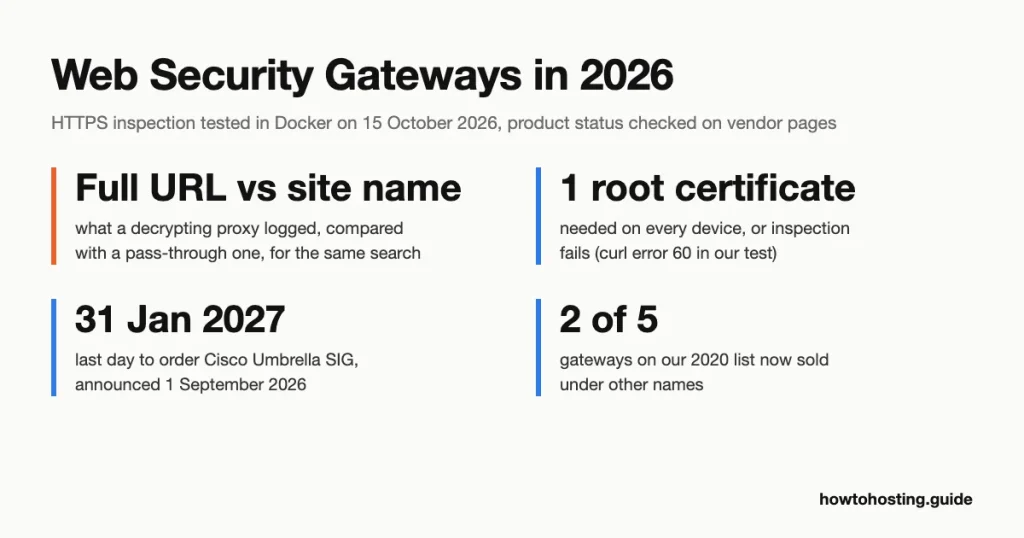
We tested what that changes in a disposable Docker setup on 15 October 2026. We also checked what became of the five products this page listed in 2020. One of those companies was sold out of administration.
Last reviewed: October 2026. Product status and published prices verified on vendor pages.
What a Secure Web Gateway Does to One Web Request
Gartner’s glossary sets the minimum. A gateway “filters unwanted software/malware from user-initiated Web/Internet traffic and enforces corporate and regulatory policy compliance”. It must include URL filtering, malicious-code detection and application controls (Gartner’s definition, archived November 2025).
NIST, the US standards agency, puts it more bluntly. Its 2022 network guide calls an SWG “fundamentally a web filter that protects outbound user traffic”.
Here’s what happens when someone on a company laptop opens a link:
- The request reaches the gateway. An agent app on the laptop sends it there, or the browser uses a proxy setting (a PAC file). Office routers can also tunnel all traffic to the gateway over GRE or IPsec, two standard tunnel types.
- The gateway checks who and where. It matches the user to a group, then looks up the site’s category and reputation. A company might block gambling as a category and any site flagged for phishing.
- It decides whether to decrypt. Without decryption it sees the site’s name and little else. With decryption it reads the full address and the content.
- It inspects what it can read. Downloads get scanned for malware. App controls can allow a tool but block uploads to it. Data loss prevention (DLP) rules look for things like card numbers leaving the company.
- It allows, blocks or warns. Then it logs the result. The log ties each request to a named person, which matters later for privacy.
One naming trap: an “internet gateway” isn’t the same thing. A home router or a cloud network’s internet gateway forwards traffic in and out. It doesn’t open, scan or judge any of it.
Secure Web Gateway vs Firewall, WAF and Proxy
The four get mixed up because they can sit in the same box. The clean way to tell them apart is direction: who starts the traffic, and whose side the tool is on.
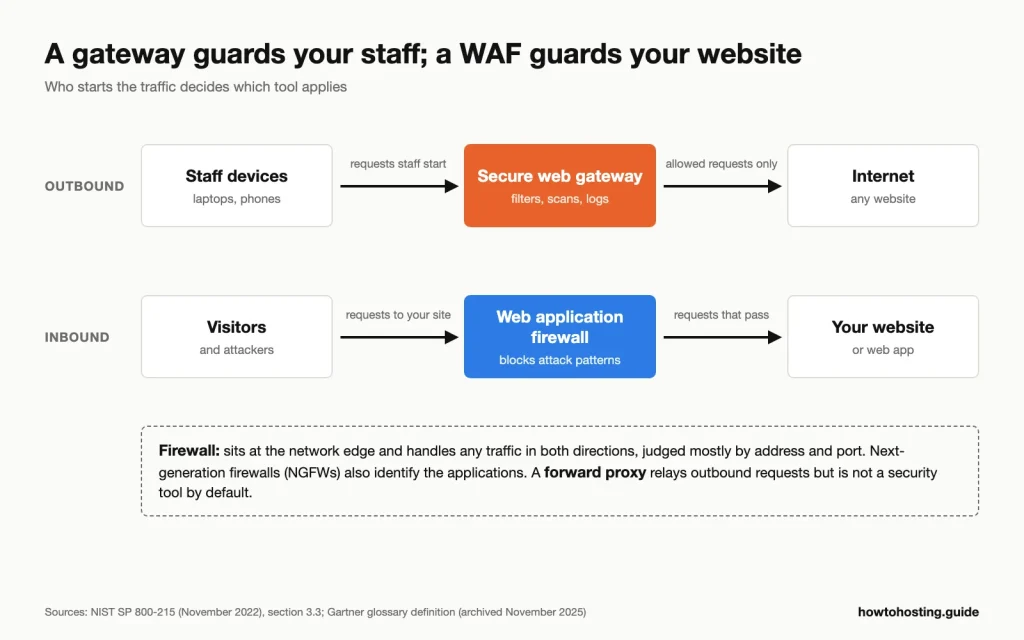
Direction decides the tool: a gateway sits on traffic your staff start, a WAF on traffic visitors send to your site. Source: NIST SP 800-215 (November 2022) and Gartner’s glossary definition.
| Tool | Protects | Traffic it handles | What it looks at |
|---|---|---|---|
| Secure web gateway (SWG) | Your users and their devices | Outbound web traffic your users start | Site category, downloads, app use, data leaving |
| Firewall (including a next-generation firewall, NGFW) | A network or a single server | Any traffic crossing the edge, both ways | Addresses, ports and, on NGFWs, applications |
| Web application firewall (WAF) | Your website or app | Inbound requests from visitors | Attack patterns such as SQL injection |
| Forward proxy | Not a security tool by default | Outbound requests it relays for users | Whatever its owner configures, often only caching |
How is a WAF different from a firewall? A WAF only handles web requests to your own site, and it reads them closely. A firewall handles every kind of traffic but mostly judges where it comes from and where it’s going.
NIST’s guide spells out the SWG side too. Gateways “are not a replacement for WAFs”, which protect websites “from inbound attacks” (NIST SP 800-215, section 3.3).
So if you run a WordPress site and want it protected, a gateway is the wrong purchase. You want a WAF in front of the site, plus the outside-in checks in our guide to testing your WordPress site’s security.
And the proxy? Every SWG is a proxy, but not every proxy is an SWG. A plain forward proxy relays requests and may cache them. The gateway adds the security part: categories, scanning, policy and the per-user log.
The lines blur at the top end, though. Next-generation firewalls now filter URLs and decrypt traffic, so a single office with one NGFW may already have most of what a gateway does.
HTTPS Inspection: The Root Certificate and the Privacy Cost
Most web traffic is encrypted now, so a gateway that can’t decrypt mostly reads site names. Decrypting means the gateway splits the connection in two. It talks to the website itself. Then it hands your browser a stand-in certificate for that site, signed on the spot with the gateway’s own root.
What it needs on every device
Your browser only accepts that stand-in certificate if it trusts whoever signed it. So the company has to install the gateway’s own root certificate on every device it wants inspected. CISA’s 2017 alert put it plainly: “administrators must install trusted certificates on client devices” (CISA TA17-075A). Cloudflare’s and Microsoft’s current setup guides say the same for their gateways.
Browsers mostly follow the operating system here. Chrome honours roots an administrator adds to the system’s trust store. Firefox started importing them by default with version 120 in November 2023, on Windows, macOS and Android (Firefox 120 release notes).
A public website’s certificate is different: it comes from a public certificate authority, like the ones in our comparison of SSL certificate providers. A gateway root is private, and it’s only trusted where IT has installed it.
The privacy trade-off
EU data protection regulators covered this exact case in 2017. Their opinion on monitoring at work calls tracking “every online activity of the employees” disproportionate. Employers should consider skipping “private webmail, visits to online banking and health websites”. Staff should also be told what the appliance monitors (Article 29 Working Party, Opinion 2/2017).
The UK regulator’s 2023 guidance is more general. It says monitoring network traffic “may be high risk” and asks employers to complete a data protection impact assessment (ICO, monitoring workers).
In practice that means a written policy, exclusions for banking and health, and logs that only a few named people can open.
What Decryption Changes: Our Docker Test
We didn’t test a commercial gateway, because that takes a company account and enrolled devices. Instead we reproduced the decryption step itself with mitmproxy 12.2.3, an open-source intercepting proxy, in Docker on 15 October 2026. The client was an Alpine Linux container with OpenSSL 3.3.7 and curl 8.14.1. Here is the certificate Wikipedia sends on a direct connection:
$ openssl s_client -connect www.wikipedia.org:443 -servername www.wikipedia.org </dev/null 2>/dev/null | openssl x509 -noout -subject -issuer
subject=CN=*.wikipedia.org
issuer=C=US, O=Let's Encrypt, CN=YE2
And the same request sent through the decrypting proxy:
$ openssl s_client -proxy hth-swg-test-mitm:8080 -connect www.wikipedia.org:443 -servername www.wikipedia.org </dev/null 2>/dev/null | openssl x509 -noout -subject -issuer
subject=CN=*.wikipedia.org
issuer=CN=mitmproxy, O=mitmproxy
The site name stays the same. The signer changes. Without the proxy’s root installed, curl refused to connect:
$ curl -sS -x http://hth-swg-test-mitm:8080 -o /dev/null https://www.wikipedia.org/
curl: (60) SSL certificate problem: unable to get local issuer certificate
More details here: https://curl.se/docs/sslcerts.html

curl failed to verify the legitimacy of the server and therefore could not
establish a secure connection to it. To learn more about this situation and
how to fix it, please visit the webpage mentioned above.

$ curl -sS --cacert /root/gateway-root.pem -x http://hth-swg-test-mitm:8080 -o /dev/null -w "HTTP %{http_code}\n" https://www.wikipedia.org/
HTTP 200
With the root trusted (the --cacert line), the page loaded with no warning. That’s the whole trick, and it’s why a gateway without its root on your device can’t read your HTTPS traffic quietly.
Then we compared what each mode writes to its log. We searched Wikipedia for “back pain” through the decrypting proxy, then through a second proxy set to pass HTTPS through untouched:
# decrypting proxy log
172.21.0.3:33956: GET https://en.wikipedia.org/w/index.php?search=back+pain HTTP/2.0

# pass-through proxy log, same request
[12:45:03.870][172.21.0.3:35870] server connect en.wikipedia.org:443 (185.15.59.224:443)
Without decryption, the log held the site name only. With decryption, it held the full search, health topic included. A real gateway can store that line with the user’s name attached. Our test covered the certificate and the logging, nothing else: no filtering, malware scanning or speed.
What breaks, and what stays unread
Apps that pin their certificate, meaning they accept only one specific certificate, refuse the stand-in and fail. Cloudflare’s documentation says “most mobile applications use certificate pinning”, and Microsoft’s says the same of “many mobile applications”. Admins handle this with exclusion lists. Microsoft’s gateway even creates an editable rule that skips finance, health, education and government sites by default.
QUIC, a newer way of carrying web traffic, is another gap. Chrome won’t accept a company-added root on QUIC connections, per its root store FAQ. Microsoft’s setup guide tells admins to block QUIC, so browsers fall back to ordinary HTTPS that the gateway can read.
Every exclusion is a blind spot, though. Cloudflare warns that a “Do Not Inspect” rule means losing the ability to log, block, apply DLP and scan for viruses on that traffic. So “the gateway inspects encrypted traffic” really means: some of it, on devices that trust its root.
The gateway also becomes a place where passwords pass in readable form. The NSA warned that the admins of an inspection system “could abuse their access to capture passwords or other sensitive data”. It also advises decrypting only once inside a network (NSA, Managing Risk from TLS Inspection).
Badly built gateways can weaken the encryption they sit in. A 2017 study tested twelve corporate inspection appliances (middleboxes). The default settings of eleven exposed connections to known attacks (Durumeric et al., NDSS 2017). That data is old, but it’s the reason to ask a vendor how its gateway checks the real site’s certificate.
How to check whether your traffic is inspected
In Chrome or Edge, click the icon to the left of the address and open the certificate details. Then look at who issued it. A public certificate authority such as Let’s Encrypt or DigiCert means no inspection. A company name or a gateway vendor’s name means your connection is being decrypted on the way.
On macOS or Linux, the same check from a terminal:
openssl s_client -connect www.wikipedia.org:443 -servername www.wikipedia.org </dev/null 2>/dev/null | openssl x509 -noout -issuerOn our Mac it printed issuer=C=US, O=Let's Encrypt, CN=YE2. macOS’s built-in LibreSSL formats it as issuer= /C=US/O=Let's Encrypt/CN=YE2. One caveat: the command doesn’t use the proxy settings your browser uses. So on a network with an explicit proxy, the browser check is the one to trust.
Where Gateways Sit in 2026: SSE and SASE
Few companies buy a gateway on its own anymore. It usually comes as one part of a platform.
Gartner defines security service edge (SSE) as a service that “secures access to the web, cloud services and private applications”. It “is primarily delivered as a cloud-based service, and may include on-premises or agent-based components”. Secure access service edge (SASE) adds the networking side, SD-WAN (software-defined links between offices), to the same package. Gartner’s SASE list names the parts: “SD-WAN, SWG, CASB, NGFW and zero trust network access (ZTNA)”.
Two of those acronyms need a line each. A cloud access security broker (CASB) controls how staff use cloud apps such as file-sharing services. Zero trust network access (ZTNA) replaces the old VPN for reaching internal company apps. The SWG is the piece that covers the open web.
Gartner’s latest SSE Magic Quadrant, its yearly vendor comparison report, came out on 29 July 2026. Its summary calls SSE “a mature market” and tells buyers to weigh security vendors “in the context of a dual-vendor secure access service edge strategy”. In plain terms: buy the security from one vendor and the office networking from another if that suits you.
Cloud doesn’t mean appliances are gone. Fortinet still sells FortiProxy boxes for up to 60,000 users. Broadcom still sells on-premises Edge SWG appliances.
Netskope offers hardware and virtual gateways next to its cloud. Fortinet even sells a “Sovereign” version of its cloud gateway that customers run in their own data centres.
Definitions date quickly here. Gartner’s own glossary entry still named Skype as an example app in its last public capture, in November 2025. Microsoft had retired Skype on 5 May 2025. The glossary page itself now redirects to a general Gartner page.
What the 2020 Version of This Page Got Wrong
We checked every claim the old page made about what a gateway does against Gartner, NIST and the vendors’ own pages. Most of the basics held up. The framing didn’t.
| 2020 claim | What we found in October 2026 |
|---|---|
| Gateways help “server safety” and protect “your servers” | Wrong. A gateway protects users browsing out. Servers and websites need a WAF, per NIST SP 800-215. |
| Sits “between the users and the internet” and uses URL filtering, app control, DLP, antivirus and HTTPS inspection | Right. That matches Gartner’s minimum list, with DLP as a common extra. |
| Five “features” of gateways in general | They follow Barracuda’s product page section by section, so they described one appliance. That page still uses the same five sections. |
| “Easy to implement” | Not for HTTPS inspection. It needs a root certificate on every device, exclusion lists and a privacy policy. |
| “Perfect for finding threats” in encrypted traffic | Only for traffic it decrypts. Pinned apps and excluded categories pass through unread. |
| Forcepoint offers “100% accuracy when an attack is imminent” | No source. Neither Forcepoint’s current page nor its September 2020 version, in the Wayback Machine, says this. |
| Gateways are “mostly cloud-based” | True now. Gartner says SSE is “primarily delivered as a cloud-based service”. |
What Happened to the Five Gateways We Listed in 2020
Two of the five no longer carry their 2020 names. One company was sold out of administration. Here’s each one, in the old page’s order:
| 2020 name | Status in October 2026 | Key date |
|---|---|---|
| Symantec Secure Gateway | Owned by Broadcom. Renamed Symantec Cloud SWG (was Web Security Service) and Edge SWG (was ProxySG). | Broadcom deal completed 4 November 2019; rename November 2022 |
| Forcepoint Web Security | Still sold under that name, now pitched around data protection | Francisco Partners completed its purchase on 11 January 2021 |
| Fortinet FortiProxy | Still sold as hardware, virtual machines and a cloud deployment; the separate cloud service is FortiSASE | Version 7.6 released 27 September 2024; latest patch 7.6.7 on 12 August 2026 |
| Barracuda Web Security Gateway | Still listed, as hardware and a virtual appliance, with no published price | No end-of-sale notice found |
| Censornet Web Security | Company in administration; business sold to Trustlayer Limited. The product is now TrustLayer Browse. | Administration and sale both on 16 April 2025 |
Censornet’s change is the easiest to miss, because its old address redirects without comment. Censornet Limited entered administration on 16 April 2025, and its business was sold the same day, according to the administrators’ proposals filed at Companies House.
Censornet’s web address now redirects to TrustLayer, which announced the rebrand on 8 May 2025. TrustLayer publishes a price: its Browse layer (web filtering plus CASB) is listed from GBP 5.70 per user per month. That figure assumes 750 or more users, billed annually up front. TrustLayer calls it an indicative price (prices as listed, with no tax line shown).
Gateways Buyers Compare in 2026
We picked these from public analyst results and vendor documentation, not from review sites. Three vendors (Netskope, Palo Alto Networks and Zscaler) announced Leader placements in Gartner’s 29 July 2026 SSE report. Cloudflare announced a Visionary placement in the same report.
Cisco is ending sales of Umbrella SIG and pointing those customers to its newer platform, so it’s on the list too. So is Microsoft, which prints a price. Broadcom and Fortinet carry over from our 2020 list because both still sell cloud and appliance versions. Forcepoint, also still sold, stays in the table above to keep this list to eight.
They’re listed alphabetically, not ranked. We didn’t test any of them.
Most are sold through sales teams as company-wide contracts. A fair test would need a company network, enrolled devices and weeks of real traffic, which a desk test can’t fake. Prices appear only where the vendor prints one.
| Product | Who it’s for | Delivery | Published price |
|---|---|---|---|
| Broadcom Symantec Cloud SWG and Edge SWG | Large organisations already on Symantec proxies | Cloud and on-premises appliances | None |
| Cisco Secure Access | Cisco Umbrella SIG customers, whom Cisco points to it | Cloud | None |
| Cloudflare Gateway (Cloudflare One) | Small teams, and buyers who want to try before a sales call | Cloud | Free up to 50 users; USD 7 per user per month, billed monthly |
| Fortinet FortiProxy and FortiSASE | FortiGate firewall owners; buyers who need inspection on their own hardware | Appliances, virtual machines and cloud | None |
| Microsoft Entra Internet Access | Microsoft 365 organisations whose staff sign in with Entra ID | Cloud | From USD 5.00 per user per month, annual commitment, plus Entra ID P1 |
| Netskope One Next Gen SWG | Companies most worried about data moving into cloud apps | Cloud, plus on-premises virtual and hardware gateways | None |
| Palo Alto Networks Prisma Access | Organisations with remote and branch staff | Cloud | None |
| Zscaler Internet Access | Companies retiring on-premises proxies and firewalls | Cloud | None |
Prices are as listed on each vendor’s US page, with no tax line shown. “Who it’s for” follows each vendor’s own pitch where it states one.
Broadcom Symantec Cloud SWG and Edge SWG
These are the 2020 page’s “Symantec Secure Gateway” under new names. Broadcom renamed Web Security Service to Cloud SWG and ProxySG to Edge SWG in November 2022. It had already stopped selling the two separately in November 2021. Both now come in one bundle, Symantec Web Protection, which Broadcom aims at “our most complex and demanding customers”.
Cisco Secure Access
Cisco announced on 1 September 2026 that Umbrella SIG, its older cloud gateway, can’t be ordered after 31 January 2027. Renewals stop on 31 January 2028, and support ends on 31 January 2029. Cisco names Secure Access, its newer SSE platform, as the replacement. If you renew Umbrella every year, your next renewal is the moment to compare it with a rival.
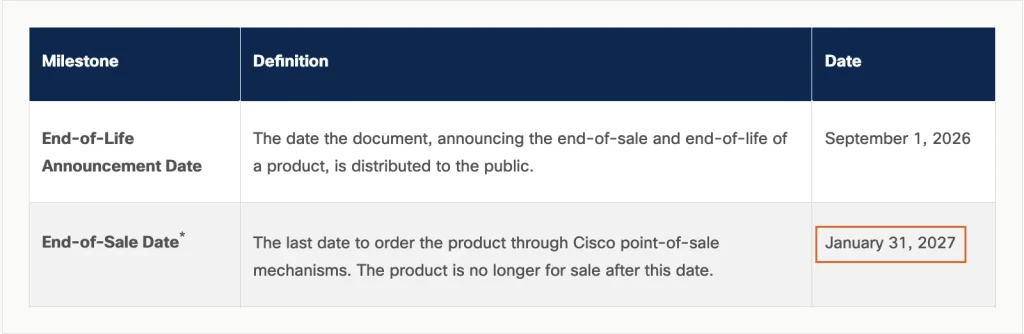
The outlined cell is the last day to order Umbrella SIG, in Cisco’s own date format. Source: Cisco end-of-life bulletin EOL15975, captured 15 October 2026.
Cloudflare Gateway (Cloudflare One)
Cloudflare is the easiest one to try. Its free plan includes the gateway with a 50-user limit.
Beyond that, the pay-as-you-go plan has no user limit, and contract customers pay a custom annual price. Traffic arrives through Cloudflare’s device app or as DNS queries. One gap on the cheaper plans: browser proxy setup with a PAC file is listed on the contract plan only.
Fortinet FortiProxy and FortiSASE
FortiProxy is the 2020 entry, still sold as hardware, virtual machines and a cloud deployment. The largest box, the 4000G, is rated for up to 60,000 users.
FortiSASE is Fortinet’s cloud gateway. On 28 July 2026, Fortinet launched FortiSASE Outpost on its FortiGate 1200G firewalls. Fortinet says it brings cloud-delivered security services into customer-controlled environments.
Microsoft Entra Internet Access
Microsoft calls it “an identity-based Secure Web Gateway”, and it reached general availability in July 2024. The listed USD 5.00 isn’t the whole bill.
Microsoft’s documentation lists Entra ID P1 or P2 as a prerequisite, and P1 is listed at USD 7.00 per user per month. Microsoft says P1 comes with Microsoft 365 E3 and Business Premium. Without either, the two licences total USD 12.00 per user per month (our calculation). The Entra Suite bundle also costs USD 12.00 and also needs P1.
Netskope One Next Gen SWG
Netskope leans on data protection, pitching “web and SaaS inline security” for any user or device. It’s mainly a cloud service. Offices can tunnel to it over GRE or IPsec, and a forwarder virtual machine can sit on-premises.
Palo Alto Networks Prisma Access
Prisma Access is Palo Alto’s “single, cloud-delivered solution”, and the SWG is one of its parts. Palo Alto describes it as “delivering consistent security to remote and branch users”.
Zscaler Internet Access
Expect two names in Zscaler’s material. Its site now heads the product “Secure Internet and SaaS Access (ZIA)”, while the body text still says Zscaler Internet Access. The pricing page lists bundles but no figures.
Do You Need a Web Security Gateway? Four Situations
The answer depends on where your people work and what they handle. Here are four common cases.
One office, modern firewall: check your firewall first. Many next-generation firewalls already filter URLs and decrypt HTTPS. A separate gateway mostly earns its cost when staff leave the building, so start there before buying a second product.
Under 50 users, little budget: Cloudflare’s free plan covers up to 50 users. That lets a mostly remote team try a real gateway at no cost. Past 50 it’s USD 7 per user per month.
Already on Microsoft 365 Business Premium? Then Entra ID P1 is included, and Microsoft’s Internet Access adds USD 5.00 per user per month on an annual commitment.
Inspection must stay on-site: this fits regulated data, or a rule that decrypted traffic never leaves your premises. Look at gateways you can run yourself. FortiProxy appliances, Broadcom’s Edge SWG and Fortinet’s Sovereign option all keep decryption on your own hardware. Plan the exclusion list (banking, health) before the first device gets the root.
Cisco Umbrella SIG customers: put 31 January 2027 in the calendar. That’s the last order date, and renewals end a year later. Compare Cisco Secure Access with at least one rival before your renewal, not after.
Whichever you pick, a gateway filters what crosses the network. It doesn’t clean a laptop that’s already infected. That still takes anti-malware on the device itself, such as SpyHunter on Windows or Mac.
Frequently Asked Questions
Is a secure web gateway the same as a VPN?
No. A VPN builds an encrypted tunnel from your device to a private network, so you can reach company systems from outside. A gateway inspects and filters web traffic headed for the public internet. Some products now do both, sending traffic through a tunnel to a cloud gateway, but they’re still separate jobs.
Can my employer see which websites I visit on a work laptop?
Usually yes, at least the site names, if traffic passes through a company gateway. If the gateway also decrypts HTTPS, it can see full addresses and what you type into pages. In our test, the decrypting proxy logged a whole search query. Check the certificate issuer as shown above to find out which case applies.
Why does my work laptop show “Your connection is not private” on some sites?
Often the company’s gateway is decrypting traffic, but its root certificate is missing on your laptop or in one app. It’s the browser’s version of the error curl gave us in the test. It can also be a clock, antivirus or Wi-Fi problem, which our guide to fixing “Your connection is not private” walks through. On a managed laptop, report it to IT rather than clicking past it.
Is there a free secure web gateway?
Yes, for small teams. Cloudflare’s Zero Trust free plan includes its gateway for up to 50 users. HTTPS inspection on it still needs the Cloudflare root certificate on each device. The other vendors here publish no free tier.
Final Verdict
A web security gateway protects people, not websites. It’s worth buying when staff work from many places on company devices. Someone also has to own the root certificate rollout, the exclusion list and the privacy policy. If you run a website and want it protected, buy a WAF instead.
For a small team testing the idea, Cloudflare Gateway costs nothing up to 50 users. Already on Microsoft 365 Business Premium or E3? Then Microsoft Entra Internet Access adds USD 5.00 per user per month to the P1 licence you have.
For large companies, Zscaler, Netskope and Palo Alto Networks announced Leader placements in Gartner’s July 2026 report, and none publishes a price. Cisco Umbrella SIG customers can still renew until 31 January 2028, but new orders stop on 31 January 2027.
Want the wider picture? Our cybersecurity basics primer covers the other layers of defence. If your concern is your own site rather than your staff, start with the WordPress security checks linked above.