
On This Page: [hide]
Short answer: a hosting plan should include free SSL, self-service backups, malware scanning with removal, and a web application firewall. We read the entry plans and checkout carts of 8 large shared hosts on 14 October 2026. All 8 come with an SSL certificate, though two make it free for the first year only. Just 4 promise to remove malware on their cheapest plan.
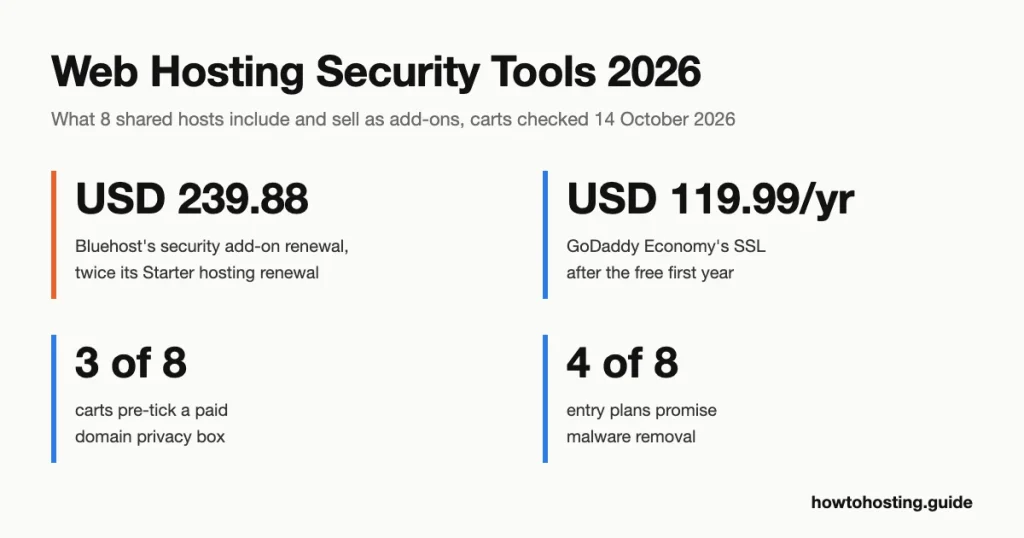
The gaps are where the add-ons live. Bluehost’s malware add-on costs USD 71.88 in year one, then renews at USD 239.88, twice what its Starter plan renews at. Three of the 8 carts tick a paid privacy box for you, and it protects nothing on your website.
Use this checklist on any plan page. The counts come from the 8 entry plans in our add-on check further down.
| Tool | What it stops | Usually included? | What to check on the plan page |
|---|---|---|---|
| SSL/TLS certificate | Someone on the network reading or changing data between a visitor and your site | Yes, 8 of 8 (GoDaddy Economy and Namecheap: free for year one only) | “Free SSL” with no “1 year” note, and the footnote on what happens after year one |
| Malware scanner | Nothing by itself; it finds known bad files after they land | 5 of 8 entry plans | How often it scans, and whether the plan says “removal” or only “scanning” |
| Malware removal | Infected files staying on the site once a scan finds them | 4 of 8 say so | “Removal” or “cleanup” on your tier, and any yearly limit |
| Web application firewall (WAF) | Requests that match known attack patterns, such as SQL injection (code slipped into a form to reach your database) | A firewall is named for 5 of 8 entry plans | “WAF” or “firewall” on your tier, not only on the plan above it |
| DDoS protection | Floods of junk traffic that knock a server offline | Named for 3 of 8 entry plans | “DDoS” in your tier’s feature list |
| Backups and restores | Losing the site for good after a hack, a bad update or a deleted file | 8 of 8 back up; 4 do it daily | How often, how many days are kept, where copies sit, and who restores |
| SFTP or SSH access | Passwords and files being read on the network while you upload | Listed for Bluehost, HostGator and SiteGround entry plans | “SFTP” or “SSH” in the feature list |
| Two-factor login (2FA) | A stolen password alone opening your control panel | Listed by Namecheap (cPanel) and HostArmada (client area) | “2FA” for both the control panel and the billing account |
| Account isolation | A hacked site on the same server reading your files | Named by HostArmada and SiteGround | “Account isolation”, or CageFS and CloudLinux (tools that wall each account off) |
Last reviewed: October 2026. Plan features, cart contents and prices were read on each host’s own pages on 14 October 2026.
SSL certificates: free is enough, but check how long “free” lasts
An SSL certificate (the file behind the https:// in your address bar) lets the browser and server set up TLS (Transport Layer Security) encryption. The TLS 1.3 standard says it’s designed to prevent “eavesdropping, tampering, and message forgery” on the connection (RFC 8446). That’s protection in transit. It does nothing for a hacked plugin, a weak password or a database someone has already copied.
Free is the normal price now. Let’s Encrypt, the nonprofit authority behind many hosts’ free certificates, says it charges no fee and issues Domain Validation certificates only (Let’s Encrypt FAQ). A paid OV or EV certificate (organization or extended validation) adds a checked company name. It doesn’t add stronger encryption.
So the thing to check isn’t “free SSL”, which every plan we read offers. It’s how long free lasts. GoDaddy’s Economy card says “Free SSL Certificate, 1 year”. Its footnote adds that the certificate “will automatically renew after the first year at the then-current price”. In the cart, that price is USD 119.99 a year. Namecheap’s help article on its free certificate says the same in gentler words: after year one, buy “the renewal SSL through the shopping cart”.
Bluehost, HostGator and SiteGround name Let’s Encrypt, which renews at no cost. Hostinger, HostArmada and DreamHost list free SSL with no one-year note.
Don’t pay extra for a “multi-year” certificate, either. Since 15 March 2026, a public certificate can be valid for 200 days at most (CA/Browser Forum Baseline Requirements). A paid plan just reissues inside that limit. If you do need an OV or EV certificate, our comparison of SSL certificate providers lists who sells them and for how much.
Malware scanning finds infections; removal is a separate promise
A scanner compares your files with known malicious code and tells you what it found. It doesn’t stop the break-in. It reports it afterwards, often on a daily schedule.
Removal is the part you’re actually paying for, and plan pages word it carefully. Bluehost’s Starter card lists “Free Malware Scanning” and, on a separate line, “Malware Detection & Removal”. HostArmada’s Start Dock lists “Malware Scan” and “Malware Removal” as two items, plus a “Hacked Website Restore” support service. Namecheap’s Stellar plan includes Imunify360, described as “malware scanners, intrusion prevention, and a machine-learning firewall”. Removal isn’t mentioned.
Add-ons draw the line even more clearly. DreamHost’s DreamShield costs USD 3 a month per site, and its own FAQ says it “identifies and disables threats it finds”. It then warns you may still need to fix file permissions, delete quarantined files or reset passwords yourself. GoDaddy’s Website Security Standard includes “site cleanup and repair 1x per year”. A second infection in the same year is your problem.
What do users report? In a January 2026 Reddit thread, a Bluehost customer said the host told them to buy SiteLock to get malware cleaned. Another user replied that SiteLock “is not a 100% guarantee to clean up everything”. One thread is not a sample, but it matches what the vendors’ own wording admits.
If your plan only scans, run your own check as well. Our guide on how to test your WordPress site’s security covers free scans you can run in a few minutes.
A web application firewall filters known attacks; it doesn’t fix your plugins
A WAF sits in front of your site and checks each web request against a set of rules. OWASP, the open web security project, says these rules generally “cover common attacks such as Cross-site Scripting (XSS) and SQL Injection” (OWASP on WAFs). Its guidance on using WAF rules as a stopgap (virtual patching) is blunter. A rule “reduces exposure only for traffic the enforcement layer inspects and attack variants its rules recognize” (OWASP Virtual Patching Cheat Sheet). The same page warns that “rule matching and transformations can miss attacks”.
Read that as: a WAF buys you time until you update the vulnerable plugin. It’s not a substitute for the update.
Which tier the WAF sits on matters, and it can change quietly. Bluehost dropped “Web Application Firewall” and “DDoS Protection Included” from its Starter plan card between 9 and 14 July 2026, per Wayback Machine captures. Both lines still appear on Business, which costs USD 6.99 a month for 36 months and renews at USD 13.99. Any review written before mid-July 2026 overstates what Starter lists.
HostGator, whose cart sells the same Complete Security add-on as Bluehost, still lists both on its cheapest Hatchling plan. At Bluehost, only the card text changed. We found no Bluehost page saying whether Starter accounts still sit behind a WAF, so ask support before you count on one.
DDoS protection keeps floods off the server, not hackers out
A DDoS attack (distributed denial of service) floods a server with junk traffic from many machines until real visitors can’t get through. Protection filters that traffic upstream, before it reaches your server. It won’t block a login with a stolen password or a plugin exploit, because those arrive as ordinary-looking requests.
Three entry plans we read name DDoS protection. Hostinger’s comparison table lists “Standard DDoS protection” on Premium, and HostGator lists “DDoS Protection Included” on Hatchling. GoDaddy’s hosting page promises “Automated DDoS protection and network monitoring”. The other five don’t mention it for their cheapest tier. That doesn’t prove they lack it; it means you’d have to ask.
Backups: check how often, how long, where, and who restores
All 8 plans include automatic backups, but the details split them. GoDaddy, SiteGround, HostArmada and DreamHost back up daily on the entry plan. Hostinger and Bluehost back up weekly, and Namecheap twice a week. HostGator’s wording is the softest. Its comparison table calls them “Courtesy website backups”, made “as a courtesy to our customers”.
Where the copies sit matters as much as how often they’re made. GoDaddy, Namecheap and HostArmada sell cPanel plans. By default, cPanel saves backups “locally to the /backup directory”, on the same server (cPanel documentation). Its makers “strongly” recommend adding a remote copy too. None of the 8 plan pages says where copies are stored. Hostinger’s help article does: daily backups you buy are “stored separately from your hosting”.
Count the days too. Hostinger keeps daily backups for 7 days, and HostArmada’s Start Dock keeps 7 daily copies. Say malware sat on your site for two weeks before anyone noticed. Then every one of those copies is infected.
That’s why the US government’s cyber defense agency, CISA, says to “maintain offline, encrypted backups of critical data” (CISA #StopRansomware Guide). It also says to test restoring them. For a small site, that means a copy you download and keep yourself. Our step-by-step guide to backing up a WordPress site shows how.
Account access: SFTP, SSH and two-factor login
SFTP is often called “secure FTP”. It isn’t FTP at all. SFTP is a separate program that “performs all operations over an encrypted ssh(1) transport”, as the OpenBSD manual puts it (sftp manual). The encrypted form of plain FTP is FTPS, which wraps FTP in TLS (RFC 4217). Either one keeps your password off the network in readable form. Plain FTP doesn’t.
Look for “SSH” or “SFTP” in the feature list. Bluehost’s Starter and HostGator’s Hatchling list “SSH & WP-CLI”, and SiteGround’s StartUp lists “Free SSH and SFTP Access”.
Two-factor login matters more than most tools on this page, because your hosting account controls everything else. Namecheap’s specs table ticks “cPanel 2FA” on all three shared plans. HostArmada lists “Client Area TFA”. Turn it on for the billing account too, since that’s where your domain and payment details live.
And never read a 2FA code to someone who calls you. In an August 2025 Reddit thread, a user described a caller who claimed to be from SiteLock. The caller asked the user’s mother for her password and her 2FA code. A reply recommended creating a temporary login for any real support job instead.
The last access point is your own computer. If it’s infected, saved passwords for your control panel or SFTP client can be stolen before any server tool sees a thing. A desktop anti-malware scan, with a tool such as SpyHunter on Windows or Mac, covers the end no hosting plan can reach.
Managed hosting is a support level, not a security tool
“Managed” means the host runs the server for you: updates to the operating system, PHP and the control panel. It doesn’t mean the host maintains your site. DreamHost says so on its hosting page: “Building custom features and maintaining your site are separate paid services.”
Your plugins, themes, admin passwords and user accounts stay your job on most plans. Treat a “managed” label as a support promise, then check the tools above line by line.
The add-on check: what 8 hosts include and what they sell
We checked each host’s cheapest shared plan on 14 October 2026, using its US or USD storefront. We read the plan page, its comparison table and footnotes. Then we opened the cart with a placeholder domain and filled in no personal details. SiteGround’s US pages redirect visitors from our location to its EU store, so its prices come from its USD “World” storefront.
Hostinger, GoDaddy and SiteGround state that their prices exclude VAT or taxes. Bluehost and HostGator showed a USD 0.00 tax line before any address was entered. Namecheap and HostArmada showed no tax line, and DreamHost said taxes are calculated after the billing address.
| Host (entry plan) | Malware tools included | Firewall | Backups | SSL | Paid security add-on: first term, then renewal |
|---|---|---|---|---|---|
| Hostinger (Premium) | Scanner that “detects and removes” | WAF | Weekly; daily is a paid add-on in Hostinger’s control panel | Free | Daily backups: price shown only inside the control panel |
| Bluehost (Starter) | Scanning plus detection and removal | Not listed since July 2026 | Weekly | Let’s Encrypt | Complete Security: USD 71.88, then USD 239.88 a year. Xcitium Backup Basic: USD 35.88, then USD 47.88 |
| GoDaddy (Economy) | None, except a 30-day trial | Not listed on the card | Daily | Free for 1 year, then USD 119.99 a year | Website Security Standard: USD 95.88 for 12 months, then USD 191.88 |
| HostGator (Hatchling) | Scanning plus detection and removal | WAF | “Courtesy” weekly | Let’s Encrypt | Complete Security: USD 71.88 for the first year; no renewal price shown |
| Namecheap (Stellar) | Imunify360 scanners | Imunify360 firewall | Twice a week | Free for 1 year | SiteLock Protect: USD 4.88 a month, renews at USD 4.88 |
| SiteGround (StartUp) | None named | Not named | Daily | Let’s Encrypt | Site Scanner: 1 month free, USD 29.88 for 12 months, then USD 4.99 a month |
| HostArmada (Start Dock) | Scan plus removal | WAF and IP firewall | Daily, 7 kept | Free | No security add-on; paid certificates from USD 9.95 a year (no renewal price shown) |
| DreamHost (Launch) | None named | “A firewall screens incoming requests” | Daily | Free | DreamShield: USD 3 a month per site |
The pattern is easy to miss on one host and hard to miss on eight. The first-year price of a security add-on tells you little. The renewal decides the cost, and two of these carts show it only after you add the item.
Bluehost is the sharpest case. Its add-on list shows Website Security at USD 5.99 a month, billed annually at USD 71.88. Tick it, and the cart line turns into “Bluehost Complete Security” with a renewal price of USD 239.88: a 3.3x jump. Starter hosting renews at USD 9.99 a month, or USD 119.88 a year. So the add-on costs twice the hosting it protects. HostGator sells the same product at the same USD 71.88 but prints no renewal line in its cart at all.
Here’s how each priced add-on compares with the plan’s own renewal, per year:
| Host | Hosting renewal per year | Security add-on per year after the first term | Add-on vs hosting |
|---|---|---|---|
| Bluehost | USD 119.88 | Complete Security: USD 239.88 | 2.0x |
| GoDaddy | USD 143.88 | Website Security Standard: USD 191.88; Standard SSL: USD 119.99 | 1.33x and 0.83x |
| Namecheap | USD 55.88 | SiteLock Protect, billed monthly: USD 58.56 | 1.05x |
| SiteGround | USD 215.88 | Site Scanner: USD 59.88 | 0.28x |
The yearly hosting figures are our arithmetic from each plan’s printed renewal. Bluehost renews at USD 9.99 a month, GoDaddy at USD 431.64 per 36 months and SiteGround at USD 17.99 a month. Namecheap’s USD 55.88 is its yearly Stellar renewal, charged on renewal invoices issued from 19 May 2026. Add-on figures are each cart’s renewal price, or a monthly rate times 12 where the host bills monthly.
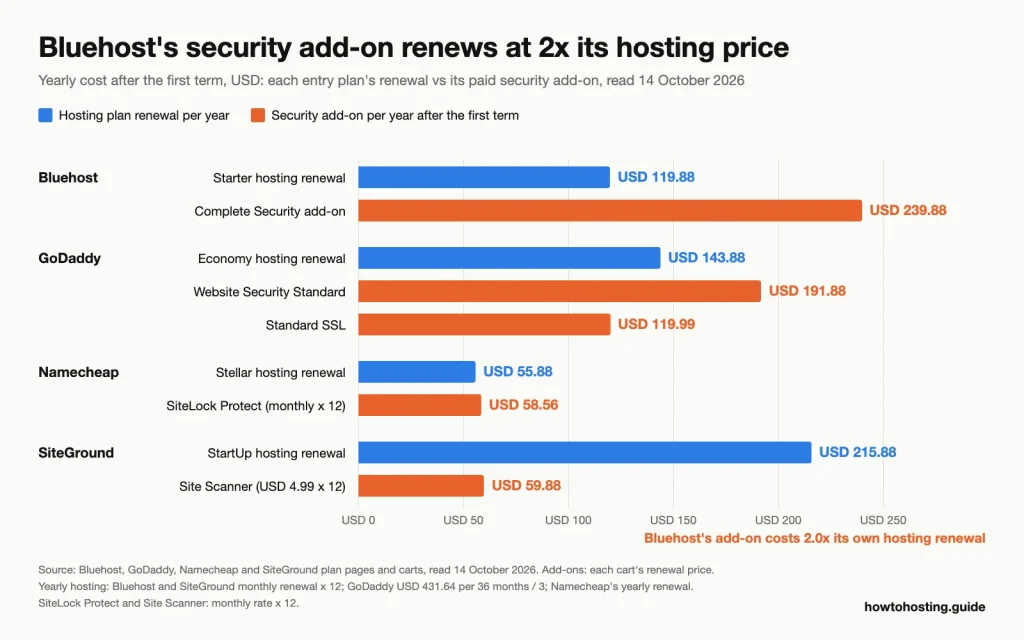
After the first term, Bluehost’s add-on costs twice its hosting and Namecheap’s SiteLock edges past the Stellar plan it protects. Source: each host’s plan page and cart, read 14 October 2026.
On Namecheap, SiteLock costs slightly more per year than the Stellar hosting it sits on, and Stellar already includes Imunify360. Before you buy it there, ask whether you need its automatic removal, or whether the included scanner plus your own backups will do.
Extras the cart adds for you
Five of the 8 carts contained something that costs money, now or later, without our ticking it. Only GoDaddy’s were site security tools.
Bluehost, HostGator and HostArmada pre-tick domain privacy. Bluehost charges USD 11.88, renewing at USD 15.00. HostGator charges USD 14.95 and HostArmada USD 4.65, and neither cart shows a renewal price. Bluehost and HostGator call it “Domain Privacy + Protection”, which sounds like security. It hides your name and address in the public domain record (WHOIS). That’s useful, but it does nothing for your website. DreamHost adds Professional Email, free for 3 months and then USD 19.99 a year.
GoDaddy’s Economy cart arrives with three “Free with this plan” lines, each with its own remove button. They are Microsoft 365 email, Standard SSL and Website Security Standard. The SSL line says the free trial ends a year after purchase and then auto-renews at USD 119.99 a year. The Website Security line reads “Free until 11/14/2026”, 30 days out.
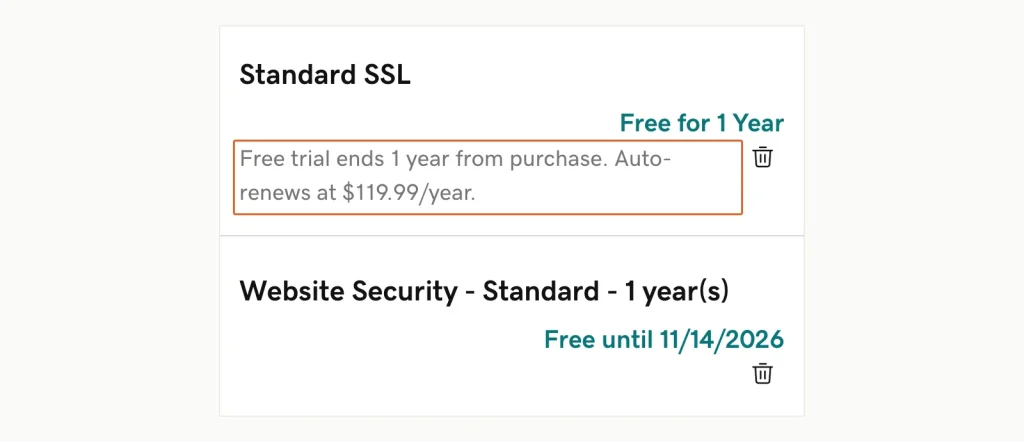
Both lines were already in the Economy cart; the outline marks the SSL renewal hidden in small grey type. GoDaddy cart, US storefront, captured 14 October 2026.
GoDaddy’s Free Trial terms, last revised 1 April 2024, say that after a trial “the Product will automatically renew at its then-current renewal price”. The cart quoted Website Security Standard at USD 191.88 at renewal on a 12-month term. Read together, those point to USD 191.88 for the first paid year, not the USD 95.88 promo price. If both extras renew, a renewal year of Economy costs USD 455.75 instead of USD 143.88, by our arithmetic.
If the free SSL lapses and nothing replaces it, visitors get a browser warning instead of your site. Our guide to fixing the “Your connection is not private” warning walks through that case.
How to check a plan before you pay
- Read the security list on the plan card for your tier, not the tier above. Bluehost’s Starter and Business cards differ by a WAF, DDoS protection and the wording on malware removal.
- Open every footnote marker next to “free”. GoDaddy’s “^” is where the SSL renewal is explained.
- Open the full comparison table and read your column. Hostinger’s table shows no daily backups on Premium; SiteGround’s crosses out on-demand backups on StartUp.
- In the cart, expand any collapsed “Recommended” or “Add-ons” panel and see which boxes are ticked. Untick what you didn’t choose.
- To see an add-on’s renewal, add it, read the renewal line, then remove it. Bluehost shows the USD 239.88 only at this step.
- After you buy, open billing and switch off auto-renew on any trial you don’t want. GoDaddy’s trial terms let you cancel a trial “at any time”.
Frequently Asked Questions
Do I really need SiteLock?
Only if your plan scans for malware but doesn’t remove it, and you won’t clean files yourself. Namecheap sells SiteLock Protect at USD 4.88 a month. It adds automatic malware removal and a 2 GB backup. But Stellar already includes Imunify360 scanning, so check the gap first. HostArmada’s Start Dock lists malware removal at no extra cost.
Is GoDaddy Website Security worth it?
On the Economy plan it comes as a 30-day trial, so the real question is whether to let it renew. Standard covers one site and one cleanup a year. GoDaddy also notes “Website Backup not included in Standard plan”. At USD 191.88 a year on renewal, it costs more than the Economy hosting itself.
How much does malware protection cost on shared hosting?
Among the 8 hosts we checked, it runs from nothing to USD 239.88 a year. Hostinger, Bluehost, HostGator and HostArmada include scanning and removal on the entry plan. DreamShield costs USD 3 a month per site, and Bluehost’s Complete Security renews at USD 239.88.
Will my host’s free SSL certificate start charging me?
On GoDaddy’s Economy plan, yes: after year one it auto-renews at USD 119.99 a year unless you cancel. Namecheap’s free certificate also covers the first year only. Hosts that issue Let’s Encrypt certificates, such as Bluehost, HostGator and SiteGround, renew them at no charge.
Bottom line
Four lines on a plan page tell you most of what you need:
- malware removal, not just scanning
- a firewall on your tier, not only the one above
- daily backups you can restore yourself
- SSL with no one-year limit
In our check, only HostArmada’s Start Dock listed all four on the entry plan. Hostinger’s Premium missed only the daily backups.
Then read the cart before you pay. A security add-on’s first-year price is the bait; the renewal line, if the cart prints one, is the real price. And whatever the host includes, keep one backup copy of your own.
Comparing hosts on these features rather than on price? Our hosting finder matches plans to your budget, expected traffic and CMS.