
On This Page: [hide]
Building a website for your small business doesn’t have to be complicated. By defining your purpose, securing a domain name, and choosing the right tools, you can create a professional online presence that attracts and engages customers. This guide covers the essential steps to help you get started.
Key Takeaways
- Define your website’s purpose to guide design decisions and connect effectively with customers.
- Choose a memorable domain name and reliable hosting provider to strengthen your online presence.
- Optimize for mobile and use SEO strategies to boost visibility and engagement.
Step 1: Determine Your Website Purpose
The first step in creating a small business website is defining its purpose. Are you selling products, providing information, or simply building credibility online? Knowing your primary goal shapes every decision that follows – from your design choices to your content strategy.
A clear purpose also ensures alignment with your target audience. When your website speaks directly to customer needs, it builds trust and drives engagement.
Step 2: Brainstorm Domain Name Ideas
Your domain name is your digital identity. It should be short, memorable, and reflective of your brand. Here’s how to come up with strong options:
- Create a list of 10–15 ideas based on keywords and your business name.
- Use a domain name generator for inspiration.
- Avoid hyphens and unnecessary characters to keep it clean and professional.
- If the .com isn’t available, consider alternatives like .co, .net, or industry-specific extensions.
Investing time into finding the perfect domain name is worth it, it builds recognition and credibility from day one.
Step 3: Select a Website Builder or CMS
Choosing the right platform depends on your skills and needs:
- Website builders (like Wix or Squarespace): Easy drag-and-drop editors, quick setup, and all-in-one solutions.
- Content Management Systems (CMS) like WordPress: Highly flexible, with thousands of plugins and themes, but requires more technical knowledge.
If you prefer simplicity, go with a website builder. If you need customization and scalability, WordPress is the better option.
Step 4: Register Your Domain Name
Once you’ve chosen your domain, register it with a trusted registrar. Many hosting companies (like Bluehost or SiteGround) bundle free domain registration with their plans, but you can also register independently through platforms like Namecheap or GoDaddy.
- Domain costs typically start around $6–$20 per year.
- Renewal fees may be higher if bundled with hosting plans.
- Use AI-powered domain search tools to quickly check availability.
Step 5: Choose a Web Hosting Provider
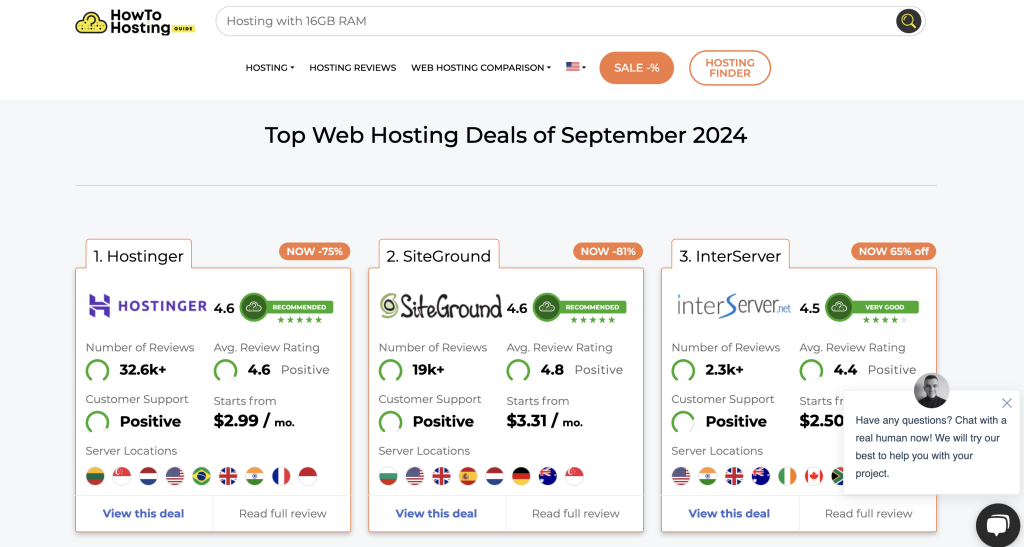
Your hosting provider determines your website’s speed, uptime, and scalability. Popular options for small businesses include:
- Bluehost: Official WordPress partner, great for SEO.
- SiteGround: Beginner-friendly with excellent support.
- DreamHost: Known for its 100% uptime guarantee.
- Hostinger: Affordable, fast, and reliable.
- GreenGeeks: Eco-friendly hosting with strong performance.
As your business grows, you can easily upgrade your hosting plan to handle more traffic.
Step 6: Pick and Customize a Template
Templates set the look and feel of your website. Platforms like WordPress and Squarespace offer hundreds of responsive, customizable templates across different industries.
- Change fonts, colors, and layouts to match your brand.
- Ensure templates are mobile-responsive for all devices.
- Use high-quality images and graphics that load quickly.
Step 7: Add Essential Content
Your website content should clearly communicate your brand and services. Essential elements include:
- Homepage with a clear value proposition
- About page to build trust
- Services or products page with details and pricing
- Contact page with forms, phone, and location
- Supporting content like blogs, images, and videos
Don’t forget SEO basics, optimize meta tags, use keywords naturally, and ensure your content is scannable.
Step 8: Optimize for Mobile
Over half of all web traffic comes from mobile devices. A mobile-optimized site improves user experience and boosts SEO rankings.
- Use responsive templates that adapt to different screens.
- Keep navigation simple (hamburger menus work well).
- Use fast-loading images and avoid intrusive pop-ups.
Step 9: Implement SEO Tools
SEO ensures your website gets found in search engines. Must-have strategies include:
- Choosing a domain with relevant keywords.
- Adding alt text for all images.
- Using structured heading tags (
<h1>, <h2>, etc.). - Building backlinks from reputable sites.
WordPress plugins like Yoast SEO or built-in tools on Wix and Squarespace can simplify the process.
Step 10: Integrate Social Media Links
Social media is a powerful driver of website traffic. Integrate links to your Facebook, Instagram, LinkedIn, or TikTok profiles directly into your header, footer, or blog posts. Social sharing buttons make it easy for users to spread your content.
Step 11: Test Your Website
Before going live, test your site thoroughly:
- Check compatibility across devices and browsers.
- Test checkout and payment functions if you run an online store.
- Run accessibility checks to meet compliance standards.
A/B testing and performance checks help refine the user experience before launch.
Step 12: Launch and Promote
When everything looks good, publish your website and promote it actively. Use:
- Email marketing campaigns
- Social media outreach
- Local SEO and Google Business Profile listings
Your launch is just the beginning. Keep updating your site regularly to stay relevant and competitive.
Summary
Creating a small business website is a step-by-step process, from defining your purpose and choosing a domain to customizing content and launching. With the right tools and strategy, your site can attract customers, build credibility, and drive growth. Remember: your website is an extension of your brand, so keep it updated, engaging, and optimized for success.
Frequently Asked Questions
Is Google Sites 100% free?
Yes, Google Sites is completely free with no hidden fees. It’s a good choice for simple sites but limited for growing businesses.
Why is determining my website purpose important?
Defining your purpose ensures your design and content align with business goals, making your website more engaging and effective.
How do I choose a good domain name?
Pick something short, memorable, and brand-focused. Avoid hyphens and unnecessary characters for better recognition.
What are the benefits of using a website builder over a CMS?
Website builders are user-friendly and require no coding. CMS platforms like WordPress offer more flexibility and scalability for advanced users.
How can I optimize my website for mobile devices?
Use responsive design, fast-loading images, and streamlined navigation. Test across devices to ensure a smooth mobile experience.