
On This Page: [hide]
Is WordPress.com worth your money in 2026? Short answer: it depends heavily on which plan you choose. The free and lower-tier plans are restrictive to the point of frustration, while the Business plan ($25/month) finally unlocks the WordPress experience most people expect.
This review analyzes aggregated customer feedback, community discussions, and verified pricing data. Unlike affiliate-heavy reviews, we include Reddit and forum feedback alongside renewal pricing that others often skip. WordPress.com is owned by Automattic, the company Matt Mullenweg founded in 2005, and it powers a significant portion of the web. But “powered by WordPress” and “hosted on WordPress.com” are very different things, and that distinction matters for your wallet.
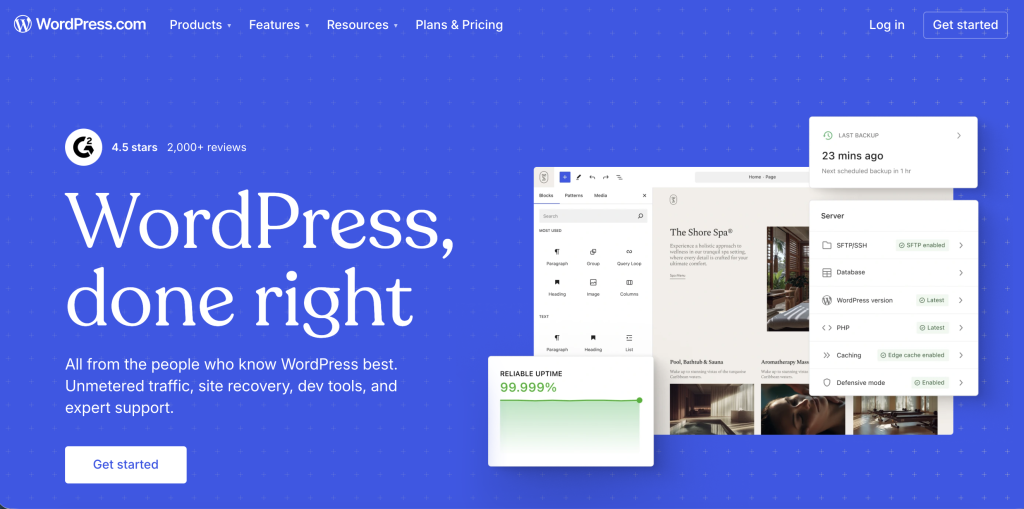
Overall assessment: WordPress.com scores 3.6/5 based on 3,959 reviews. Half of reviewers give 5 stars, praising support quality and ease of setup. However, 13% leave 1-star reviews citing plan restrictions, surprise renewals, and account suspension issues. Best suited for bloggers who want zero server management. Less ideal for anyone needing plugins, custom code, or tight budget control.


| Name | WordPress.com |
| Total Reviews | 3971 |
| Average Score | 4.0 |
| Website | https://wordpress.com |
| Server Locations |  United States United States |
Number of Reviews
Avg. Review Score
Customer Support
Features and Services
WordPress.com offers managed WordPress hosting, meaning they handle servers, security updates, and backups so you can focus on content. This differs from WordPress.org, where you download free software and find your own hosting. The tradeoff: convenience versus control.
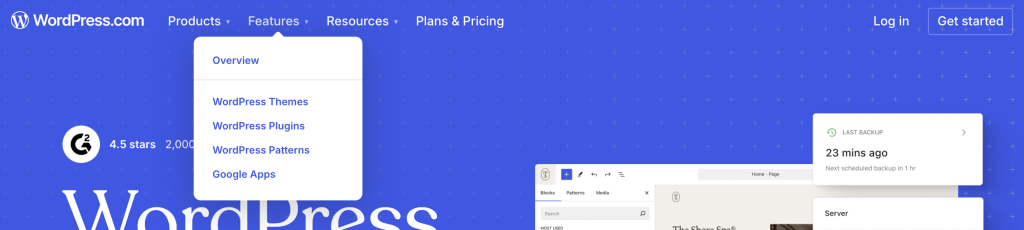
Hosting Types Offered
- Managed WordPress Hosting – All plans include hosting, SSL (security certificates that encrypt your site), and automatic updates
- Blog Hosting – The platform’s original strength, with built-in publishing tools
- Business Websites – Available on Premium plan and above
- eCommerce – Commerce plan includes payment processing and shipping tools
- Enterprise – Custom solutions starting at $25,000/year for large organizations
Key Features Customers Highlight
Based on review analysis, here’s what users actually mention:
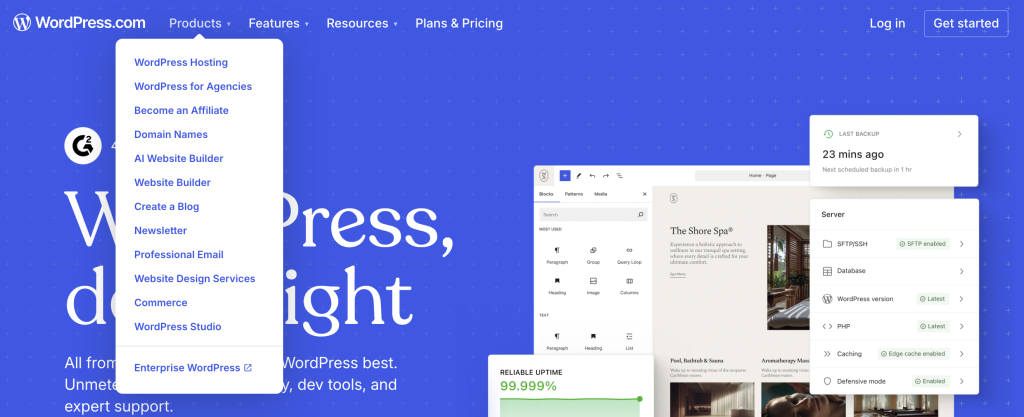
- Plugin Library – Thousands of plugins available, but only Business plan and above can install third-party plugins or upload custom ones. Personal and Premium plans recently gained limited plugin access.
- Free Domain – All paid annual plans include one year of free domain registration. After that, expect $18-25/year for renewal.
- Automatic Backups – WordPress.com handles backups automatically, a relief for non-technical users
- Built-in Security – SSL certificates (HTTPS) included on all plans, even free
- Jetpack Integration – Security scanning, performance tools, and social sharing built in
Data Center Locations
WordPress.com operates four primary data centers: US West, US Central, US East, and EU West. They maintain over 20 secondary locations across six continents. Your site gets replicated to a second data center in real-time for redundancy. One limitation: you pick your primary region when activating hosting features, and you can’t change it later.
Performance Expectations
WordPress.com uses high-frequency CPUs with automatic failover and burst scaling. Their infrastructure can scale a site to over 100 PHP workers (processes handling visitor requests) instantly. Pressable, part of the same Automattic family, offers a 100% uptime guarantee, though WordPress.com’s standard plans don’t publish a specific SLA (Service Level Agreement, a guaranteed uptime commitment).
User reviews frequently praise loading speeds, though some report occasional slowdowns during traffic spikes on lower-tier plans. Independent benchmark data specifically for WordPress.com is limited compared to traditional hosts.
Customer Experience
With 3,959 reviews on Trustpilot and a 3.6/5 average, WordPress.com shows a polarized user base. Half of reviewers (50%) give 5 stars, while 13% give 1 star. That spread tells you something: when it works, users love it. When it doesn’t, they’re vocal about it.
What Customers Praise
Support quality from “Happiness Engineers”: Multiple reviews highlight knowledgeable, patient support staff. A January 2026 reviewer noted that support was “incredibly knowledgeable, patient and easy to understand.” The human support, when you reach it, consistently earns praise.
Ease of setup for beginners: Users who just want a blog running quickly appreciate the managed approach. No server configuration, no security plugins to install, no update anxiety. One October 2025 reviewer stated they’re “not a true website designer whatsoever” but WordPress “with their amazing plugin library has made everything so easy.”
Reliability and uptime: Reviews rarely mention downtime. The multi-data-center infrastructure with automatic failover appears to deliver on its promise for most users.
Common Complaints
Plan limitations frustrate users: The most consistent complaint across reviews and forums is that lower plans don’t allow meaningful customization. “If you purchase the base plan, there isn’t much you can do with customization, and most of the features require upgrades,” writes one reviewer. Another calls the entry offerings “quite expensive” for what you get.
Interface complexity: Despite being marketed as beginner-friendly, some users find the dashboard unintuitive. Reviews mention “the learning takes too much time” and describe menu navigation as confusing. The interface differs from self-hosted WordPress, creating a learning curve for anyone familiar with the standard WordPress admin.
AI support before humans: Several reviews mention frustration with the AI chatbot that handles initial support queries. Users report the bot “couldn’t answer questions and tried rerouting to forums.” Getting to a human requires persistence.
Community Feedback (Reddit and Forums)
What are people saying outside official review platforms? Community discussions add important context:
Self-hosted preference dominates: Reddit discussions about WordPress hosting frequently recommend WordPress.org (self-hosted) over WordPress.com. The consensus: if you’re paying for the Business plan anyway, you could get more flexibility with traditional hosting for less money.
Account suspension concerns: Forum threads reveal a pattern of accounts being suspended without prior warning. One user wrote: “WP seems to have a habit of suspending first and asking questions afterward.” While WordPress.com acknowledges mistakes happen and offers appeals, the process frustrates users who lose access to their content suddenly.
The .com vs .org confusion: Many community members point out that first-time users often don’t understand the difference between WordPress.com (hosted service) and WordPress.org (free software you host yourself). This leads to frustration when users realize they’ve chosen a more restricted environment than expected.
Support Quality
WordPress.com offers email and live chat support for paid plans, with a stated 24-hour response target. No phone support exists, which the company explains by noting that WordPress issues “often require sharing links and screenshots that work better in written format.”
Free plan users only get community forums and documentation. The disparity is notable: paid users praise support quality, while free users feel abandoned when problems arise.
Support cannot help with third-party plugins, custom code issues, or sites hosted elsewhere. This limitation matters for Business plan users who install external plugins and then encounter problems.
When to Use WordPress.com
WordPress.com is a strong choice in specific scenarios:
Ideal For
Bloggers who want zero technical hassle: If your goal is writing content and you never want to think about hosting, updates, or security, WordPress.com handles all of it. The managed infrastructure means you focus on posts, not server logs.
Personal projects and hobby sites: For a family blog, personal portfolio, or side project, the Personal plan ($4/month annual) provides enough features without complexity. You get a custom domain, no ads, and decent support.
Small businesses wanting simplicity: The Business plan delivers full plugin access with managed hosting. If you value support over DIY control, and you’re comfortable with the pricing, it removes operational headaches.
You’ll Appreciate It If
- You hate server management – because WordPress.com handles everything from updates to security patches
- You prioritize uptime over price – because their multi-data-center infrastructure is reliable
- You want quick setup – because you can have a site running in minutes without technical knowledge
- You value integrated tools – because Jetpack features come built-in rather than requiring separate installation
When NOT to Use WordPress.com
No host is perfect for everyone. WordPress.com isn’t the right choice if:
Look Elsewhere If
You need full WordPress flexibility on a budget: The Business plan’s $25/month price point is higher than many managed WordPress hosts offering similar or better features. If plugins and custom themes matter to you, managed WordPress hosting alternatives often cost less.
You’re building a high-traffic eCommerce store: While the Commerce plan includes basic store features, dedicated WooCommerce hosts like Pressable or specialized eCommerce platforms offer better scalability and features. The $45/month Commerce plan limits you to 50 GB storage.
You want complete control: WordPress.com restricts certain plugins (caching plugins, some backup tools) even on Business plans. If you need full server access or specific technical configurations, self-hosted WordPress.org with a VPS hosting provider gives you that freedom.
Red Flags for Your Situation
- Budget is tight: Free and Personal plans are too limited for most business purposes. You’ll likely upgrade, costing more than expected.
- You hate long commitments: Best prices require 3-year terms. Monthly billing costs 55-69% more.
- Phone support is essential: WordPress.com only offers chat and email. No phone line exists.
- You have specific plugin needs: Some popular plugins are prohibited even on Business plans due to conflict with their managed infrastructure.
- You’ve been burned by account suspensions before: Community feedback suggests WordPress.com sometimes suspends first and investigates later.
If any of these apply, consider Ghost, Squarespace, or self-hosted WordPress with traditional hosting instead (see Alternatives section below).
WordPress.com Transparency Score
We assess how upfront WordPress.com is with important information:
- Company Information: Excellent – Automattic’s ownership, founding story, and leadership are clearly documented. The company operates transparently as a remote-first organization since 2005.
- Pricing Transparency: Good – Promotional prices are displayed clearly, and renewal rates are technically available. However, the pricing page emphasizes discounted rates while renewal costs require clicking through to plan details. The multi-year commitment requirement for best prices isn’t immediately obvious.
- Technical Documentation: Good – Data center information, feature lists, and platform capabilities are documented in their support section. However, specific uptime SLAs for standard plans aren’t published prominently.
- Terms and Policies: Good – Refund policy (14 days annual, 7 days monthly) is clear. Content policies are documented, though users report suspension decisions sometimes lack initial clarity.
Overall Transparency: WordPress.com scores well on company information and technical documentation. Pricing transparency could improve by showing renewal rates more prominently on the main pricing page. The account suspension process, while ultimately resolvable, could benefit from clearer upfront communication.
Alternatives to WordPress.com
If WordPress.com doesn’t fit your needs, these alternatives address common gaps:
For Better Value: Self-Hosted WordPress with Budget Hosting
If you’re comfortable with slightly more technical setup, WordPress.org (the free software) combined with affordable shared hosting costs significantly less than WordPress.com’s Business plan while offering more flexibility. You’ll handle updates yourself, but gain full plugin and theme access.
For Modern Blogging: Ghost
Ghost was built specifically for bloggers and publishers who find WordPress overly complex. It loads faster (averaging 0.8-second load times versus 2.6 seconds for typical WordPress sites), includes native membership and subscription features, and has a cleaner interface. Self-hosted Ghost is free; managed Ghost hosting starts around $9/month.
For Design-First Users: Squarespace
If visual design matters more than plugin flexibility, Squarespace offers polished templates and an intuitive editor. Pricing starts at $16/month with eCommerce available at higher tiers. You sacrifice WordPress’s ecosystem but gain design consistency and simpler management.
For Managed WordPress at Lower Cost: Hostinger or SiteGround
Both offer managed WordPress hosting with full plugin access at prices below WordPress.com’s Business plan. You get the WordPress experience users expect, minus the platform restrictions. Check our WordPress hosting comparison for detailed analysis.
- WordPress.com reviews from United States
| Average score | 4.10 |
| Number of reviews | 1907 reviews |
- WordPress.com reviews from United Kingdom
| Average score | 3.49 |
| Number of reviews | 260 reviews |
- WordPress.com reviews from Canada
| Average score | 4.04 |
| Number of reviews | 145 reviews |
- WordPress.com reviews from Spain
| Average score | 4.11 |
| Number of reviews | 110 reviews |
- WordPress.com reviews from France
| Average score | 3.07 |
| Number of reviews | 98 reviews |
- WordPress.com reviews from Italy
| Average score | 3.85 |
| Number of reviews | 95 reviews |
- WordPress.com reviews from Australia
| Average score | 3.96 |
| Number of reviews | 85 reviews |
- WordPress.com reviews from Germany
| Average score | 3.75 |
| Number of reviews | 85 reviews |
- WordPress.com reviews from India
| Average score | 4.42 |
| Number of reviews | 66 reviews |
- WordPress.com reviews from Netherlands
| Average score | 3.69 |
| Number of reviews | 62 reviews |
- WordPress.com reviews from Brazil
| Average score | 4.43 |
| Number of reviews | 58 reviews |
- WordPress.com reviews from Indonesia
| Average score | 4.48 |
| Number of reviews | 31 reviews |
- WordPress.com reviews from Sweden
| Average score | 4.00 |
| Number of reviews | 26 reviews |
- WordPress.com reviews from New Zealand
| Average score | 4.31 |
| Number of reviews | 26 reviews |
- WordPress.com reviews from Mexico
| Average score | 4.50 |
| Number of reviews | 22 reviews |
- WordPress.com reviews from Ireland
| Average score | 3.77 |
| Number of reviews | 22 reviews |
- WordPress.com reviews from Switzerland
| Average score | 4.26 |
| Number of reviews | 19 reviews |
- WordPress.com reviews from South Africa
| Average score | 4.00 |
| Number of reviews | 18 reviews |
- WordPress.com reviews from Belgium
| Average score | 3.62 |
| Number of reviews | 16 reviews |
- WordPress.com reviews from Greece
| Average score | 3.87 |
| Number of reviews | 15 reviews |
- WordPress.com reviews from Denmark
| Average score | 3.62 |
| Number of reviews | 13 reviews |
- WordPress.com reviews from Israel
| Average score | 3.71 |
| Number of reviews | 13 reviews |
- WordPress.com reviews from Philippines
| Average score | 4.50 |
| Number of reviews | 12 reviews |
- WordPress.com reviews from Romania
| Average score | 4.25 |
| Number of reviews | 12 reviews |
- WordPress.com reviews from Austria
| Average score | 3.42 |
| Number of reviews | 12 reviews |
- WordPress.com reviews from Singapore
| Average score | 4.33 |
| Number of reviews | 12 reviews |
- WordPress.com reviews from Turkey
| Average score | 4.36 |
| Number of reviews | 11 reviews |
- WordPress.com reviews from Argentina
| Average score | 4.36 |
| Number of reviews | 11 reviews |
- WordPress.com reviews from Japan
| Average score | 3.60 |
| Number of reviews | 10 reviews |
- WordPress.com reviews from Finland
| Average score | 3.40 |
| Number of reviews | 10 reviews |
WordPress.com Plans and Pricing
WordPress.com pricing looks attractive at first glance. But what will you actually pay long-term? The gap between promo rates and renewal prices is notable. Prices shown are for annual billing in EUR (the default on their pricing page).
Renewal Warning: WordPress.com’s promotional prices require multi-year commitments. Monthly billing costs 55-69% more. And when your term ends, prices reset to standard rates. A Business plan at $25/month renews at the same rate only if you commit to another year upfront. Monthly billing jumps to $40/month.
Free Plan
Cost: $0 forever
Includes: 1 GB storage, WordPress.com subdomain (yoursite.wordpress.com), WordPress.com ads displayed on your site
Limitations: No custom domain, no plugin installation, limited theme selection, WordPress.com branding
Personal Plan
Entry price: €2.75/month (requires 3-year commitment) | €4/month (annual)
Monthly billing: €9/month
Includes: 6 GB storage, free domain for first year, ad-free experience, email support
Best for: Personal blogs, hobby sites, portfolios
Premium Plan
Entry price: €5.50/month (3-year) | €8/month (annual)
Monthly billing: €18/month
Includes: 13 GB storage, premium themes, basic design customization, monetization tools
Best for: Bloggers wanting better design options and basic monetization
Business Plan
Entry price: €17.50/month (3-year) | €25/month (annual)
Monthly billing: €40/month
Includes: 50 GB storage, full plugin installation, custom themes, SFTP/SSH access (secure file transfer and command-line server access), staging environment
Best for: Businesses needing full WordPress functionality
Commerce Plan
Entry price: €31.50/month (3-year) | €45/month (annual)
Monthly billing: €70/month
Includes: 50 GB storage, payment processing, shipping integrations, product management
Best for: Online stores with physical or digital products
Hidden Costs to Watch
- Domain renewal after first year: $18-25/year depending on extension
- Late domain renewal: $80 redemption fee if domain expires and you renew during grace period
- Premium plugins/themes: Some third-party tools have separate costs
- Email hosting: Not included by default, requires add-on or external service
Pricing Verdict
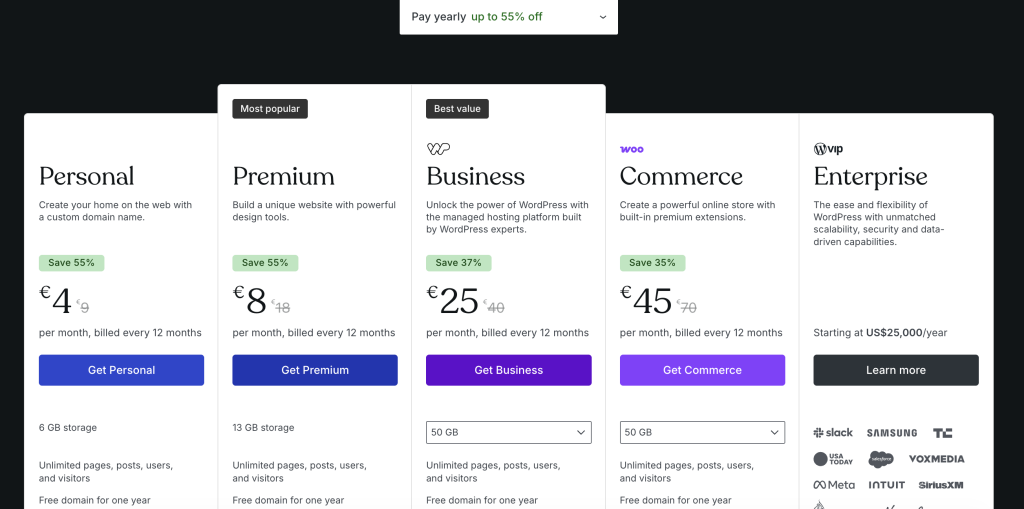
WordPress.com isn’t cheap once you factor in what most users actually need. The free plan is too limited for serious use. Personal and Premium plans restrict plugin access enough to frustrate anyone wanting standard WordPress functionality. The Business plan at €25/month (annual) finally delivers what users expect. But that’s €300/year. You can find managed WordPress hosting for less elsewhere. The value question comes down to how much you value Automattic’s managed infrastructure versus raw price.
- Bandwidth Unlimited
- Number of Sites Unlimited
- Bandwidth Unlimited
- Number of Sites Unlimited
- Bandwidth Unlimited
- Number of Sites Unlimited
- Bandwidth Unlimited
- Number of Sites Unlimited
- Bandwidth Unlimited
Conclusion
WordPress.com earns its 3.6/5 rating from 3,959 reviews through a clear value proposition: managed hosting without technical complexity. The support team consistently earns praise, uptime is reliable, and for pure bloggers, the experience delivers.
The Bottom Line
WordPress.com works well if you value convenience over cost and don’t need extensive customization. The free and lower-tier plans are too restrictive for most serious use, which means you’re realistically looking at the Business plan ($25/month) to get full WordPress functionality. At that price point, you’re paying a premium for managed hosting convenience.
For bloggers and small businesses who want hands-off hosting and can accept the pricing, WordPress.com delivers. For developers, budget-conscious users, or anyone needing specific plugins, self-hosted WordPress with traditional hosting offers more freedom for less money.
For more options, check our managed WordPress hosting guide where WordPress.com alternatives are compared in detail.
Frequently Asked Questions
Is WordPress.com good for beginners?
Yes and no. Setup is simple: you can have a site running in minutes without touching technical settings. But the interface differs from self-hosted WordPress, which confuses anyone following standard WordPress tutorials. The learning curve exists, just in different places. Reviews are split. Some praise ease of use while others find the menu system unintuitive.
Is WordPress.com worth the price?
At the Business plan level ($25/month annual), WordPress.com is more expensive than many managed WordPress hosts offering similar features. The value lies in Automattic’s infrastructure reliability and integrated Jetpack tools. If you factor those benefits highly, it’s competitive. If you’re primarily comparing raw features per dollar, alternatives often win. The free and Personal plans are too limited for business use, so budget accordingly.
What do customers complain about most?
Three issues dominate complaints: plan limitations on lower tiers (no plugins on free/Personal plans frustrated many), the jump between promotional and renewal pricing, and account suspensions that occur without prior warning. The 13% of 1-star reviews frequently mention feeling restricted or caught off-guard by policies.
How does WordPress.com compare to Wix or Squarespace?
WordPress.com offers more power at higher tiers but more complexity overall. Wix and Squarespace provide more intuitive visual builders for non-technical users. If you want the WordPress ecosystem (themes, plugins, community), WordPress.com delivers it in managed form. If you want the simplest possible website builder with beautiful templates, Squarespace may suit you better. Wix sits between them in complexity.
Is WordPress.com good for eCommerce?
The Commerce plan ($45/month) includes WooCommerce integration, payment processing, and shipping tools. For small stores, it works. For growing stores with high traffic or complex inventory, dedicated eCommerce platforms or self-hosted WooCommerce with specialized hosting typically perform better. The 50 GB storage limit may constrain media-heavy product catalogs.
Does WordPress.com offer refunds?
Yes. Annual and multi-year plans are refundable within 14 days. Monthly plans allow 7-day refunds. Domain registrations have a shorter 96-hour (4-day) window. If you cancel outside these periods, no prorated refunds are given. One catch: if you registered a free domain with your plan and cancel after the domain refund window, you’ll receive a partial refund (plan cost minus domain value).