
このページで: [隠れる]
短い答え: ブログストリームに属する日付の投稿をすべて使用します: ニュース, チュートリアル, お知らせ, レシピ. 常に同じ場所に配置する必要があるコンテンツにはページを使用します: 家, 約, サービス, Contact and your privacy policy.
A quick test helps. Would a reader expect it in your RSS feed or a category list? 役職. Does it belong in the main menu for years? ページ.
The old rules need an update, けれど. WordPress’s own default theme, トゥエンティ・トゥエンティーファイブ, doesn’t print the date on a single post. And a page with comments switched on still shows no comment box in it. Every difference below was checked on 9 10月 2026 ワードプレス上で 7.1.3, running in WordPress Playground, with one block theme and one classic theme.
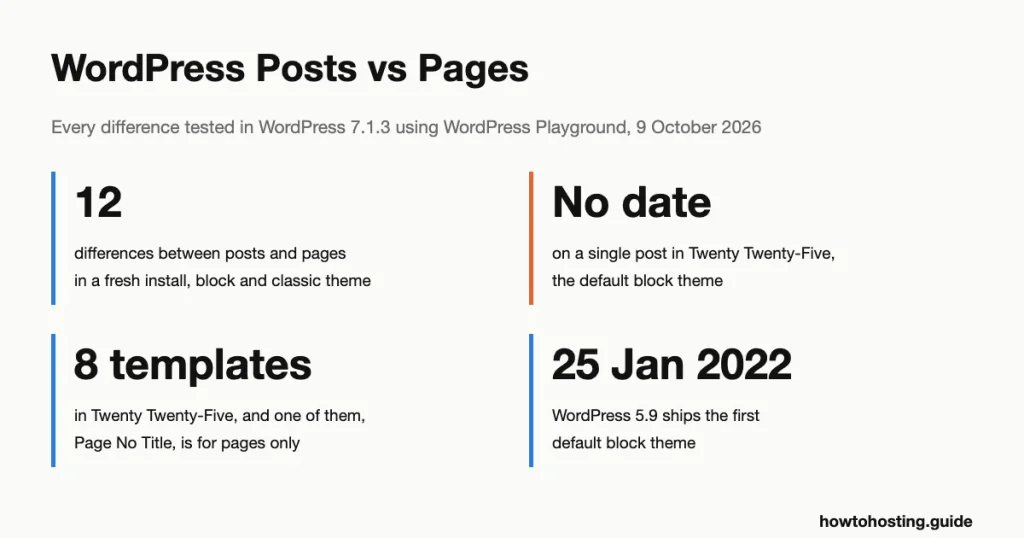
Posts vs Pages: 12 Differences at a Glance
Here’s what differs in a fresh WordPress 7.1.3 インストール. “Block theme” means Twenty Twenty-Five, デフォルト. “Classic theme” means Twenty Twenty-One, which builds pages from PHP files instead of blocks.
| Attribute | 投稿 | ページ |
|---|---|---|
| Date in the web address | はい, with a date-based permalink setting (/2026/10/05/autumn-soup/) | 一度もない (/about/team/) |
| Monthly date archive (/2026/10/) | Listed | Not listed, even when published that month |
| Date and author shown to visitors | Up to the theme: classic showed both, block showed the author only | どちらでもない, in both themes |
| Categories and tags | はい | No panel for either |
| Main RSS feed (/feed/) | 含まれています | Left out |
| カテゴリー, tag and author archives | 含まれています | Left out |
| Parent and child items | いいえ | はい, and the child’s address nests under the parent |
| Manual order | いいえ, newest first (sticky posts can be pinned) | Order field, in Quick Edit only |
| Comments on a new item | 開ける | Closed |
| Templates in Twenty Twenty-Five | Single Posts; “Change template” greyed out | ページ, plus Page No Title |
| Excerpt and post format | はい | いいえ |
| Can be the homepage | いいえ, only as part of the post list | はい, under Settings, それから読書 |
The rest is shared. Both use the same block editor, take a featured image, keep revisions and show up in the XML sitemap WordPress builds at /wp-sitemap.xml. Site search covers both, それも. Our search for “レシピ” returned a page and a post side by side.
The editor shows the split clearly. Open a post and the right-hand sidebar offers an excerpt, a format, Categories and Tags. Open a page and those four are gone, replaced by a single Parent setting.
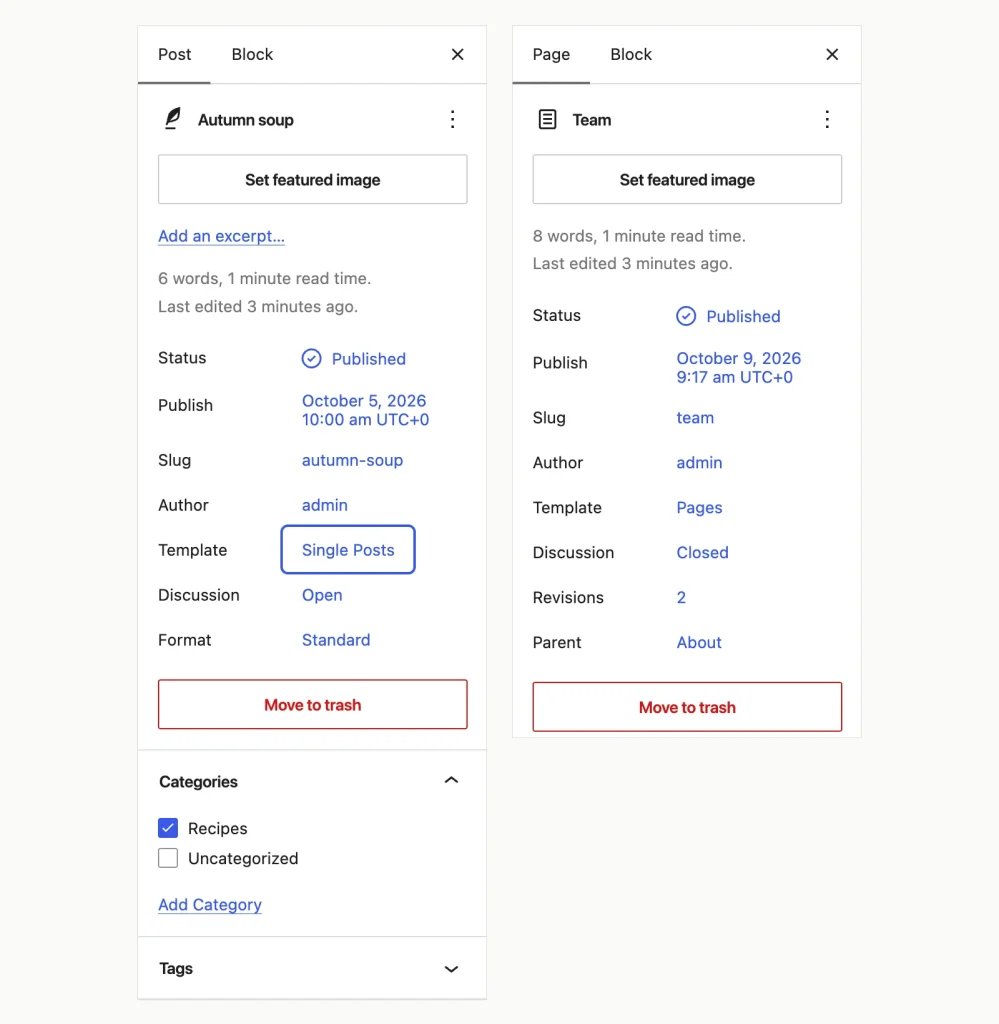
左, a post; 右, ページ. Only the post offers an excerpt, a format, Categories and Tags, while only the page has a Parent setting. WordPress 7.1.3, WordPress Playground でテスト済み, 9 10月 2026.
When a Post Is the Right Choice
Posts are built to be found by time and by topic. Every post lands in the main feed, the monthly archive, its category and tag archives and its author’s archive. You don’t set any of that up. It just happens when you click Publish.
私たちのテストでは, the main feed at /feed/ carried our four posts and none of our pages. We also tried adding ?post_type=page to the feed address. It returned the same four posts. So if a newsletter tool or a feed reader should pick something up, it has to be a post.
Pick a post when the content:
- has a date that matters to the reader, such as a price change, an event or a release;
- belongs to a topic you’ll keep writing about, so a category archive can collect it;
- should show up in “latest posts” リスト, which only ever pull posts;
- will be one of dozens, where a flat list of pages would turn into clutter.
それらの “latest posts” lists can sit almost anywhere. 私たちのガイド showing recent posts in a sidebar or footer オプションをカバーします.
Posts can’t nest, けれど. ありません “sub-post”. If you want structure, use categories, which can have parent categories of their own. Tags can’t.
When a Page Is the Right Choice
Pages are built to be found by place. They sit outside the date system: no date archive, no feed, nothing in the address that ages. Our About page was published on 9 10月 2026, and the October archive still skipped it.
Their one real superpower is hierarchy. Give the Team page a parent of About, and its address becomes /about/team/. The editor’s Parent setting spells out a second effect: 子ページ “show up as sub-items in the default navigation menu.” That’s exactly what a Services section with five service pages needs.
Pages are also the only type that can become your homepage. The Homepage menu under Settings, then Reading listed About, Team and Sample Page. 投稿がまったくありません.
Pages also carry an Order number for sorting. Don’t look for it in the editor, けれど. の 7.1.3 we found it only in Quick Edit, on the Pages list (hover a page, then click Quick Edit).
Dates and Authors Are the Theme’s Call
“Posts show a date and author, pages don’t” is the line most guides repeat. Both types store a date and an author in the database. Whether visitors see them depends on the theme.
Twenty Twenty-One, the classic theme, printed “Published October 5, 2026”, “By admin”, the category and the tag on our post. The page got none of that. トゥエンティ・トゥエンティーファイブ, the block default, printed “Written by admin in Recipes” on the post. Its own date was missing. The only dates on that screen belonged to the “More posts” list at the bottom.
Does that matter? For news and price posts, はい. A reader can’t tell a 2026 post from a 2019 1. The fix belongs in Single Posts, the template every post uses, found in the Site Editor’s Templates list. Twenty Twenty-Five already uses the Post Date block in its More posts list, so the block is ready to add. We didn’t make that edit in our test.
Comments on Pages: Off by Default, Sometimes Off for Good
WordPress opens comments on new posts and closes them on new pages. Our site setting said “開ける”, and new posts followed it. New pages stayed “Closed” in the Discussion setting regardless.
You can switch a single page to open. What happens next depends on the theme again. トゥエンティ・トゥエンティ・ワンで, the comment form appeared under the page. 225年に, nothing appeared. Its Pages template simply has no Comments block in it, so there’s nowhere for comments to print.
Want feedback on an About page in a block theme? You’d add a Comments block to the Pages template, which then affects every page using it. We didn’t test that step. A contact form is usually the better tool for a page anyway.
What Changed With Block Themes and Site Templates
Templates used to be the clearest difference. A theme developer wrote PHP files, と “page template” was something only pages could pick. WordPress 4.7, にリリースされました 6 12月 2016, opened page templates to every post type. The idea that templates belong to pages stuck around anyway.
WordPress 5.9, にリリースされました 25 1月 2022, shipped Twenty Twenty-Two, the first default block theme, and put its templates in the Site Editor. ブロックテーマで, templates are made of blocks, and you edit them in the dashboard with no code. WordPress 6.3, にリリースされました 8 8月 2023, added pages to the Site Editor too.
Here’s how that looks today. Twenty Twenty-Five ships 8 テンプレート. A post uses Single Posts, a page uses Pages, and the theme adds one extra choice, Page No Title, that only pages can pick. On our post, the Template menu showed “Change template” greyed out, because the theme offered posts nothing else.
Then we clicked “Create new template” on a post and called it “Recipe post”. WordPress’s own dialog warned what would happen: “A custom template can be manually applied to any post or page.” Sure enough, the page’s template picker then listed Recipe post next to Page No Title. Templates you create yourself aren’t tied to one type.
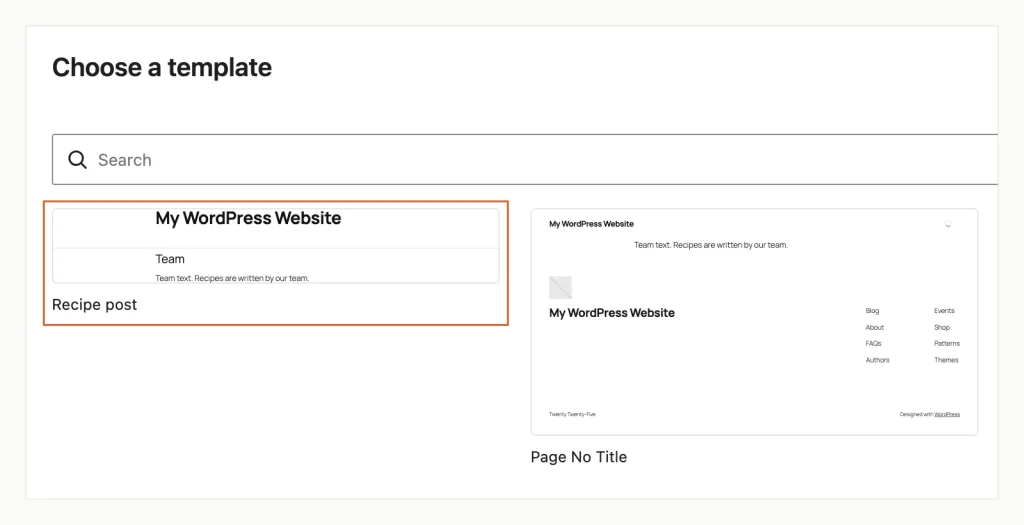
The template picker on a page, after we created “Recipe post” from a post. The outlined card shows it is offered to pages too. WordPress 7.1.3, WordPress Playground でテスト済み, 9 10月 2026.
The Site Editor itself still treats the two differently. Under Appearance, それから編集者, the menu lists Identity, スタイル, ページ, ナビゲーション, Patterns and Templates. Pages get their own entry there. Posts don’t, so you still write and manage them under Posts in the dashboard.
On a classic theme, none of this applies. Templates stay as PHP files, and Twenty Twenty-One ships no extra page templates at all. Planning a jump from classic to block? 読んだ how to switch WordPress themes safely 最初, because headers, menus and widgets all get rebuilt.
Three Mistakes People Make With Posts and Pages
Making pages named after categories. Picture pages called News, Opinion and Video in the menu, plus categories with the same names. A user on Reddit described exactly this setup in June 2026. Their posts showed on the homepage but never “下” the matching page. A page and a category don’t connect just because they share a name. Link the menu to the category archive instead (such as /category/news/), or add a filtered post list to the page. 私たちの guide to adding posts to a page in WordPress walks through the post list options step by step.
Building a growing library out of pages. チュートリアル, help articles and product notes feel “timeless”, so people make them pages. Fifty pages later there are no categories, no tags and no feed. Use posts for anything you’ll keep adding to. Save pages for the handful of sections that define the site.
Putting dates in the address of evergreen posts. Our test site used a date-based permalink setting, so a post lived at /2026/10/05/autumn-soup/. That’s fine for news. For a guide you’ll update for years, the date ages the address. Choose a format such as “投稿名” under Settings, then Permalinks before you publish much. Changing it later changes every post’s address.
Changing a Page Into a Post (or Back)
WordPress has no built-in switch for this. A free plugin, Post Type Switcher, adds one. Its directory listing showed version 4.0.1, last updated on 24 行進 2026, 以上で 200,000 アクティブインストール. It’s marked as tested up to WordPress 6.9.10, not 7.x.
We installed it anyway and converted a page called Opening hours. The plugin added a Post Type setting to the sidebar and asked for confirmation first. Three things changed after we accepted:
- The address moved from /opening-hours/ to /2026/10/09/opening-hours/, following the date-based permalink setting.
- The old address redirected to the new one when we opened it in the browser.
- The new post appeared in the main RSS feed, with no category attached.
So after a switch, give the post a category and check that the old address still lands on it. Rather not depend on that redirect? Copy the content into a new post, then point the old address at it with a redirect plugin.
よくある質問
Is a post or a page better for SEO?
Neither type ranks better on its own. Search engines see a web page, not a WordPress content type, and both types appear in the sitemap WordPress builds. What differs is the extras: posts get category archives, feeds and dates. Pick by how readers will find the content, not by rankings.
Can I add categories to a WordPress page?
Not out of the box. Pages have no Categories or Tags panel, and WordPress doesn’t register either for pages. A plugin or a few lines of code can add them, but we didn’t test that. If content needs categories, it usually should be a post.
Why doesn’t my WordPress post show the date?
Your theme leaves it out. Twenty Twenty-Five shows the author and category on a single post, but not the post’s date. Open Appearance, それから編集者, 次にテンプレート, and add a Post Date block to Single Posts. That edit wasn’t part of our test, so rehearse it on a staging site.
Can a post have sub-posts like pages have subpages?
いいえ. Posts can’t have a parent post, only pages can. Group related posts with a parent category and child categories instead, since categories nest and tags don’t.
Which One Should You Use?
Default to posts for anything you publish regularly. Keep pages for the few fixed sections that hold the site together, and use parent pages when a section has subsections. On a block theme, check two things your theme may hide: the date on single posts and the comment form on pages.
Curious to see these differences for yourself? WordPress プレイグラウンド, where we ran all of this, gives you a throwaway WordPress in a browser tab for free. We cover it, with other no-cost setups, in our guide to creating a WordPress blog without a domain. Building the blog side next? Our guides on putting a post list on a page and on recent-posts lists, both linked above, take it from here.