
Weebly VS Jimdo – 比較 +6000 レビュー - JA
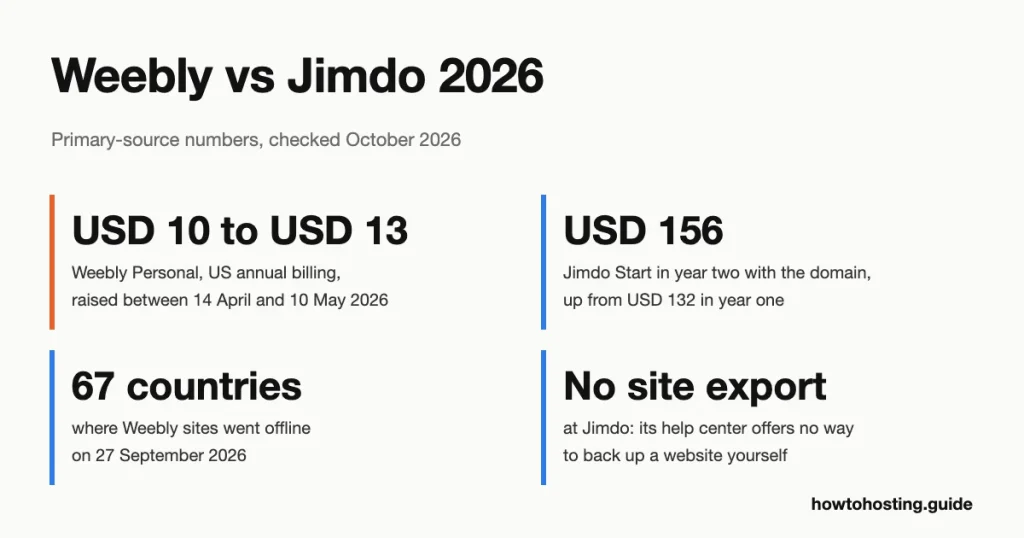
Weebly は US Personal プランを米ドルから調達しました 10 米ドルへ 13 春のひと月 2026. 独自のヘルプ ページが新規ユーザーを Square オンラインに誘導します. ビジネスサイトとして Jimdo を選択してください 10 ページ以下; keep Weebly only for a site already built there.
簡単な回答: Jimdo is the safer place to start a small site in 2026. Start costs USD 11 月, sites sit in Ireland, and Jimdo still ships features. Planning a blog or more than 50 ページ? Pick neither. Neither one exports blog posts, so start on WordPress.com Personal at USD 48 1年.
全機能比較
 Weebly
1. Weebly


 728
728
 中性
中性


| スペース | 帯域幅 | 価格 | |
|---|---|---|---|
| 無制限 | 無制限 | $6.00 | プランを見る |
| 無制限 | 無制限 | $12.00 | プランを見る |
| 無制限 | 無制限 | $26.00 | プランを見る |
| スペース | 帯域幅 | 価格 | |
|---|---|---|---|
| 512 MB | 無制限 | $5.00 | プランを見る |
| 無制限 | 無制限 | $25.00 | プランを見る |
 Jimdo
Jimdo
1. Jimdo

 5.6k +
 ポジティブ
ポジティブ
| スペース | 帯域幅 | 価格 | |
|---|---|---|---|
| 無制限 | 無制限 | $52.63 | プランを見る |
| 無制限 | 無制限 | $20.41 | プランを見る |
| 無制限 | 無制限 | $12.89 | プランを見る |
総合得点
| Deciding factor | Weebly | Jimdo |
|---|---|---|
| エントリープラン, 12-月 期間 | 個人的: 13ドル/月, Square ads stay | 始める: 11ドル/月, 広告なし |
| リニューアル | USD 13/mo plus a .com at USD 19.95/yr | USD 11/mo plus the domain at USD 24/yr |
| Cheapest ad-free plan | プロ: 15ドル/月, USDで更新 15 plus the .com | 始める (その上) |
| Page limit | None stated | 10 スタート時, 50 成長中 |
| Where sites are hosted | SFO data center, per Weebly's server headers | AWS, アイルランド |
| 返金 | 30 年間計画の日数 | 14-day withdrawal, consumers only |
| Self-service export | Page ZIP, product and order CSVs | Order CSV (ウェブサイトビルダー) それだけ |
| 2026 状態 | から撤退 67 国 | Still adding features |
We judged both on exit options, two-year cost and hosting (how we compared them).
最終レビュー済み: 10月 2026. 価格と機能を検証しました.
にジャンプ: 価格設定 | 状態 | 書き出す | ホスティング | 払い戻し | 特徴 | 選択する | よくある質問 | 評決
Weebly vs Jimdo Pricing in Year One and Year Two
Both sites pick your currency from your location, so we used the US storefront for each. Weebly's US prices come from its pricing page as the Wayback Machine captured it for a US visitor on 7 10月 2026. Jimdo's come from its own US price data, 続きを読む 18 10月 2026, with no tax added for a California address.
Weebly sells three paid plans with no first-year discount, so each renews at the price you start on. Personal costs 米ドル 13 月 年間請求について, または米ドル 16 月ごとに. Professional costs USD 15 (米ドル 20 毎月), and Performance costs USD 32 (米ドル 36 毎月).
Personal has a gap that's easy to miss: Weebly's own plan table ticks "Remove Square Ads" only from Professional up.
Jimdo's beginner editor, now called the Website Builder, also has three paid plans. Start costs USD 11 12 か月の期間で 1 か月, 米ドル 10 の上 24 months and USD 12 月ごとに. Grow costs USD 17 and Unlimited USD 49.50 の上 12 月. The plan price stays put at renewal. The domain doesn't.
Jimdo includes a domain in the first term by taking its cost off the bill. Its price data puts that discount at USD 24 12か月の任期で. It also says "更新時, the cost of the domain will be charged separately." So Start's second year costs 米ドル 156, 米ドルではありません 132.
Weebly works the same way from Professional up: one year of domain credit, then a .com at USD 19.95 1年.
| プラン (私たち, 12-月払い, .com from the platform) | 1年目 | 2年目 |
|---|---|---|
| ウィーブリーパーソナル (Square ads stay) | 米ドル 175.95 | 米ドル 175.95 |
| Weebly Professional | 米ドル 180 | 米ドル 199.95 |
| Jimdo Start (10 ページ) | 米ドル 132 | 米ドル 156 |
| ジンドゥーグロー (50 ページ) | 米ドル 204 | 米ドル 228 |
For an ad-free site of up to 10 ページ, Jimdo Start undercuts Weebly Professional. The gap is USD 48 1年目と米ドルで 43.95 2年目に. 過去 10 ページ, the order flips. Jimdo Grow costs USD 24 more than Weebly Professional in year one and USD 28.05 2年目はさらに.
[キャプション ID="attachment_115397" 整列="中央揃え" 幅="628"]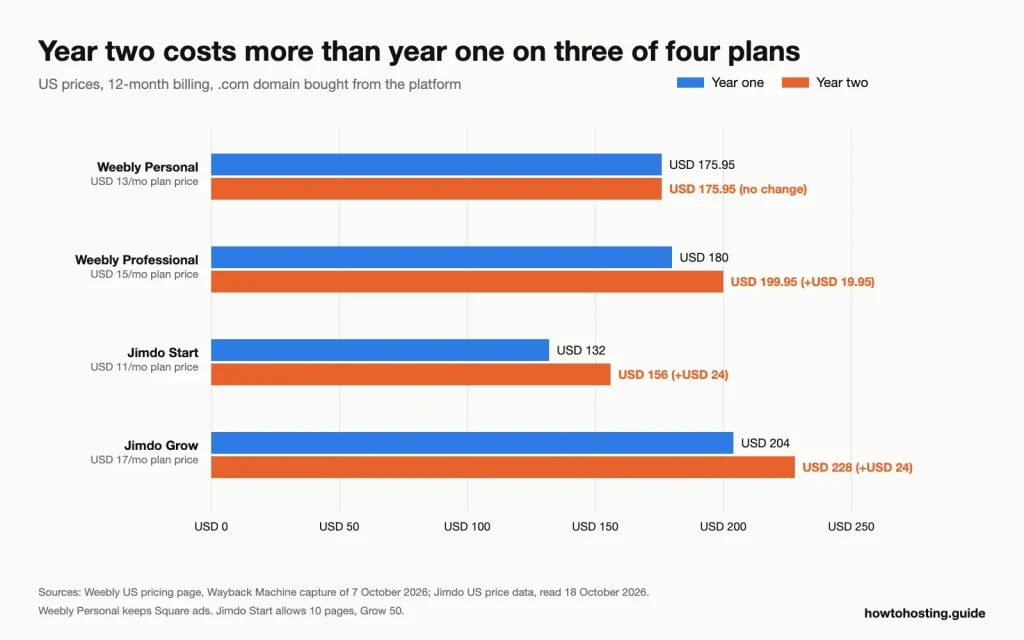 Domain renewal lifts year two on three of the four plans; Weebly Personal stays flat because it never included a domain. ソース: Weebly US pricing page (Wayback Machine capture, 7 10月 2026) and Jimdo US price data, 読んだ 18 10月 2026.[/キャプション]
Stretch it to three years, paying the cheapest way each platform allows. Weebly Professional comes to USD 579.90, because annual billing is the longest term Weebly sells. Jimdo Start costs USD 396 if you take 24 months and then renew for 12. Jimdo Grow lands at USD 588, almost level with Weebly.
Shopping from Europe? Jimdo's Irish storefront showed Start at EUR 12.40 月, 含む 23% アイルランドの付加価値税. Weebly's Irish page showed Personal at EUR 11 月, prices as listed, 税金明細が表示されていない場合.
勝者: Jimdo, for any site that fits in 10 ページ. Once you need Jimdo's 50-page Grow plan, Weebly Professional is cheaper every year.
Which Platform Is Still Being Developed?
Weebly's support center insists there are "中止の予定はありません" the builder "at this time." In the same answer, it nudges anyone starting a site toward Square Online. It even pitches Square Online to people who don't sell anything. That's the owner telling you where it wants you.
Weebly is also shrinking. It's winding down service in 67 国, 引用 "changes in regulation" and a wish to simplify its operations. Sites there stopped publishing new pages on 29 六月 2026 and went offline on 27 9月 2026. Account access ends on 26 12月 2026.
That list leaves out the US, イギリス, カナダ, オーストラリア, アイルランド, Germany and France. It includes Singapore, アラブ首長国連邦, ケニア, ナイジェリア, Turkey and Colombia.
Weebly raised its US prices between 14 4月と 10 5月 2026, moving Personal from USD 10 米ドルへ 13 年間請求で 1 か月. Professional went from USD 12 米ドルへ 15, and Performance from USD 26 米ドルへ 32. Weebly announced no date, so that window comes from Wayback Machine captures served to US visitors.
[キャプション ID="attachment_115395" 整列="中央揃え" 幅="628"]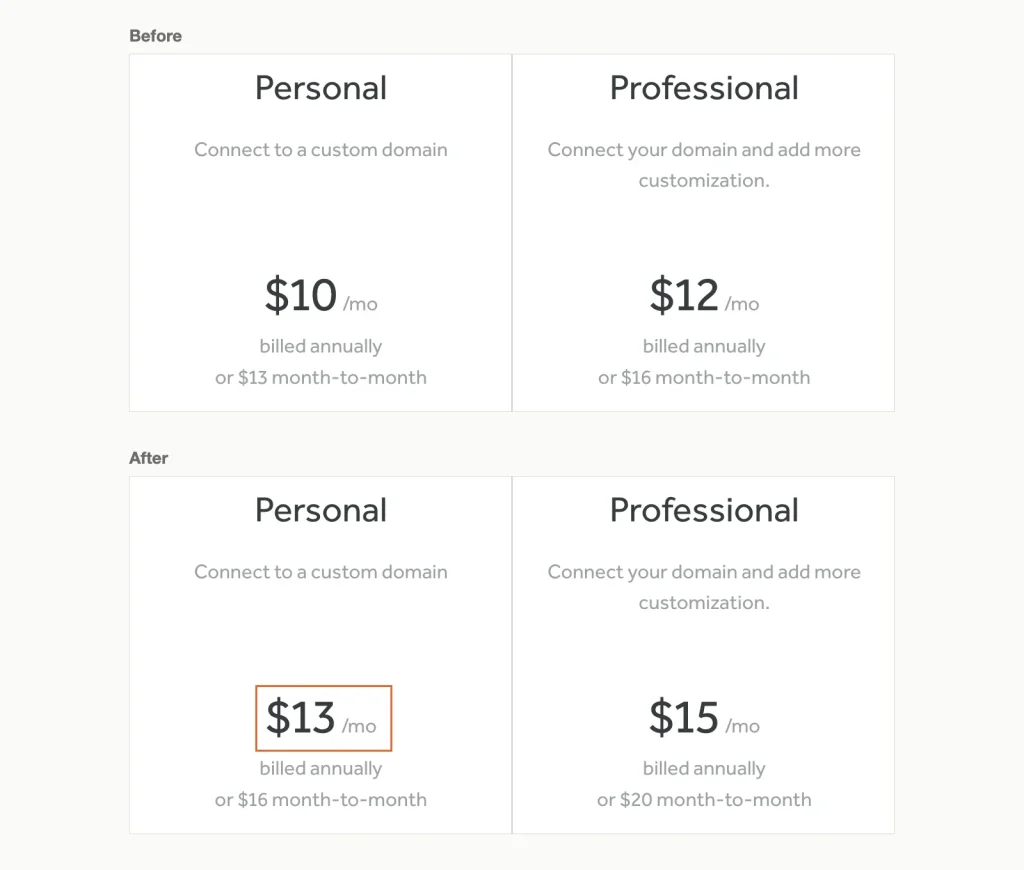 Compare the annual price on each card: Personal went from USD 10 米ドルへ 13 月, Professional from USD 12 米ドルへ 15. Weebly US pricing page, Wayback Machine captures of 14 4月 2026 (上) と 7 10月 2026 (下).[/キャプション]
The mobile app has gone too. Weebly's billing help says the app "is no longer available for download." It stays only on devices that had it installed by 15 12月 2025, so new owners have to edit in a web browser.
Little else moves. The US pricing page still carries a 2019 copyright line. The newest product launch we found in Weebly's help center is a 2019 relaunch of its platform for web designers. Later changes we found are upkeep, such as a September 2022 change to how sites load fonts, made for GDPR.
Jimdo is steering newcomers too, but toward its own newer editor rather than away from itself. Its help center sends beginners to the Website Builder, a guided editor that drafts pages from your answers. クリエイター, the older hands-on editor, sits behind a "Try our Creator editor" link on the pricing page.
Creator isn't closed, whatever some reviews say. Jimdo's help still links to a "Create a new Creator website" サインアップ, and newer Creator sites get a jimdoweb.com address. What you can't do is carry content across. Jimdo's help says Creator content "can't be moved over" to the Website Builder.
The Website Builder keeps gaining tools. Jimdo's help center has documented Companion, an AI business adviser included with every account, 以来 13 5月 2026. Its help center also covers new invoicing and payment-link tools.
One change cut the other way. A help article published on 19 8月 2025 replaced "no fixed storage limit" on the top plans with a 500 GBの上限.
勝者: Jimdo. Both owners are steering you somewhere, but only Jimdo is steering you toward a product it's still building.
Leaving Later: What Each Platform Lets You Export
When both owners have other priorities, plan your exit before you build. ここ, 奇妙なことに, the platform in decline is the easier one to leave. We read both help centers for every export feature. We didn't open accounts or run the exports ourselves.
Weebly: a rough archive plus useful CSVs
Weebly's site archive is the main way out. エディターで, 設定を開く, then General, then Archive, and Weebly emails you a ZIP file of the site. Its help page warns that "blog and store pages aren't included." Contact forms and slideshows may also break outside Weebly, and the ZIP can't be imported back.
Store and marketing data come out separately, which fills much of that gap. Products export to a CSV file from the items list. Orders export as CSV or as a QuickBooks file. Email-marketing contacts export as CSV, and Download My Data in your account settings hands over your account data.
Owners' reports match the warning. の 2026 threads on Reddit's r/Weebly, one owner described the ZIP as every HTML file dumped into a single folder. Another said their archive held only the first page of their blog.
Jimdo: no site export at all
Jimdo has no export for the site itself. Its Creator help says plainly: "there is also no option for creating a backup of your website yourself." The suggested workaround is a browser extension that saves the open page, one page at a time. The Website Builder help adds that Jimdo's own server backups can't restore individual pages.
Jimdo's terms ask for what its help center says you can't do. セクション 9 tells you to "create regular backups of all content of your Jimdo Websites yourself", especially product and buyer data. The tools for that are thin. The Website Builder exports orders to CSV, but neither help center documents a product export.
A shortcut off Weebly, 未テスト
One builder claims a faster route out of Weebly. Articulation says its converter pulls pages, blog posts and products straight from a published Weebly site. Publishing the result needs its paid plan, 米ドルで 10 a month billed yearly or USD 12 毎月. We didn't test it, and a cluster of near-identical "強くお勧めします" replies about it on r/Weebly, posted within a day, reads like marketing.
Want the wider picture? We've compared what twelve no-code builders let you take when you leave, from code downloads to nothing at all.
勝者: Weebly, 明らかに. A messy ZIP plus product and order CSVs beats saving Jimdo pages one browser tab at a time.
Where Your Site Is Hosted, and What It Means for GDPR
Jimdo says exactly where your data lives. Its help center states that "our services and databases are hosted in AWS cloud data centers in Ireland", ISO認証取得 27001 およびSOC 2. The company is Jimdo GmbH in Hamburg. Its product privacy policy still lists some processing by service providers in the USA.
Weebly makes no such promise. Its privacy notice lets it store data "米国では, カナダ, 日本, the European Union, and other countries." Its servers do name a location in their response headers. The main site reports an SFO data center, and published sites answer from hosts on an internal network labeled sf2p.
Customers outside the US, カナダ, Japan and Australia sign with Squareup International Ltd, a Block company. That changes who you contract with, not where the servers sit.
Why does it matter? GDPR is the EU's data protection law.
Under GDPR, sending personal data outside the EU needs a legal basis, such as an adequacy decision or standard contract clauses. The European Commission's rules on international data transfers set out the options. Neither platform removes that paperwork entirely. Jimdo keeps the main database in the EU, which leaves less to explain when a customer asks.
We skipped our usual network latency test for this pair. Weebly's servers identify as SFO and Jimdo's sit in Ireland, so they don't serve the same region. Both also put published sites behind Cloudflare, so a ping would measure Cloudflare's network, not either platform.
Uptime promises are thin on both sides. Jimdo's terms warrant 98% yearly availability, and only for business customers, while its help page cites 99.9% 稼働時間. Weebly's terms provide the service "そのまま" and name no figure at all.
勝者: Jimdo, for any business whose customers ask where their data is stored.
払い戻し, Renewal Notice and Cancelling
Weebly's terms give every paid account, except month-to-month ones, a 30-日返金保証. The window opens again for 30 days after each renewal. それは珍しいですね. If an annual plan renews before you notice, you can still ask for the money back.
Weebly plans auto-renew by default. Switching that off keeps your plan running to its end date. Domains bought through Weebly renew 45 days before they expire, so turn that off separately if you're leaving.
Jimdo offers no money-back guarantee. Consumers get a 14-day right of withdrawal, but only where their country's law grants one, as in the EU. Business users get none, and that includes the self-employed. A freelancer buying a plan for work has no refund window at all.
少なくともキャンセルしてください one month before renewal, or Jimdo extends the contract by its original term. German and Dutch consumers are the exception: 最初の学期の後, they can cancel monthly.
Jimdo emails a reminder about six weeks ahead. Payment then arrives as a secure link, and the invoice is due 14 数日後. 二 2026 Reddit comments describe unpaid Jimdo invoices passed to debt collectors, one after a card expired.
After a contract ends, Jimdo's terms let it delete all site data within four weeks. Creator users lose their mail as well, since cancelling deletes every mailbox on the custom domain. Move those mailboxes to a separate email host before you cancel.
勝者: Weebly. A 30-day refund that also covers renewals beats a consumer-only withdrawal right and a month's notice.
Editors, ブログ, Stores and Support
Weebly is one editor for everything. ページ, a blog and a store sit in the same drag-and-drop tool, and even the free plan includes a cart with unlimited items. PayPal checkout, item reviews and abandoned-cart emails need Performance at USD 32 月. Weebly's pricing page lists no platform fee per sale, and its help center gives no rate either.
Jimdo splits the same jobs across products. The Website Builder has no blog: Jimdo's own comparison lists blogging only under Creator. Pages are capped at 5 無料で, 10 on Start and 50 成長中. Selling needs a separate store plan, 米ドルから 18 a month for Basic, and Jimdo takes no commission on sales.
Pick the store tier with care. In Jimdo's Irish price data, Basic lacks product variants, discount codes and sale prices. Business adds them, 米ドルで 21 a month in the US. Creator keeps a blog and a shop in one editor instead. Its Pro plan costs USD 13 一ヶ月後 12 months in Jimdo's US price data.
Support access differs most on the cheap plans. Weebly offers chat and email support even on Free, and phone support from Personal up. Jimdo gives Free users no support. Start promises an answer in one to two workdays and Grow in 24 時間, counted Monday to Friday, 7:00 に 17:00 中央ヨーロッパ時間.
勝者: Weebly, if you want a blog and a shop in one editor. Jimdo wins for a guided first site that doesn't need a blog.
How We Compared Weebly and Jimdo
We weighted six factors for a reader choosing between two older builders whose owners are steering users elsewhere. Exit options came first, then development status, then the two-year cost with the domain included. Hosting location and refund terms came next. Editor features came last, because a cheap plan you can't leave is the costliest kind.
各価格, limit and policy comes from the providers' own pages, 続きを読む 18 10月 2026. That means pricing pages, Jimdo's US price data, both help centers, both sets of terms and both privacy notices. Wayback Machine captures dated Weebly's price rise and the end of its app. We read 2026 Reddit threads for owner experiences and report them as counts, never averages.
We quote US prices for both, because both sites pick your currency by location. Weebly's US page came from a Wayback capture whose archived headers show a US delivery point. Jimdo's came from the price data its own pricing page loads for a US address.
Know the limits. We didn't open accounts, build sites, run exports or test speed, and we didn't analyze customer review scores. Every export description is the provider's own.
Multi-year costs assume a .com bought from the platform and the cheapest billing terms each one sells. We chose the alternatives in the verdict for one reason: each one lets you leave with your content, or brings a Weebly site with it.
選び方: Weebly, Jimdo or Neither
以下であなたの状況を見つけてください. Each threshold comes from the prices and limits above.
- Your Weebly site is in one of the 67 withdrawn countries: it went offline on 27 9月 2026. Use Download My Data and each site's Archive before logins end on 26 12月 2026. Then rebuild elsewhere; Jimdo documents no way to import a site.
- Weebly site in a supported country, 下 50 ページ: stay until your next renewal, but download the archive and your data now. Copy blog posts out by hand, because the ZIP skips blog pages. Weebly's 30-day refund after a renewal covers you if you miss the date.
- New business site of 10 ページ以下, customers in the EU: Jimdo Start at USD 11 月. Skip Weebly Professional, USDかかります 48 more in year one and serves sites from its SFO data center.
- New site with a blog, より多い 50 ページ, or a must-have exit: neither. Neither platform exports blog posts, and past 50 pages Jimdo needs Unlimited at USD 49.50 月. WordPress.com Personal costs USD 48 a year and exports posts and pages as a standard XML file. Happy to run your own install? WordPress on 予算共有ホスティング lets you take the whole site with you.
- You already sell in person with Square: neither Weebly plan. Weebly's own support page points you to Square Online, which syncs with your Square item library. Don't pay USD 32 a month for Weebly Performance just to add PayPal.
よくある質問
Will my Weebly site keep working if I don't move it?
はい, if your account is in the US, イギリス, カナダ, Australia or another country off Weebly's withdrawal list. Square's stated position is that the builder isn't being discontinued. Its terms still let it discontinue the service or change prices at any time. Keep a fresh archive, so a future notice doesn't find you without a copy.
Is Jimdo a good website builder for a small business?
For a brochure site of up to 10 ページ, はい. Start costs USD 11 月, includes the domain for the first term and hosts in Ireland. It's a poor fit for a blog, because the Website Builder has none. It's also wrong for anyone who may want to leave, since the site itself can't be exported.
Can I move my Weebly site to Jimdo?
自動的ではありません. Jimdo documents no site import, and Creator can't import store products either. You'd rebuild each page by hand, copying text and images from Weebly's archive ZIP. If you're leaving Weebly anyway, pick a destination with an exit of its own, so you only rebuild once.
Is Jimdo or Weebly cheaper for a small online store?
ステッカー価格で, Weebly: its cart works on the free plan and on Personal at USD 13 月. Jimdo's cheapest store plan costs USD 18. Jimdo states it takes no commission, while Weebly lists the fees per payment processor in its checkout settings. If you expect a big catalog, a WooCommerce store on WordPress hosting keeps your products portable.
最終評決
Jimdo wins this comparison for a new small site. Start costs USD 11 月, sites sit on AWS in Ireland, and the company still ships features. Accept two limits before you sign: 10 pages on Start, and no way to export the site itself.
Weebly earns a place only for a site that already runs on it. Export the archive and the CSVs today, then plan your move around the next renewal. Don't start a new site there; Weebly's own help page steers new sites to Square Online.
ブログ用, より多い 50 pages or any site you may want to move, the answer is neither. WordPress.com Personal 費用は米ドル 48 a year and exports your posts and pages as a standard XML file. Sellers already using Square's point of sale should take Weebly's advice and build on スクエアオンライン.
Still deciding whether a builder is right at all? 私たちのガイド WordPress とウェブサイトビルダーの比較 covers ownership and long-term cost in more depth. If you'd rather stay with a builder, the no-code roundup linked above compares twelve of them, including where each lets you go next.