
このページで: [隠れる]
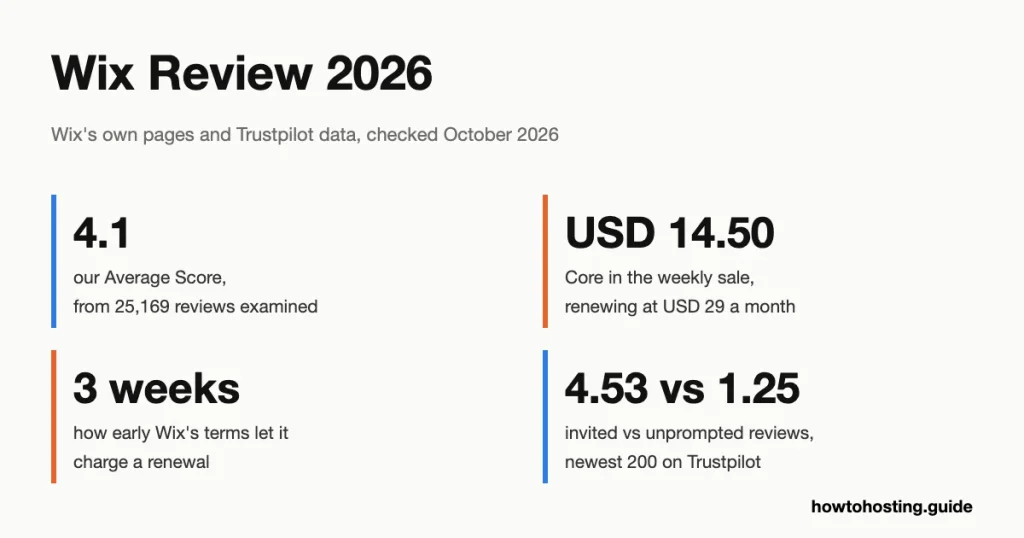
Wix を使用すると、見栄えの良い中小企業サイトをオンラインに簡単に公開できます. 2年目に支払う金額を計算するのははるかに困難です. Wix の平均スコアは次のとおりです 4.1 から 5, から計算される 25,169 カスタマーレビュー. Behind that number sit two very different groups. People building a site love the editor. People dealing with a renewal write many of the angry reviews.
We built this review from Wix’s own pages, all read on 7 10月 2026. They include the plans page and the code that runs it, and the Terms of Use dated 9 7月 2026. We also used the help center and Wix’s filings with the US Securities and Exchange Commission (SEC).
その上に, we split Trustpilot’s latest reviews into invited and unprompted ones, and read Reddit threads from the past year. We didn’t build a site on Wix or contact its support. The Wix reviews ranking today list the plan prices but stop at checkout. None of the five we read mentions that Wix’s terms allow a renewal charge up to three weeks early. None notices that its 50% sale comes back every week.
素早い評決: Wix scores 4.1 から 25,169 レビュー. Beginners praise the editor, and Core puts bookings, payments and a store in one dashboard. The main complaints are early renewal charges, refunds that stop after 14 days and support that starts with a chatbot. It suits a small business that plans to stay on Wix for years.
の上 4 7月 2025, Wix announced higher Premium plan prices, raising its Business plan from USD 36 米ドルへ 39 月. Wix’s help center says the new prices apply to renewals too, so any review still quoting USD 36 describes a price no Business subscriber pays.
最終更新日: 10月 2026. 価格とレビューデータが検証済み.


| 名前 | Wixホスティング |
| 総レビュー | 25169 |
| 平均スコア | 4.1 |
| Webサイト | http://www.wix.com |
| 住所 | 40 ハナマルテルアビブ通り. テルアビブ , IL |
レビュー数
平均. レビュースコア
顧客サポート
機能とサービス
Wix is a website builder, not a host in the usual sense. You don’t choose a server, a location or a control panel. Wix runs the hosting, security and software updates, and your site lives on its platform for as long as you pay.
What Wix Sells in 2026
The main product is still the Wix Editor, a drag-and-drop builder with more than 2,000 templates according to Wix’s plans page. 1月に 2026 Wix released Wix Harmony, which its annual report calls the company’s new flagship AI website builder. Harmony mixes “vibe coding” (describing what you want in plain language) with drag-and-drop control, through an AI agent called Aria.
Agencies and freelancers get Wix Studio, which replaced Editor X when Wix retired it in 2024. Wix also owns Base44, an AI app builder bought in June 2025, and Wixel, an AI design tool linked from its menus. Most small business owners will only ever touch the Editor or Harmony.
Features That Decide Your Plan
- 支払い: Light can’t accept payments or offer scheduling. Selling anything starts at Core, where the plan card adds “支払いを受け入れる” と “Scheduling and services”.
- Storage and team size: Light gives 2 GBと 2 collaborators, 芯 50 GBと 5, 仕事 100 GBと 10. Business Elite has unlimited storage and 100 collaborators.
- Payment fees: Wix Payments charges US merchants 2.9% + 米ドル 0.30 per card sale, また 3.7% + 米ドル 0.30 for American Express. When you refund a buyer, Wix keeps its original fee. A chargeback (a buyer disputing a card payment with their bank) 費用は米ドル 15.
- テンプレート: Wix’s help center says you can’t switch an existing site to a different template. A redesign means a new site, with elements copied across by hand.
- 無料プラン: The site lives at an address like username.wixsite.com/sitename and carries Wix branding. A paid plan is needed to connect your own domain, even one bought from Wix.
Where Wix Runs Your Site
Wix doesn’t sell server locations, so there’s nothing to pick. Its annual report for 2025 says its primary data centers sit in two US locations, one on each coast, and either can run alone. Google and Amazon host most of that computing. A further data center in Europe serves as backup. CDN providers (networks that keep copies of your pages close to visitors) spread the load worldwide. For a visitor in Europe or Asia, speed depends far more on those copies than on anything in your plan.
パフォーマンスの期待
We didn’t run our usual latency measurement for Wix. That test times how fast a host’s servers answer from home internet connections in 8 に 10 国. It only tells a buyer something when they can choose where their site is hosted. Every Wix site goes out through Wix’s own delivery network, so the test would only time the nearest CDN server. No plan you buy changes that. We didn’t check independent benchmarks for this review either, so we quote none.
Wix’s uptime claims don’t agree with each other. The plans page promises “99.99% 稼働時間”, while a help center article says “99.9% 稼働時間”. The Terms of Use contain no uptime figure at all and supply the service “As Is” と “As Available”. So neither number is a guarantee you could claim credit against. The gap isn’t trivial. A site at 99.9% can be down for roughly 8.8 hours in a year; で 99.99%, 1時間未満.
Customers rarely complain about the speed of live sites. の 200 newest English one-star reviews on Trustpilot, 16 mention slowness or downtime. Most of those describe the editor or dashboard, and several name Wix Harmony as “スロー” また “laggy”.
顧客体験
Reviews of Wix split into two camps that barely meet. Trustpilot について, Wix has a TrustScore of 3.4 から 29,154 レビュー, 3,531 of them from the past 12 月. Of all reviews, 70.5% 5つ星であり、 22.2% 一つ星です, leaving little in between. Four-, 三- and two-star reviews make up just 3.5%, 1.4% と 2.4%. A plain average of every star comes to about 4.0. Since the TrustScore weights recent reviews more heavily, これは 3.4 says recent reviews are worse than the long record.
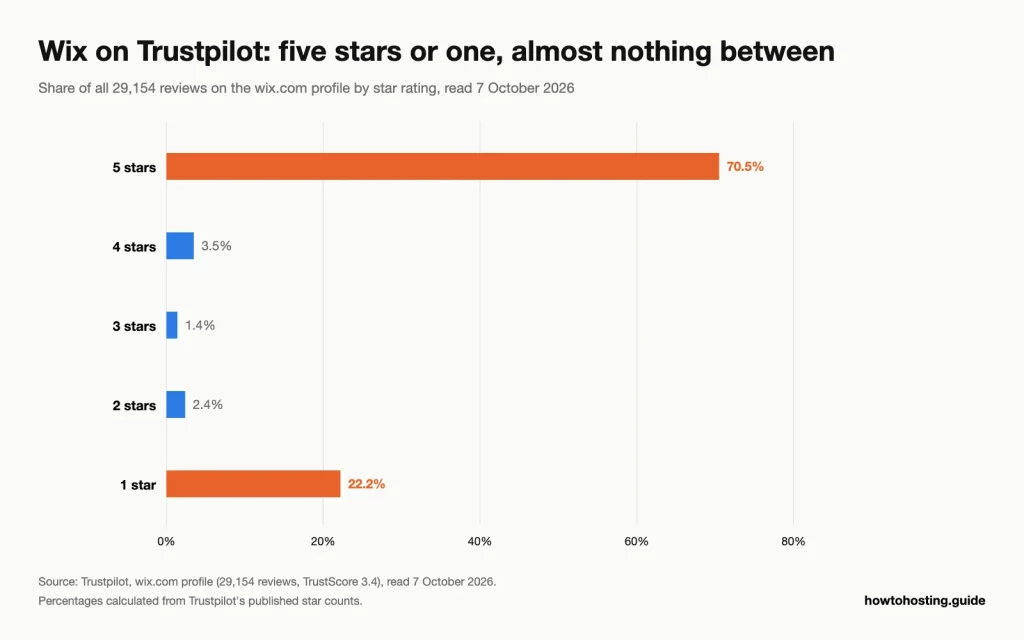
Nearly every Wix review on Trustpilot sits at one end of the scale. ソース: トラストパイロット, wix.com profile, 読んだ 7 10月 2026.
Two Kinds of Reviewer
Who prompts the review explains most of the split. Trustpilot labels every review as invited by the company or written unprompted. その中で、 200 最新のレビュー (12 September to 7 10月 2026), the 100 invited ones averaged 4.53 出演者. The 100 organic ones averaged 1.25, と 85 そのうちの 1 つ星を付けました. Wix replied publicly to 141 の 200. どちらのグループも実際の顧客です; one was asked, and the other went looking for somewhere to complain.
What Happy Customers Say
Ease of use dominates the praise. We also read the 160 newest English five-star reviews, から 6 8月~ 7 10月 2026. そのうち, 83 use words like easy, simple or intuitive, と 155 were invited. Several come from people who call themselves non-technical and built a site for a club, a non-profit or a one-person business. Web designers on Reddit say the same from the other side. One told a non-profit volunteer they use Wix a lot and recommend it to most clients, because it’s easy to manage.
Where the Complaints Cluster
Billing heads the list. Besides the 14 early-charge stories, five one-star reviewers describe a renewal at more than double their first payment. One Business plan went from USD 248.27 米ドルへ 496.54. That jump matches what the weekly sale produces, though the reviewers don’t say how they first bought.
Wix Payments comes next. Some merchants report a closed payments account and money held for months; one says Wix kept about USD 8,600 over a “classification mismatch”. Account locks are the third theme. When Wix suspends an account, the site, the domain and any email on that domain go dark together. Running through all three is support: reviewers describe chatbot loops, repeated requests for documents and tickets left open for days.
Reddit Threads From the Past Year
Reddit threads from the past year repeat the billing story with more detail. 10月 2026 post in r/WIX, タイトルの “11 Month Charge Warning”, describes a yearly renewal taken a month early and a refused refund. In another thread, a business owner says Wix banned their account. Over five days it asked for ID, bank details and a statement, then went silent. Commenters pointed out that Wix is itself the domain registrar there. So the owner could complain to ICANN, ドメインレジストラを監督する機関.
Not every thread blames Wix. One buyer complained that a domain bought from Wix needed a paid plan before it would connect. Most replies said that’s how Wix works, and the pricing page makes it clear. A designer who moved a client off Wix after five years said rebuilding the site was the easy part. Copying the DNS records from Wix’s nameservers, including Google Workspace mail settings, took two of the three hours.
Getting Help From Wix
Wix’s contact page opens with a chat that promises help “すぐに, 24/7”, and reviewers describe it as an AI assistant. From there you can ask for a human “Customer Care Expert” チャットで, phone or email. For English, callbacks run 24/7, while human chat runs Monday to Friday, 2 午前~ 6 PM EST. There’s no number you can dial; phone support means a callback you request. Russian and Korean speakers get email only. Business Elite adds what the plans page calls priority customer care, and it reserves “VIP phone support” for a higher plan.
When to Use Wix
Wix pays off for owners who want one login for the site, 予約, payments and email, and who expect to stay for years.
Good Matches
- A local service business that takes bookings: a salon, tutor or studio gets a site, scheduling and payments on Core. There are no plugins to update. 米国では, card sales cost 2.9% + 米ドル 0.30 それぞれ.
- A designer building for a client who’ll edit alone: owners with no tech skills praise the editor more than anything else. The designer gets agency tools in Wix Studio.
- A side project you want to try at no cost: the free plan lets you build and publish on a wixsite.com address. You upgrade only if the idea works.
It Fits If
- ホスティングをしたい, security and updates done for you.
- You can buy on a sale day and pay double from year two.
- Your site is mostly pages, bookings and a small store, not a big blog.
When NOT to Use Wix
Most of Wix’s drawbacks only bite when you try to leave, pay less or get money back.
Reasons to Skip It
You might move the site later. Wix’s help center states plainly that a Wix site must run on Wix’s servers.
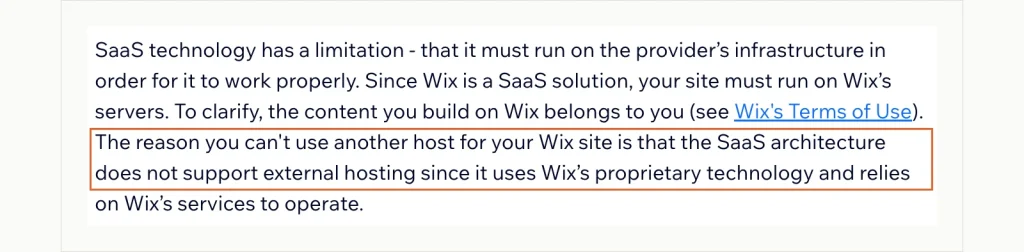
The outlined sentence explains why a Wix site can’t move: it only runs on Wix’s own servers. Wix Help Center, Exporting or Embedding Your Wix Site Elsewhere, 捕らえられた 7 10月 2026.
Some data does come out. Wix exports physical products as CSV files, a spreadsheet format, まで 5,000 rows per file. It also exports up to 50,000 contacts at once. Blog posts can’t be exported to other platforms, digital products can’t be exported, and the design stays behind.
Your income runs through one payment account. Merchants on Trustpilot describe Wix Payments accounts closed with funds held for months. If one processor going quiet would stop your business, keep a second option ready.
You want a refund after you’ve renewed. The 14-day guarantee covers only the first upgrade of a free site. 更新, upgrades and domains are excluded. Several reviewers who were charged early say their refund requests were refused.
Cheap selling is the priority. 米ドルでのライト 17 can’t take a single payment. Selling starts at Core, これは米ドルです 29 a month at list price.
A written uptime promise is a must. The terms contain none, whatever the marketing pages say.
Check Before You Pay
- Note the renewal date minus three weeks, and decide by then whether to cancel.
- Consider registering your domain with a separate registrar and connecting it. A locked Wix account then can’t take your domain and email down with it.
- Read the plan card for the features you need; Light has no payments or scheduling.
If moving the site later matters, WordPress on a shared host solves it. If the store is the business, Shopify is the stronger home. Both are covered below.
- Wix ホスティングのレビュー アメリカ合衆国から
| 平均点 | 4.29 |
| レビュー数 | 7958 レビュー |
- Wix ホスティングのレビュー イギリスからです
| 平均点 | 3.46 |
| レビュー数 | 4111 レビュー |
- Wix ホスティングのレビュー フランスから
| 平均点 | 3.82 |
| レビュー数 | 1705 レビュー |
- Wix ホスティングのレビュー カナダから
| 平均点 | 4.39 |
| レビュー数 | 1255 レビュー |
- Wix ホスティングのレビュー ドイツから
| 平均点 | 3.52 |
| レビュー数 | 1175 レビュー |
- Wix ホスティングのレビュー インドから
| 平均点 | 4.74 |
| レビュー数 | 752 レビュー |
- Wix ホスティングのレビュー スペインから
| 平均点 | 4.44 |
| レビュー数 | 706 レビュー |
- Wix ホスティングのレビュー オーストラリアから
| 平均点 | 4.11 |
| レビュー数 | 668 レビュー |
- Wix ホスティングのレビュー イタリアから
| 平均点 | 3.96 |
| レビュー数 | 593 レビュー |
- Wix ホスティングのレビュー スイスから
| 平均点 | 4.23 |
| レビュー数 | 550 レビュー |
- Wix ホスティングのレビュー メキシコから
| 平均点 | 4.86 |
| レビュー数 | 482 レビュー |
- Wix ホスティングのレビュー 南アフリカから
| 平均点 | 4.67 |
| レビュー数 | 375 レビュー |
- Wix ホスティングのレビュー オランダから
| 平均点 | 3.33 |
| レビュー数 | 343 レビュー |
- Wix ホスティングのレビュー ベルギーから
| 平均点 | 3.84 |
| レビュー数 | 321 レビュー |
- Wix ホスティングのレビュー オーストリアから
| 平均点 | 4.08 |
| レビュー数 | 252 レビュー |
- Wix ホスティングのレビュー コロンビアから
| 平均点 | 4.91 |
| レビュー数 | 211 レビュー |
- Wix ホスティングのレビュー アルゼンチンから
| 平均点 | 4.83 |
| レビュー数 | 197 レビュー |
- Wix ホスティングのレビュー デンマークから
| 平均点 | 2.87 |
| レビュー数 | 196 レビュー |
- Wix ホスティングのレビュー ニュージーランドから
| 平均点 | 4.56 |
| レビュー数 | 168 レビュー |
- Wix ホスティングのレビュー アイルランドから
| 平均点 | 3.75 |
| レビュー数 | 166 レビュー |
- Wix ホスティングのレビュー フィリピンから
| 平均点 | 4.76 |
| レビュー数 | 157 レビュー |
- Wix ホスティングのレビュー チリ出身
| 平均点 | 4.94 |
| レビュー数 | 153 レビュー |
- Wix ホスティングのレビュー スウェーデンから
| 平均点 | 3.45 |
| レビュー数 | 149 レビュー |
- Wix ホスティングのレビュー イスラエルから
| 平均点 | 4.36 |
| レビュー数 | 144 レビュー |
- Wix ホスティングのレビュー トルコから
| 平均点 | 4.18 |
| レビュー数 | 142 レビュー |
- Wix ホスティングのレビュー ギリシャから
| 平均点 | 4.53 |
| レビュー数 | 128 レビュー |
- Wix ホスティングのレビュー マレーシアから
| 平均点 | 4.65 |
| レビュー数 | 119 レビュー |
- Wix ホスティングのレビュー アラブ首長国連邦から
| 平均点 | 4.20 |
| レビュー数 | 117 レビュー |
- Wix ホスティングのレビュー シンガポールから
| 平均点 | 4.51 |
| レビュー数 | 113 レビュー |
- Wix ホスティングのレビュー ポルトガルから
| 平均点 | 4.24 |
| レビュー数 | 106 レビュー |
Wix Plans and Pricing
Wix’s US list prices are USD 17, 米ドル 29, 米ドル 39 と米ドル 159 a month for Light, 芯, Business and Business Elite. Each price is billed yearly and paid up front, 税引き前, so Core costs USD 348 1年. The plans page shows no monthly price, though Wix’s refund article confirms monthly billing exists. Other countries see local prices; Wix’s own price table lists Core at GBP 16 イギリスで.
How does that compare? Selling is where Wix asks for more. Wix’s Light plan, 米ドル 17 a month on its US price list, can’t take a payment at all. On Squarespace’s EUR storefront, the cheapest plan costs EUR 11 a month billed annually and already accepts payments.
| プラン | List price (私たち) | Weekly sale, 最初の学期 | で更新します | 保管所 |
|---|---|---|---|---|
| 光 | 17ドル/月 | No discount | 17ドル/月 | 2 GB |
| 芯 | 29ドル/月 | USD 14.50/mo | 29ドル/月 | 50 GB |
| 仕事 | 39ドル/月 | 19.50ドル/月 | 39ドル/月 | 100 GB |
| ビジネスエリート | USD 159/mo | USD 79.50/mo | USD 159/mo | 無制限 |
All four plans are billed yearly and paid in full, with tax added at checkout. The checkout itself needs a Wix account, so these figures come from the plans page and Wix’s own price table rather than a cart.
The Sale That Comes Back Every Tuesday
Some visitors see a green banner reading “Special offer – 50% OFF select plans”. Below the plans sits a deadline: “Offer valid until Thursday 7:00 AM GMT”. We read the plans page’s code to find out when it appears. It switches on every Tuesday at 07:00 UTC and off on Thursday at 07:00 UTC, week after week. Only visitors in the US, イギリス, カナダ, オーストラリア, ドイツ, India and Israel get it. Everyone else sees full price, which is why our first look from Bulgaria showed no sale.
To confirm, we reloaded the page on Wednesday 7 10月 2026 with its location check set to the US. It showed Core at USD 14.50, USDでのビジネス 19.50 USDのビジネスエリート 79.50, with Light unchanged at USD 17. The small print says the price is “Only valid for the initial term of yearly / multi-year subscriptions”. Wix’s terms add that after a discounted period it may renew your plan “automatically and without notice” at the full fee.
So the Thursday deadline isn’t a reason to rush. It is a reason not to buy on a Friday if you can wait until Tuesday.
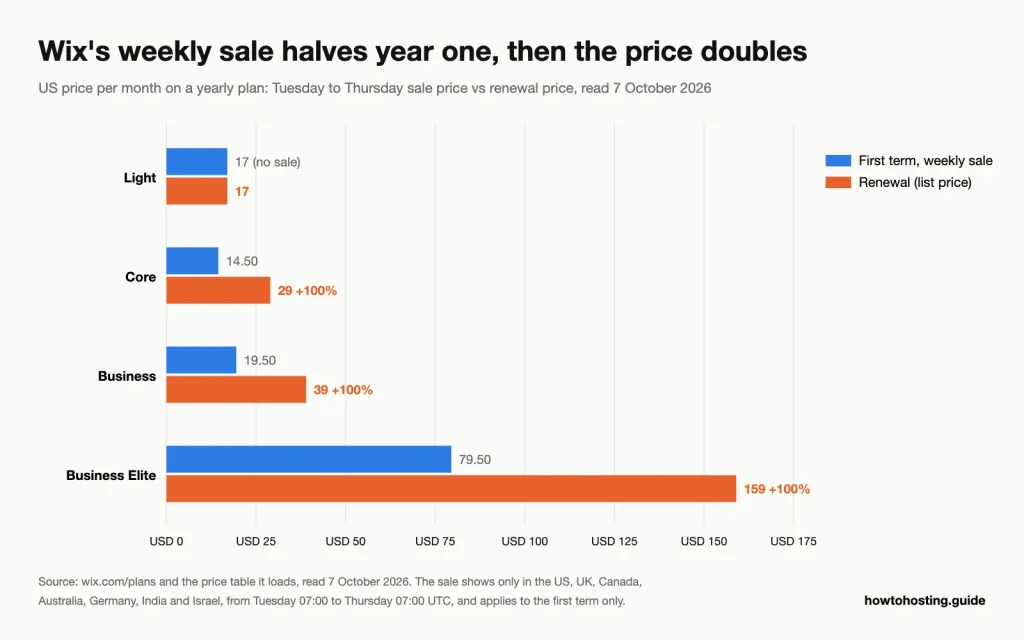
Year one bought in the Tuesday to Thursday sale, set against every year after it. ソース: wix.com/plans and the price table it loads, 読んだ 7 10月 2026.
更新の警告: Core bought in the weekly sale costs USD 14.50/mo, または米ドル 174 最初の1年間. で更新されます 29ドル/月, または米ドル 348 1年: a 100% 増加. Business goes from USD 234 米ドルへ 468 a year and Business Elite from USD 954 米ドルへ 1,908.
When the Renewal Charge Lands
Wix’s Terms of Use say it will try to charge your stored card “up to three (3) weeks before such renewal period commences”. For yearly plans, Wix only says it “will endeavor” to send a notice 30 数日先. 実際には, the money can leave your account while you still think you have weeks to cancel.
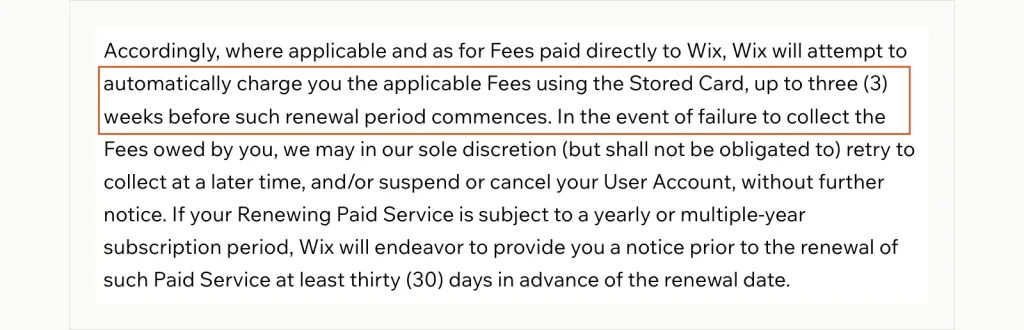
Read the outlined lines first: the charge can come three weeks before the new term. The 30-day notice is only something Wix will endeavor to send. Wix Terms of Use, セクション 6.3, 捕らえられた 7 10月 2026.
Reviewers notice. We read the 200 newest English one-star reviews on Trustpilot, から投稿されました 4 8月~ 7 10月 2026. Fourteen describe a renewal taken 14 days to about a month early. Redditで, one user found the next charge date hidden behind a small “billing details” link under the plan’s expiry date. If you plan to leave, turn off auto-renewal a month before the expiry date, not a week.
Costs on Top of the Plan
- ドメイン: Yearly plans include a voucher for one free year on a new domain, redeemable within 60 日々. Wix’s domains page prints no renewal price, so check it in your account before year two.
- Refund limits: Domains carry no money-back guarantee, and renewals are excluded from the 14-day refund.
- AIクレジット: The terms say used credits can’t be refunded, even when the output contains “エラー” また “hallucinations”.
- Payment fees: Wix Payments takes 2.9% + 米ドル 0.30 per US card sale, and cross-border sales add 1.5%.
Is Wix Good Value?
Wix is priced for owners who stay. At list price, Core costs USD 348 1年, 毎年. That’s fair for a site that takes bookings and payments without a developer. The catch is timing rather than the number. Buy between Tuesday and Thursday if you’re in one of the seven sale countries. Then put the renewal date in your calendar three weeks early, and budget for full price from year two.
- 特徴 カスタマーサービス
- 機能 ドメインを接続
- 機能 ドメインを接続 無料ドメイン Wix 広告を削除 カスタマイズされたファビコン
- 機能 ドメインを接続 無料ドメイン Wix 広告を削除 カスタマイズされたファビコン フォームビルダーアプリ – $48 バリューサイトブースターアプリ – $60 価値
- 機能 ドメインを接続 無料ドメイン Wix 広告を削除 カスタマイズされたファビコン フォームビルダーアプリ – $48 バリューサイトブースターアプリ – $60 バリューオンラインストア 10 メールキャンペーン/月のプロフェッショナルサイトレビュー
- 機能 ドメインを接続 Wix 広告を削除 無制限の動画時間 販売分析 & の無料ドメインを報告 1 年 $75 広告バウチャーサイトブースターアプリ – $60 バリュービジター分析アプリ – $60 バリュープロフェッショナルロゴ – $50 ValueProeコマース機能優先応答VIPサポート
Wix Transparency Score
Wix is open about the company and hard to read on price. Its terms are clear; they just aren’t kind to the customer.
企業情報: 素晴らしい. Wix.com Ltd. is listed on NASDAQ and files reports with the SEC. They name its Tel Aviv address and its data center setup. They also disclose events like the cut of about 20% of its staff announced in June 2026.
価格の透明性: 限定. The weekly sale depends on your country and the time of week. Monthly prices aren’t shown and the domain renewal price isn’t printed. The early renewal charge sits in the terms, not on the plans page.
技術文書: 限定. Two different uptime figures appear on Wix’s own pages and neither is in the terms. The best account of where sites are hosted is in an SEC filing, not on the hosting page.
規約とポリシー: 良い. The refund and renewal rules are written clearly and easy to find. The catch is what they say: the 14-day refund applies only to the first upgrade of a free site.
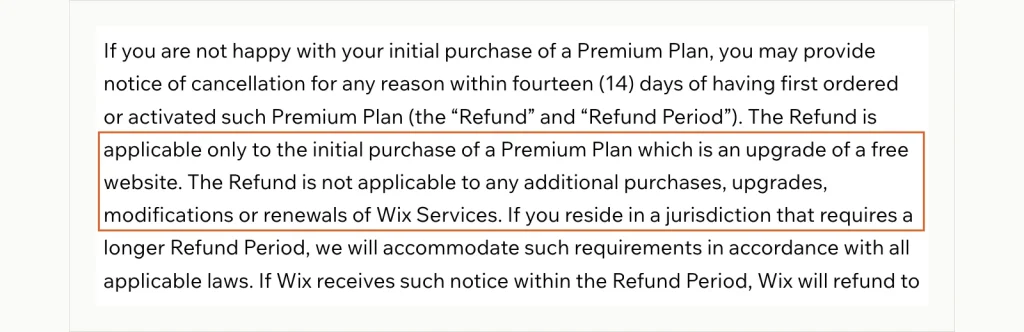
Start with the outlined lines, which exclude renewals and upgrades from the refund. The next sentence allows a longer period where local law requires one. Wix Terms of Use, セクション 6.4, 捕らえられた 7 10月 2026.
全体的な透明性: Good on the company, weak on what you’ll pay and when. Read section 6 of the terms before buying, because that’s where the important rules live.
Alternatives to Wix
Each option below answers one gap from the previous section: moving the site later, keeping store data portable, and taking payments on an entry plan.
For a Site You Can Take With You: 共有ホスティング上の WordPress
WordPress is free, open-source software. Your whole site can move to any host that runs it: ページ, 投稿, theme and database. Shared hosting is the cheapest way to run it, そして私たちの 共有ホスティングの比較 sets out the options.
For a Store That Has to Grow: Shopify
Shopify is built around selling. Its help center says you can export products, 顧客, stock levels and orders as CSV files. That keeps your store data portable in a way Wix’s blog and digital products aren’t.
For Design-Led Sites That Take Payments Early: Squarespace
Squarespace’s cheapest plan costs EUR 11 a month billed annually on its EUR storefront. It already accepts payments, which Wix’s Light plan can’t. It also exports part of a site, including one blog, to a WordPress .xml file.
結論
Wix earns its 4.1 から 25,169 reviews as a builder, not as a billing experience. Half of its newest five-star reviews praise how easy the editor is. Its newest one-star reviews keep returning to renewals, refunds and support.
Buy Wix if you run a small service business, want bookings and payments in one place and plan to stay. Buy it between Tuesday and Thursday if you’re in a sale country, and treat the first-year price as a discount, not the real price. Choose WordPress on shared hosting if you might ever move, and Shopify if the store is the business.
何を選んでも, set two reminders: one three weeks before renewal, and one to check what the domain will cost in year two. If you already know you want out, 私たちの WordPress hosts for leaving Wix compares which hosts help with the move.
よくある質問
Is Wix really that good?
For building a site, はい. Its easy editor is the most common praise in five-star reviews, and Core covers bookings and payments. Our Average Score is 4.1 から 25,169 レビュー, held down mainly by billing and support complaints.
How much does Wix actually cost?
米国では, Light is USD 17 月, コア米ドル 29, ビジネス米ドル 39 and Business Elite USD 159, all billed yearly up front. From Tuesday to Thursday, 芯, Business and Business Elite drop 50% 第一期のみ. After that they renew at full price, それで米ドル 174 first year of Core becomes USD 348.
Why are people leaving Wix?
Recent one-star reviews point mostly to billing: renewals charged weeks early, prices doubling after a discounted first year and no refunds on renewals. Others cite payment accounts closed with funds held, and support that starts with a chatbot.
Which is better for 2026, WixまたはSquarespace?
Squarespace is the cheaper way to start taking payments, since its entry plan includes them and Wix’s Light plan doesn’t. It also exports part of a site to WordPress, while Wix can’t export blog posts. Wix gives more freedom in the editor and more built-in business tools.
What is the downside to Wix?
You can’t take a Wix site with you. It has to run on Wix’s servers, blog posts can’t be exported, and you can’t even switch an existing site to a new template. Only physical products and contacts come out as CSV files.
Can you get a refund midway through a Wix subscription?
通常はそうではありません. The 14-day guarantee covers only the first upgrade of a free site, and renewals and domains are excluded. Wix’s help center says you can still contact support to ask for a review of your case.
