
Su questa pagina: [nascondere]
Su 18 agosto 2023, Il ransomware ha colpito CloudNordic e ha crittografato ogni disco del server, oltre ai suoi sistemi di backup primari e secondari. La maggior parte dei suoi clienti ha perso tutti i dati che conservava lì. Se il tuo ospite si è oscurato, or says your data is gone, work through these steps in this order.
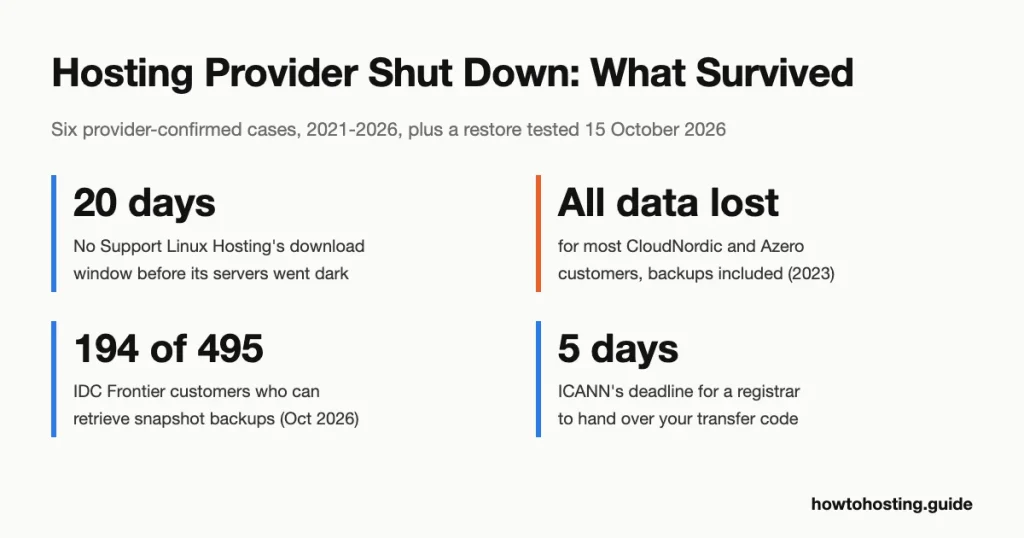
- Test what still answers: try your control panel, SFTP login and webmail right now. No Support Linux Hosting gave customers 20 days after its 2021 breach before its servers went dark. That was the only time to copy anything.
- Download what you can reach: take the site files, a database export and your mailboxes. Copy your DNS records into a text file as well.
- Find your domain’s registrar: look it up on ICANN Lookup, then log in at that registrar, not at the host. Note the expiry date.
- Get your newest off-host backup: that’s a copy in storage the host never controlled. With nothing else, the Wayback Machine may still hold your public pages.
- Restore at a new host: install a fresh WordPress and restore your files and database onto it. Our tested steps for UpdraftPlus and WP-CLI are below.
- Point the domain there: change the name servers at your registrar, or the A and MX records at your DNS provider. Recreate every record you saved.
- Move email within four days: sending servers usually retry for 4 per 5 days before giving up, so delayed mail can still reach a new mailbox.
- Change every password: assume the attacker has every one the old host held. Dove puoi, restore a backup made before the attack date.
Last reviewed October 2026. We tested the backup and restore steps on 15 ottobre 2026 in a disposable local Docker site, con WordPress 7.1.3, UpdraftPlus 1.26.9 e WP-CLI 2.12.0. Domain and DNS steps can’t be tested on a local machine. They come from ICANN’s policy and the registrars’ own documentation instead.
Which of three situations are you in?
Hosts fail after an attack in three ways. Each one leaves you a different amount of time, so work out which you’re facing before you do anything else.
The host announces a shutdown date
This is the best of the three, because the servers keep running for a while. Di 9 febbraio 2021, No Support Linux Hosting’s homepage said a hacker had compromised all the servers it used, including its customer database. The notice told customers to download their backups through cPanel. A later version added a deadline: all remaining web servers would shut down on 28 febbraio 2021.
That cPanel advice, which our own 2021 news post repeated, only worked inside the window. Di 7 March the notice said every system was offline, and the company could no longer give access to any site it had hosted. So if your host names a date, download everything today. Moving can wait.
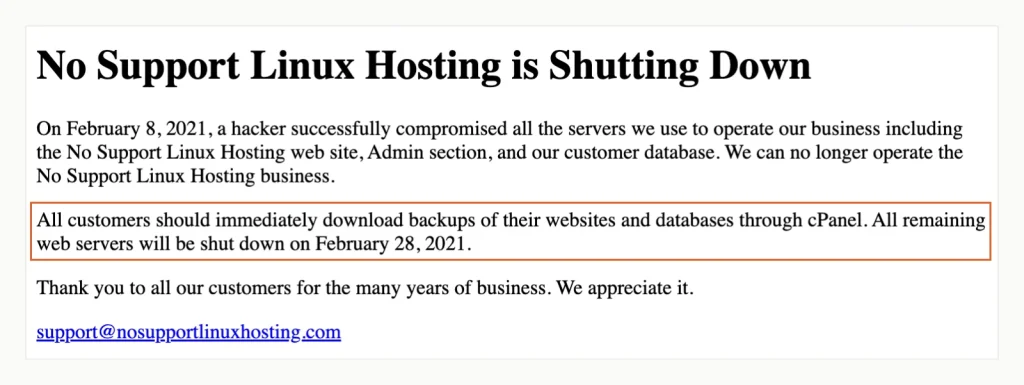
The outline marks the cPanel download advice and the 28 February deadline that ended it. No Support Linux Hosting’s homepage, Acquisizione di Wayback Machine 1 marzo 2021.
The company survives, but your data doesn’t
CloudNordic, Azero, HostDzire and IDC Frontier didn’t announce closures after their attacks. They rebuilt, but customer data on the hit systems was lost or out of reach. CloudNordic rebuilt its name servers, web servers and mail servers “without data”, in our translation of its Danish notice. The accounts still existed. The files in them didn’t.
Here the provider’s dashboard may work again within days, which tempts people to wait. Non. Ask in writing whether your data still exists, and start the restore somewhere else at the same time.
One service closes for good
Rackspace disclosed a ransomware incident in its Hosted Exchange email service in an SEC filing on 6 dicembre 2022. Su 5 gennaio 2023 it said that environment would not be rebuilt. Customers had to move to Microsoft 365 or another mail service and fetch their old mailboxes separately.
What you can still save, and what is usually gone
Several things you need never lived on the host’s servers in the first place. Go through this list before you assume the worst.
| Item | Usually survives? | Where to look |
|---|---|---|
| Registrazione del dominio | sì, if you can reach the registrar of record | Ricerca ICANN, then that registrar’s account |
| record DNS | No, if the host ran your DNS | Your own notes or an old zone export |
| Site files and database | Only as off-host copies | Your backup storage, your computer, a developer’s copy |
| The host’s own backups | Qualche volta | Ask the host in writing; don’t count on them |
| Old email | Only as local copies | Your desktop mail app’s offline folders |
| New mail sent to you | Spesso, if you act within 4 per 5 giorni | Your new mail service, once MX points to it |
| Certificato SSL | No, but a free one is quick to reissue | The new host’s Let’s Encrypt or AutoSSL tool |
| Le password | Treat them as exposed | Change all of them |
The host’s own backups split our six cases (see the table further down). CloudNordic’s backup systems were encrypted along with everything else. IDC Frontier’s snapshots survived, ma solo 194 di suo 495 affected customers had used that feature.
No backup at all? The Wayback Machine is the last resort, and CloudNordic pointed its own customers to it. It stores public pages and images, never your database, user accounts or form entries. Expect to rebuild the site by hand from it.
Your domain and DNS: who really holds them
Your domain is held by a registrar, even if you bought it in the same checkout as your hosting. What matters now is which company is the registrar of record, and whether you can still log in there.
Find the registrar of record
Enter your domain at Ricerca ICANN. The result names the registrar, the expiry date and the name servers. Then check which company answers DNS for your domain:
$ dig +short NS example.com
hera.ns.cloudflare.com.
elliott.ns.cloudflare.com.
If those name servers belong to your old host, your site and email stop working even while the domain itself is safe. That’s what happened at CloudNordic, whose rebuilt name servers came back empty.
If your registrar is a separate company
You’re in the easy case. Log in at the registrar and switch the name servers to the new host’s. Or keep DNS where it is and edit the A and MX records. Namecheap’s documentation warns that existing records don’t move across when you change name servers. You set them up again by hand, and the change can take up to 24 hours to reach everyone.
Un'eccezione: Cloudflare Registrar doesn’t allow outside name servers at all. Its FAQ says you’d have to move the domain to another registrar first. In practice you leave DNS at Cloudflare and edit the records there.
If the host was also your registrar
A host that sold you a domain may only be a reseller for an accredited registrar. ICANN Lookup shows the registrar of record either way. CloudNordic’s notice told customers that its non-.dk domains sat with the registrar Ascio, and how to move them. Contact the registrar of record directly, with proof that you’re the registrant.
For .com, .netto, .org and other generic domains, ICANN’s Transfer Policy puts firm deadlines on your side. The registrar has to hand over your transfer code within five calendar days of your request, unless you can generate it yourself. It can’t refuse solely because of a payment dispute.
Si applicano due limiti. A registrar may deny a transfer within 60 days of registration or of a previous transfer. Country-code domains such as .uk or .de follow their own registry’s rules, so check those with the registry.
And if the registrar itself fails? ICANN-accredited registrars must deposit their registration data with an escrow agent. ICANN can use that copy to move names from a failed registrar to another one.
Restoring from an off-host backup on a new host
We rebuilt the whole scenario. Un “old host” ran WordPress with a post, una pagina, an image and a comment. UpdraftPlus sent a backup to a separate FTP server, standing in for storage you own. Then we deleted the old host, database and files included, and restored onto a fresh WordPress at the same address.
We used FTP only because it could run inside our test network. On a real site, choose Google Drive, Dropbox o Amazon S3, since UpdraftPlus’s free FTP option sends data unencrypted.
With UpdraftPlus
- On the new host, install WordPress and the UpdraftPlus plugin. Aperto UpdraftPlus in the admin menu, poi il impostazioni linguetta.
- Choose the same remote storage the old site used and enter its login details. Per FTP, the folder in Remote path must already exist. Our first connection test failed until we created it.
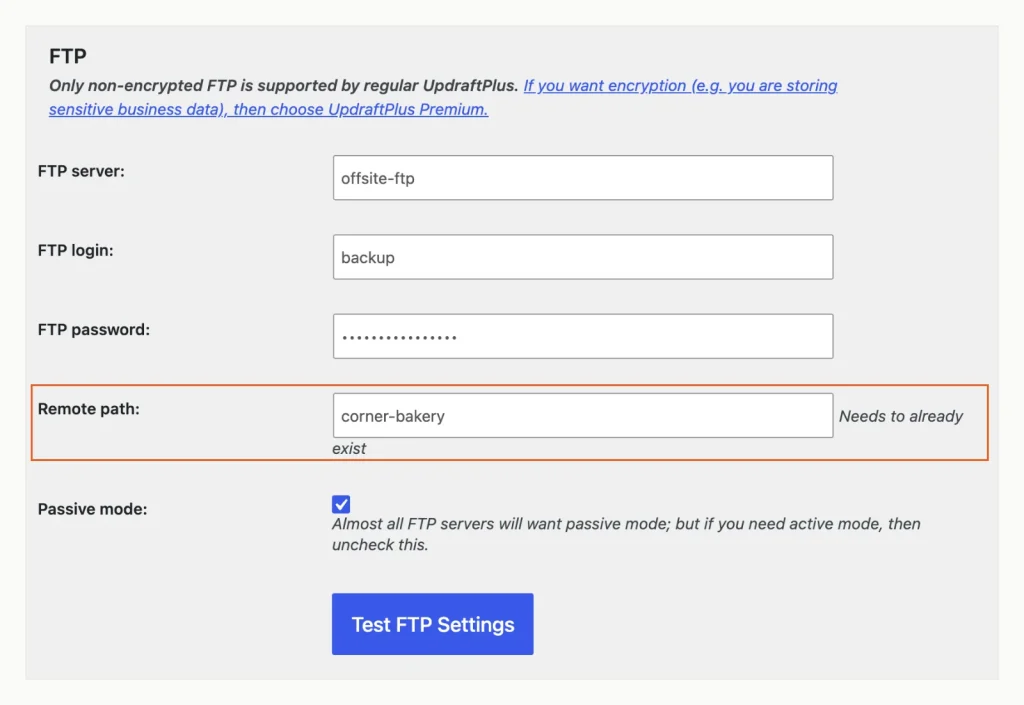
The Remote path folder has to exist on the storage server before UpdraftPlus can write to it. UpdraftPlus 1.26.9 on WordPress 7.1.3, tested in a local Docker site, 15 ottobre 2026.
- Clic Salvare le modifiche, apri il di riserva / Ristabilire scheda e fare clic Rescan remote storage. A prompt warns that every backup in that folder will be added, whichever site made it. Accept it, and the old backup set appears.
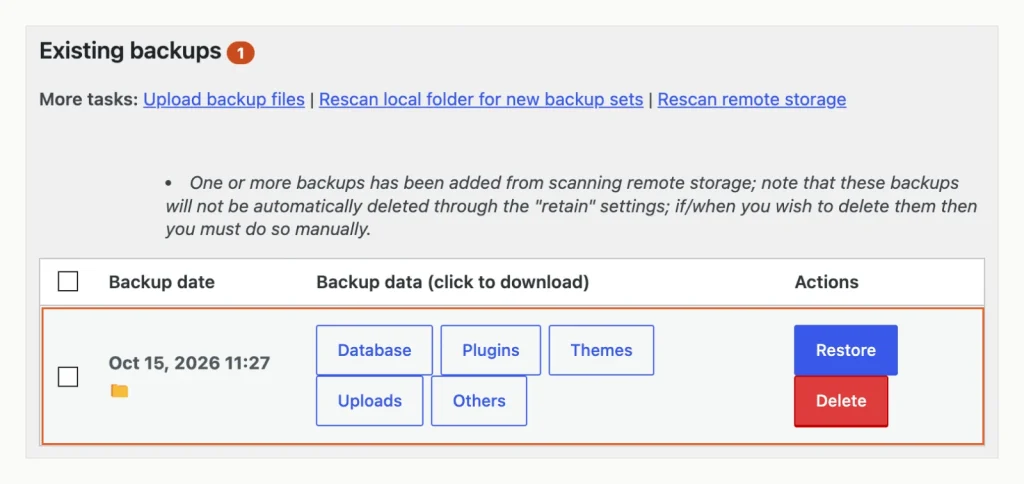
After the rescan, the empty new site lists the old site’s backup set, ready to restore. UpdraftPlus 1.26.9 on WordPress 7.1.3, tested in a local Docker site, 15 ottobre 2026.
- Clic Ristabilire, tic tac plugin, Temi, Upload, Altri e Banca dati, quindi fare clic Il prossimo.
- UpdraftPlus downloads the archives and warns that this installation didn’t create the backup set. On a new host that’s expected. Clic Ristabilire ancora.
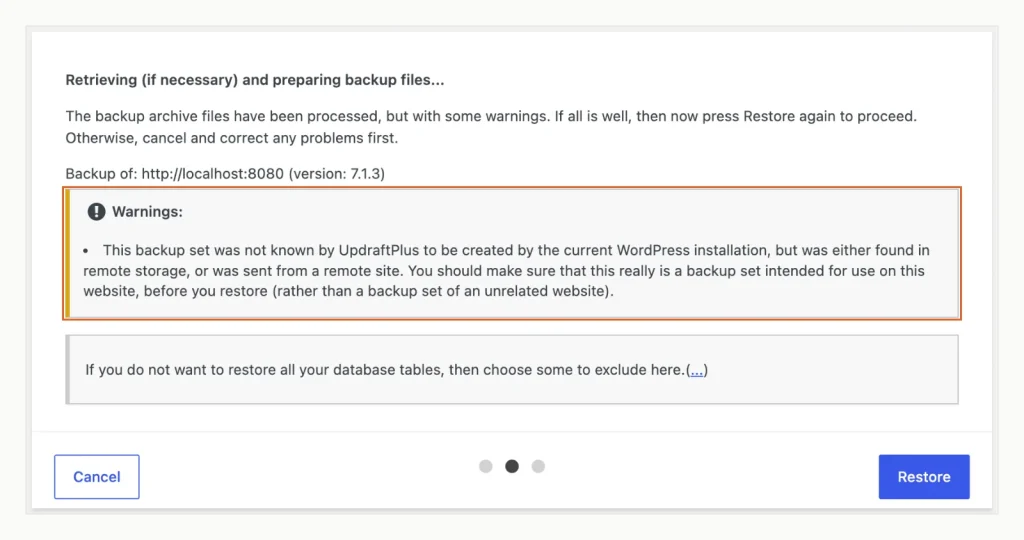
On a new host this warning is expected, because the backup came from the old installation. UpdraftPlus 1.26.9 on WordPress 7.1.3, tested in a local Docker site, 15 ottobre 2026.
The plugin reported a successful restore. The post, its image and the comment loaded at their old addresses.
Con WP-CLI
If your backup is a database dump plus a copy of the wp-content folder, the command line is quicker. We ran these in the WordPress folder of a second fresh host. Our test reached it through Docker’s own shell rather than SSH, so only the login step differs. The paths are from our test, and yours will differ.
$ cd /var/www/html
$ tar -xzf /tmp/home/corner-bakery-wp-content.tar.gz
$ wp db import /tmp/home/corner-bakery-db.sql
Success: Imported from '/tmp/home/corner-bakery-db.sql'.
$ wp option get siteurl
http://localhost:8080
$ wp post list --fields=ID,post_title,post_status
+----+----------------------+-------------+
| ID | post_title           | post_status |
+----+----------------------+-------------+
| 5  | Autumn opening hours | publish     |
| 1  | Hello world!         | publish     |
+----+----------------------+-------------+
The import overwrites the new site’s database, so run it on a fresh install only, never on a site you want to keep.
Three things that broke in our test, and the fixes
New admin login gone: the restored database replaces the new host’s users. Our fresh admin account was gone after both restores, and only the old site’s account was left. Log in with the old password, then change it at once:
$ wp user update owner --user_pass='a-new-long-passphrase'
Success: Updated user 1.
Import works, site looks new: a new host’s installer may use a different table prefix from your old site. Our second host used wpnew_, while the backup used wp_. WP-CLI reported success, yet WordPress kept reading the empty install. Matching the prefix fixed it:
$ wp option get blogname
My WordPress Website
$ grep table_prefix wp-config.php
$table_prefix = 'wpnew_';
$ wp config set table_prefix wp_ --type=variable
Success: Updated the variable 'table_prefix' in the 'wp-config.php' file with the value 'wp_'.
$ wp option get blogname
Corner Bakery
That’s why your backup should include a copy of wp-config.php, which holds the prefix. UpdraftPlus’s free version left it out in our test. Our backup set held plugins, temi, caricamenti, other wp-content folders and the database, e nient'altro.
Messaggi 404, homepage works: our second host had no .htaccess file, so every pretty permalink failed. Aperto impostazioni > Permalink e clicca Salvare le modifiche. WordPress wrote the file again, and the post loaded.
One more check before the domain points at the new site: was this backup made before the attack? A copy taken after an intruder got in can carry their backdoor. The provider’s notice usually gives the date. No Support Linux Hosting’s said 8 febbraio 2021, and CloudNordic’s said the night of 18 agosto 2023.
E-mail: you have about four days
Mail is the part people forget until a client says a message bounced. Two different things are at stake: the mail already in your old mailbox, and the mail arriving now.
Old mail lived on the host’s server, so it survives only as a copy somewhere else. CloudNordic and united hoster both pointed customers to the copy in their desktop mail app. The German host told Outlook users to export it to a .pst file, ready to import into a new mailbox.
New mail has more time than you’d think. RFC 5321, the standard for sending email, says senders should generally keep retrying for at least 4 per 5 giorni. Postfix, a widely used mail server, gives up after 5 days by default. Set up a new mail service and point your MX records at it inside that window, and delayed messages can still arrive.
That only holds while the old mail server doesn’t answer. A rebuilt, empty server that rejects your address makes senders bounce the message at once. In quel caso, move the MX records the same day.
Rackspace shows the other half of the job. Di 5 gennaio 2023, more than half of its affected customers could download some or all of their old mail. Meno di 5% of those had actually done it.
Real cases: hosts that shut down or lost data after attacks
We kept only incidents confirmed by the provider’s own notice or a regulatory filing, continua a leggere 15 ottobre 2026. Six cases from 2021 per 2026 met that bar. Our search found none from 2024 o 2025 that did.
| Provider | Attack | What happened | Did customers get data back? | fonte |
|---|---|---|---|---|
| Nessun supporto per l'hosting Linux | 8 febbraio 2021 | A hacker compromised all its servers, its admin area and its customer database. The company closed and shut its last web servers on 28 febbraio 2021. | Only what customers downloaded before the shutdown. By early March nobody could reach the sites. | Provider notices, 9 febbraio, 1 marzo e 7 marzo 2021 (Wayback Machine) |
| Rackspace (Scambio ospitato) | 2 Dic 2022 | Ransomware hit its hosted email platform. Rackspace closed the service for good and moved customers to Microsoft 365 or elsewhere. | In parte. More than half of affected customers had some or all old mail ready to download by 5 Jan 2023. | SEC 8-K, 6 Dic 2022; status update of 5 Jan 2023 (Wayback Machine) |
| united hoster | Found 20 Maggio 2023 | Ransomware encrypted its Hosted Exchange servers and mail databases. It set up stand-in mailboxes and began building a new Exchange system. | Not stated. New mail was queued and delivered; for old mail, customers were told to export their local Outlook copy. | Customer letter, 24 Maggio 2023 (Wayback Machine) |
| CloudNordic and Azero | 18 agosto 2023 | Ransomware encrypted every server disk and both backup systems. Servers came back empty. | No. The providers said most customers lost all their data with them. | Provider notices, 22 agosto 2023 (CloudNordic, Azero, Wayback Machine) |
| HostDzire | 5 agosto 2026 | Ransomware encrypted the virtual disks on its VMware nodes, including all of them in India. | No. Data on those nodes was “permanently lost”. Customers with external backups could restore onto replacement servers. | Announcement on HostDzire’s site and its staff post on LowEndTalk, tutti e due 5 agosto 2026 |
| IDC Frontier (IDCF Cloud) | 7 ottobre 2026 | Ransomware stopped virtual servers in four zones of its East Japan Region 1, influenzando 495 companies and local governments. | In parte, still open. 194 customers who used its Snapshot feature can retrieve backups; the rest need their own. | IDC Frontier’s 3rd and 5th incident reports, 8 e 14 ottobre 2026 |
In all six cases, the provider’s own statement sent customers back to copies they held themselves. That meant a cPanel download, a local mailbox, an external backup or a downloaded mail archive. Provider-side backups were hit or miss.
IDC Frontier changed its outlook on 14 ottobre 2026, detto 194 di suo 495 affected customers can retrieve snapshot backups. Six days earlier, it had said only customers’ own backups could restore their data.
HostDzire made the point about hardware in its LowEndTalk post. In giro 80% of its affected nodes already ran on RAID, which protects against a failed disk, not against ransomware.
How to prepare before it happens
Every fix above is easier if you set four things up in advance. None of them costs much.
Keep a backup the host can’t touch
A backup in the same account as your site fails at exactly the wrong moment. Take cPanel’s Backup Wizard. Its Home Directory option saves the full backup on that same server; only its FTP and SCP options send it elsewhere. Kinsta’s documentation says its daily snapshots sit on the same host machine as the site.
So schedule a plugin to send copies to storage in your own name, such as Google Drive or Amazon S3. I nostri WordPress backup plugin comparison lists each plugin’s free storage options.
Keep the storage login outside the site, pure, in a password manager. The plugin’s settings live in the WordPress database, so they vanish with the host. We had to type the FTP details in again on the new site before the rescan could find anything.
Copy wp-config.php into your backup now and then. It holds the table prefix your restore has to match.
Keep the domain away from the host
Register the domain at a company that doesn’t host your site. Then a host failure costs you the site, not the address. Turn on auto-renew, and give the registrar a contact email the host doesn’t run, or the renewal warnings go to a dead inbox.
Write down your DNS records
If the host also runs your DNS, its failure wipes the zone. Save your records while they still resolve. This dig command lists the common record types for any domain:
$ dig +noall +answer example.com A example.com AAAA example.com MX example.com TXT example.com NS
example.com.		151	IN	A	172.66.147.243
example.com.		151	IN	A	104.20.23.154
example.com.		96	IN	AAAA	2606:4700:10::6814:179a
example.com.		96	IN	AAAA	2606:4700:10::ac42:93f3
example.com.		300	IN	MX	0 .
example.com.		300	IN	TXT	"v=spf1 -all"
example.com.		300	IN	TXT	"_k2n1y4vw3qtb4skdx9e7dxt97qrmmq9"
example.com.		86359	IN	NS	hera.ns.cloudflare.com.
example.com.		86359	IN	NS	elliott.ns.cloudflare.com.
dig only shows names you ask for, so it misses subdomains you’ve forgotten. Export the zone from your DNS panel as well if it offers that. Check for DKIM records too, which sit on names like selector._domainkey.example.com.
Run one practice restore
Do what we did: restore your latest backup onto a fresh WordPress, on a staging site or a local copy. Problems like the lost admin login or a mismatched table prefix then turn up on a quiet afternoon, not in the middle of an outage.
Domande frequenti
What happens to my domain if my hosting company shuts down?
It stays registered until its expiry date, with the registrar of record. ICANN Lookup shows you which company that is. If that company isn’t your host, the registration itself doesn’t change. If your host resold it, ask the registrar of record for your transfer code.
Can I switch hosting companies if my old host is offline?
sì, if you have a backup stored away from the old host. Install WordPress at the new host and restore onto it, as in our test. Migration services that copy from your old server can’t help once that server is gone.
Was my data stolen when my host was hit by ransomware?
Non necessariamente, because ransomware can lock data without copying it. Rackspace found its attacker had accessed the mail archives of 27 out of nearly 30,000 Hosted Exchange customers. IDC Frontier said on 14 ottobre 2026 that it found no sign data left customers’ Server virtuali. Treat your passwords as exposed either way.
Should I change my passwords after my host was hacked?
sì, tutti loro, starting with any you’ve reused elsewhere. No Support Linux Hosting said the attacker reached its customer database. Change your WordPress, Banca dati, SFTP, email and backup-storage passwords, plus any API keys stored on the site.