
Sur cette page: [cacher]
Nous avons reconstruit ce guide en effectuant chaque étape dans WordPress 7.1.3 et vérifier chaque réclamation Google par rapport à la propre documentation Search Central de Google. Plusieurs conseils du 2020 la version n'a pas survécu à cette vérification. Neither did some of the red warnings Yoast SEO still shows.
Réponse rapide: an SEO-friendly WordPress post has a clear title, a short slug and headings that match its sections. Its images carry alt text, and you write its meta description yourself. These eight steps cover it:
- Ensemble Réglages > Permaliens à Nom de la publication before you publish much. A new install puts the date in every post URL.
- Write a title that says exactly what the post covers. WordPress prints it as the page’s main heading (the H1).
- Split the body with Heading blocks: H2 for each section, H3 for parts inside a section.
- Give each meaningful image alt text that describes it in the context of this post. Cocher Mark as decorative only for pure decoration.
- Shorten the slug (the last part of the URL) to the few words a reader would recognise.
- Install an SEO plugin, then write the SEO title and meta description by hand.
- Link to related posts with anchor text that names what the reader will find there.
- After publishing, check the post with the URL Inspection tool in Google Search Console.
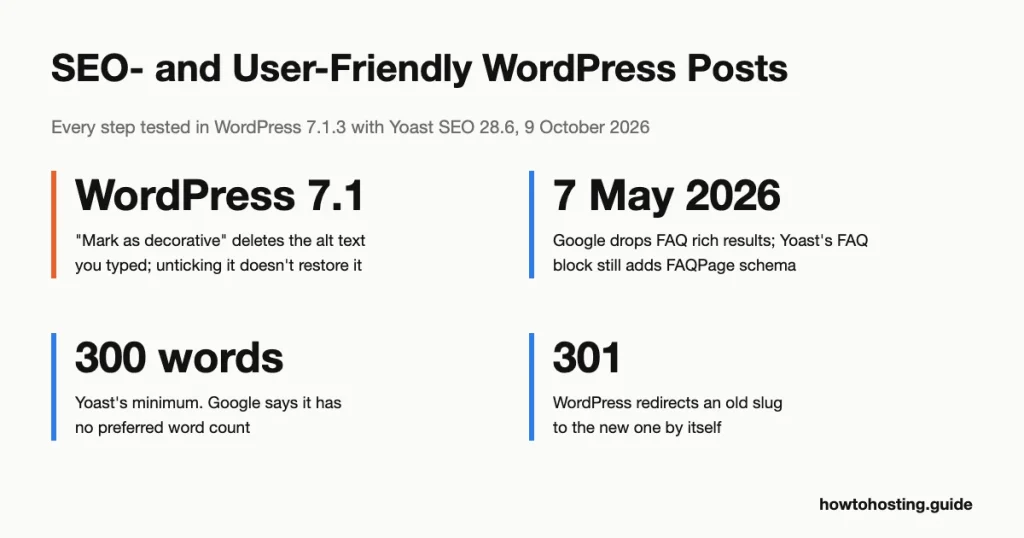
We tested these steps in WordPress 7.1.3 en utilisant WordPress Playground sur 9 octobre 2026, with the Twenty Twenty-Five theme and Yoast SEO 28.6. The test shows what WordPress and Yoast actually output. It can’t show rankings or traffic, so this guide makes no promises about either.
How to Tell Which Part of Your Post Needs Work
Start with what Google can see. Ses SEO Starter Guide suggests a site: search for your domain first. If your posts show up, they’re in Google’s index and the work is about presentation, not discovery.
No results at all? Ouvrir Réglages > En lisant et regarde Search engine visibility. Avec Discourage search engines from indexing this site ticked, our test post carried <meta name='robots' content='noindex, nofollow' /> in its source. That tag asks search engines to keep the page out of their results.
Then open a published post, view its page source and search for these five things:
| Chercher | What it controls | What our test showed |
|---|---|---|
<title> |
The usual source of the blue headline in Google | WordPress alone: the post title, a dash, then the site name. Yoast: the same pattern, editable per post |
<meta name="description"> |
A possible source for the snippet under the headline | WordPress alone prints none. Yoast, on default settings, prints one only if you write it |
<h1> |
The main heading on the page | Twenty Twenty-Five prints the post title as the only H1 |
alt=" |
The text description of each image | Whatever the Image block held when you last saved the post |
name='robots' |
Whether search engines may index the page | “noindex, nofollow” while the Reading setting above was ticked |
Whatever is missing from that list tells you which step below to start with.
Étape 1: Switch Permalinks to Post Name Early
A fresh WordPress install doesn’t use the Post name setting. Ours came up as “Day and name”, so the test post lived at /2026/10/09/sourdough-starter-feeding-schedule/. The installer tries that dated pattern first; you can see it in the core file that sets up permalinks.
Aller à Réglages > Permaliens, prendre Nom de la publication et cliquez Sauvegarder les modifications. The URL becomes /sourdough-starter-feeding-schedule/: shorter, and it doesn’t make an evergreen post look old.
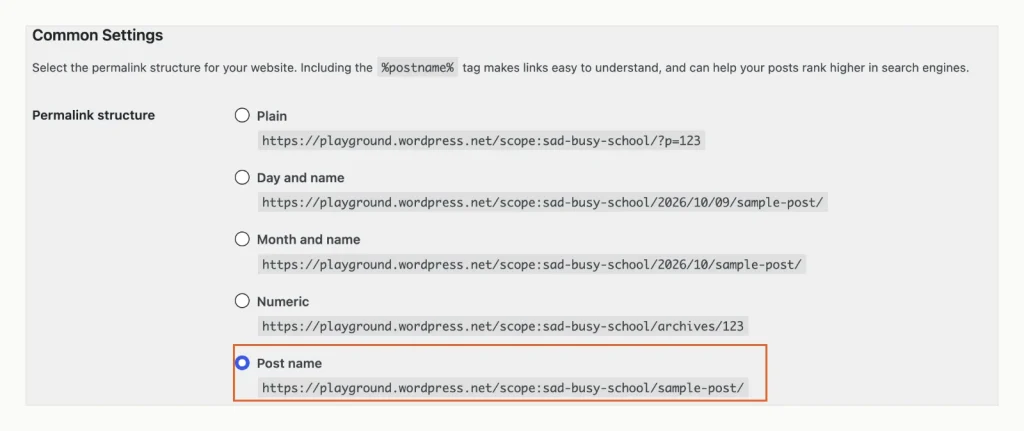
Post name gives a readable address with no date in it. The line above the options is WordPress’s own claim about rankings, which Google’s Starter Guide contradicts. WordPress 7.1.3, tested in WordPress Playground, 9 octobre 2026.
Pick it for readers, not for rankings. The Permalinks screen itself says the %postname% étiquette “can help your posts rank higher in search engines”. Google’s Starter Guide says the opposite: keywords in the URL path “have hardly any effect beyond appearing in breadcrumbs”. (Breadcrumbs are the site path Google may show above a result.)
Google does recommend words a reader can understand, avec hyphens rather than underscores entre eux. WordPress slugs already use hyphens.
Already have a few hundred dated URLs? Then switching changes every one of them.
Google redirect documentation recommends a permanent server-side redirect whenever a URL changes. We couldn’t observe how a real server answers the old dated addresses, because Playground routes requests its own way. So after switching, open a few old URLs and confirm each one lands on the right post.
Étape 2: Write the Title, Then Structure the Body With Headings
Type the title in the editor’s title field, not as a Heading block. On the published post, Twenty Twenty-Five printed it as <h1 class="wp-block-post-title">, the only H1 on the page. That matches Google’s title link guidance: make the main title the most prominent text, par exemple “in the first visible <h1> élément”.
Keep it clear and specific. Google says a good title is “unique to the page, clear and concise”. There is no length limit on the title element; Google cuts the displayed headline “comme requis, typically to fit the device width”. The 60-character rules on other guides are display estimates, not Google limits.
For the body, type /heading on a new line and press Enter. The Heading block starts as an H2. To change the level, select the block and click H1 à H6 in the sidebar. le Transform to menu on the toolbar’s level button does the same.
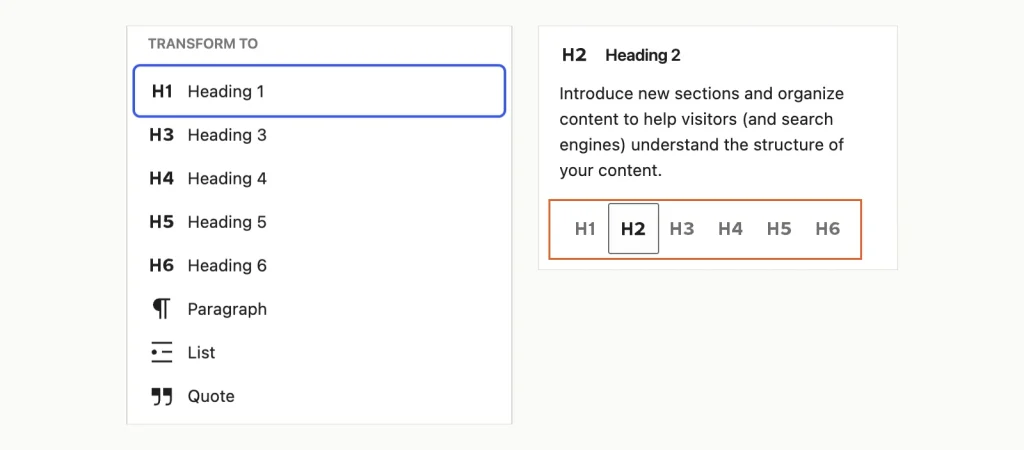
Two routes to the same setting: the toolbar menu on the left, the level buttons in the block sidebar on the right. WordPress 7.1.3, tested in WordPress Playground, 9 octobre 2026.
Does the order matter to Google? Non. The Starter Guide calls headings in semantic order “fantastic for screen readers”. From Google’s side, “it doesn’t matter if you’re using them out of order”.
The guide adds that there’s no ideal number of headings either. Keep H2 before H3 anyway. Screen reader users jump through a post by its headings, and a skipped level makes that list harder to follow.
One surprise from the test: the theme adds headings of its own. The single-post template printed “commentaires” et “More posts” as H2s, and the site title further down as another H2. Don’t chase a perfect outline in tools that count them.
Étape 3: Add Alt Text, and Watch the New Decorative Checkbox
Alt text is a short description of an image for anyone who can’t see it. Google image SEO page calls it “the most important attribute” for image metadata. Google reads it together with computer vision and the text around the image. The same page warns that stuffing alt text with keywords can make a site look like spam.
You can type it in two places. In the Media Library window, le Alt Text field sits above Title, Image Caption and Description. Whatever you type there is copied into the Image block when you click Sélectionner. Plus tard, edit it in the block sidebar under Alternative text.
The copy happens once, bien que. After we changed the alt text in the Media Library, the published post still showed the old wording. So fix alt text inside each post’s Image block, not in the library.
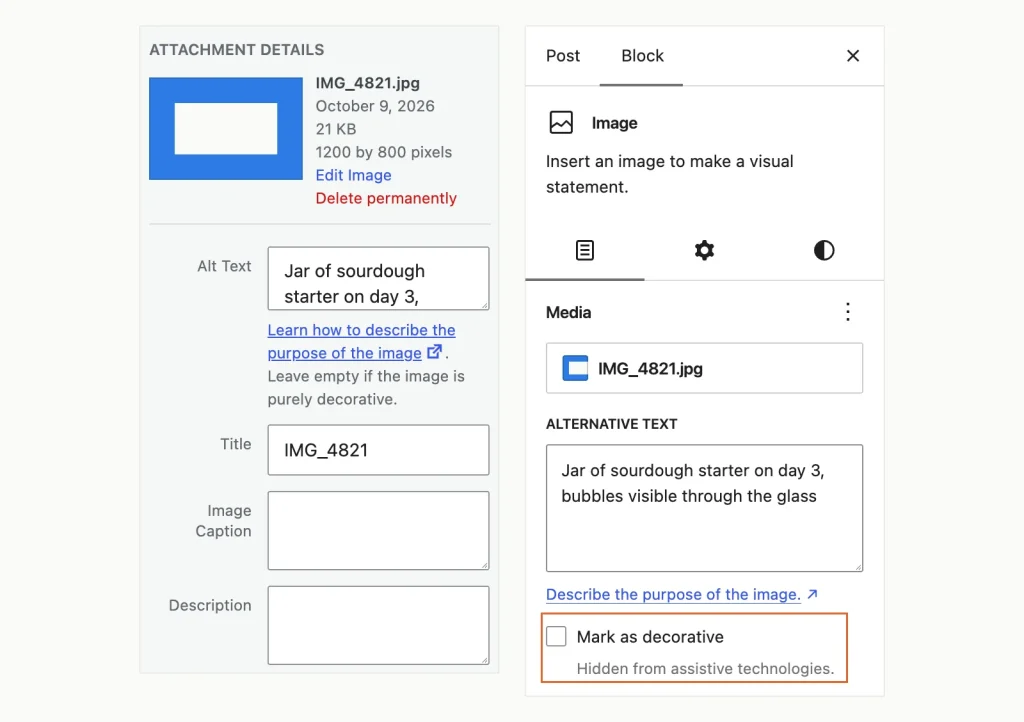
The library field (la gauche) only fills the block once; the block field (droite) is what gets published. Ticking the outlined box empties it. WordPress 7.1.3, tested in WordPress Playground, 9 octobre 2026.
WordPress 7.1, libéré 19 août 2026, added a Mark as decorative checkbox to the Image block, and ticking it deletes your alt text. The checkbox isn’t in the Image block of WordPress 6.9 ou 7.0. Dans notre test, unticking it left the field empty: seulement annuler brought the text back.
A decorative image is published with alt="" role="none". Screen readers skip it, and search engines get no description of it. Use the box for borders, dividers and background flourishes. Never use it on a photo, chart or screenshot that the post refers to.
Two more habits help.
Rename files before upload: our test image arrived as IMG_4821.jpg, and Google says a descriptive filename gives it “very light clues” about the subject. And place each image next to the paragraph it illustrates, since Google uses nearby text as context. Unsure whether to save a JPEG, PNG or WebP? Notre image file formats guide les compare.
Étape 4: Fix the Slug, the Excerpt and the Meta Description
The slug
WordPress builds the slug from the whole title. Our title “How to Feed a Sourdough Starter: A 7-Day Schedule” became how-to-feed-a-sourdough-starter-a-7-day-schedule. Ouvrez le Publier tab in the sidebar, click the slug next to Slug, and trim it. Nous avons utilisé sourdough-starter-feeding-schedule.
Changing a published slug is less risky than it sounds. We renamed a published post’s slug, and the old address redirected to the new one on its own. WordPress stores the old slug and answers with a 301, une redirection permanente, which is the kind Google recommends. Your own internal links still point at the old URL, bien que, so update them.
The excerpt is not a meta description
The excerpt is an optional summary under Add an excerpt dans le Publier languette. Many themes show it on blog and archive pages.
It isn’t a meta description: WordPress alone printed no description tag at all. With Yoast active and no description written, the page still had no description tag. Yoast did use the excerpt as og:description, the text social networks show in link previews.
One trap in the excerpt box: close it by clicking somewhere else. Pressing Esc threw the typed text away in both of our tries.
The meta description
Here’s what Google’s snippet documentation dit: “Google primarily uses the content on the page to automatically determine the appropriate snippet.” It may use your meta description “when it describes the page better than other parts of the content”. There’s no length limit; long ones are cut to fit the screen.
So write one anyway, in one or two plain sentences that summarise this post and no other. In Yoast, Cliquez sur Search appearance in the Yoast sidebar. The window holds the SEO title, Slug et Méta description des champs, with a preview above them.
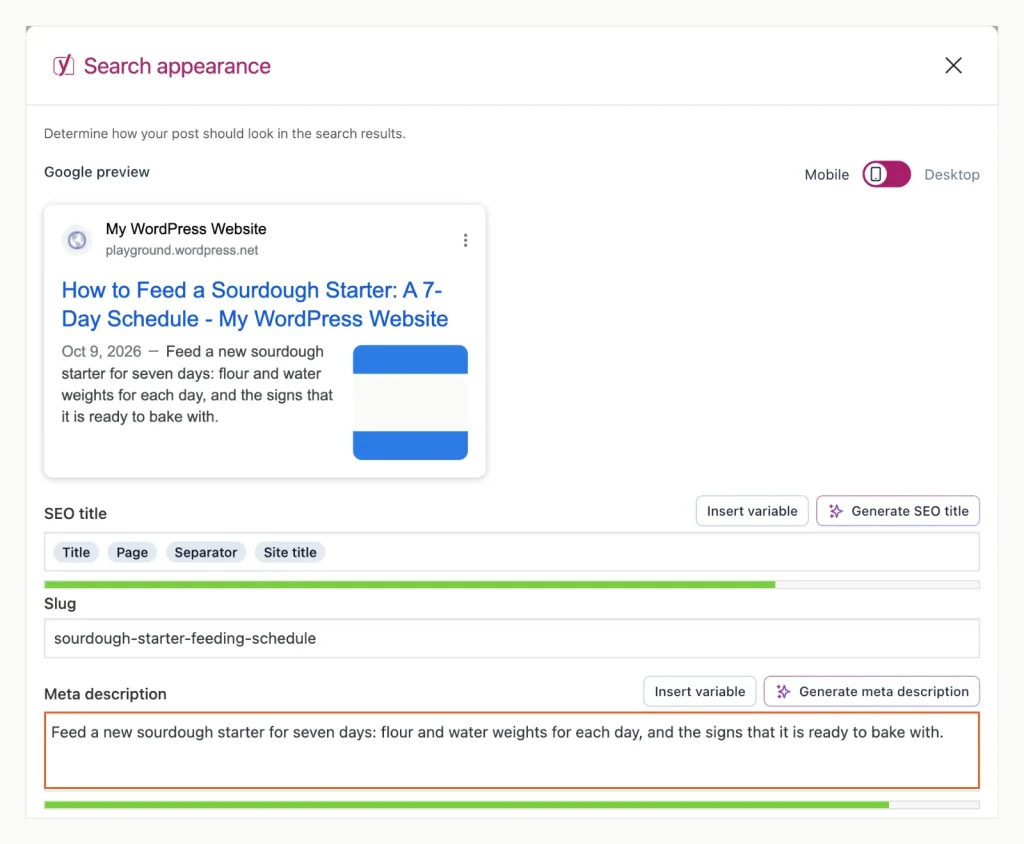
Yoast’s preview uses the description you type into the outlined field. Google may still pick text from the post instead. Yoast SEO 28.6 sur WordPress 7.1.3, tested in WordPress Playground, 9 octobre 2026.
Étape 5: Link Out, Link In, and Leave Comment Links to WordPress
Inside the post, link to your related posts with anchor text that names the target. Google link guidelines liste “Click here” et “Lire la suite” as too generic. A good test: read only the linked words. Do they still say what’s on the other page?
Link out to sources you trust, such as the organisation behind a statistic. Google’s Starter Guide says links to a resource that “corroborates what you’re writing about” ajouter de la valeur. If you must link to a source you don’t trust, ajouter rel="nofollow" to that link.
Comments need nothing from you. A logged-out visitor’s comment with a link was saved with rel="nofollow ugc" on that link and held for moderation. That is exactly what Google’s outbound link page recommends for user-generated content (ugc). Approve comments for your readers’ sake; no Google document we read treats them as a ranking boost.
Étape 6: Installer un plugin SEO, Then Read Its Checks With Care
WordPress alone gives a post no meta description field and no structured data. (Structured data is code that labels the page’s parts for search engines.) A free SEO plugin adds both.
We used Yoast SEO, the most installed of the six free SEO plugins we looked up. Sur 9 octobre 2026, WordPress.org listed 10,000,000+ active installs and a rating of 96 hors de 100 de 27,819 Commentaires. Notre guide pour installing WordPress plugins covers the setup screens.
With Yoast active, our test post gained a description tag, social preview tags and a schema graph. It also got a canonical link (the address that counts as the original). That graph labelled the page as an Article and a WebPage, plus the image, chapelure, site and author.
The traffic-light analysis is a different matter. On our 66-word test post, Yoast 28.6 raised eight problems. Several of them argue with Google’s own documentation:
| Yoast 28.6 message | What Google’s documentation says | Ce qu'il faut faire |
|---|---|---|
| “far below the recommended minimum of 300 mots” | Starter Guide: “there’s no magical word count target, minimum or maximum”. Helpful-content page: Google has no preferred word count. | Write as long as the topic needs |
| Keyphrase density “less than the recommended minimum” | Repeating words “over and over (even in variations)” is keyword stuffing and against the spam policies. Google’s language matching understands related wording. | Use the phrase where it reads naturally |
| “write the exact match of your keyphrase in the SEO title, and put the keyphrase at the beginning” | A good title is unique, clear and concise. Google warns against repeating phrases in titles. | Lead with the topic, not a forced phrase |
| Keyphrase in slug: “That’s great!” | Keywords in the URL path have “hardly any effect beyond appearing in breadcrumbs”. | Keep the slug short and readable |
| “You don’t have multiple H1 headings, well done!” | Number and order of headings don’t matter to Google Search. | Keep one H1 for screen readers |
| No internal or outbound links | Links help users and Google discover pages and add context. | Add the ones a reader needs |
| No meta description: “Search engines will display copy from the page instead” | Google mostly builds snippets from page content anyway. | Write one; it may be used |
Treat the analysis as a writing prompt, not a score to max out. An orange light on word count for a short, complete answer is fine.
FAQ Blocks and Schema After May 2026
Google stopped showing FAQ rich results on 7 Mai 2026, according to its Search Central change log. (Those were the expandable question lists under some results.) A change log entry dated 15 juin 2026 then removed the FAQ documentation altogether.
Yoast 28.6 hasn’t caught up. Ses “Yoast FAQ” block still describes itself as a way to list questions “in an SEO-friendly way”. When we added one, the page’s schema gained an FAQPage type and a Question entry. The block shows no notice that Google no longer uses it for rich results.
Keep using an FAQ block if your readers want one; it’s still content. Just don’t add it for a Google feature that no longer exists. The same goes for AI search. Google guide to its generative AI features says no special markup or LLMS.txt file is needed, et ça “Google Search ignores them”.
Advice From 2020 That No Longer Belongs Here
The earlier version of this page recommended five things for SEO that Google’s current documentation doesn’t support:
- CAPTCHA as a Google signal: the old page said it “boosts how Google sees” a site. No Search Central page says this. Add CAPTCHA to stop spam, rien de plus.
- Comment plugins for SEO: the Google pages we read mention comments only when discussing their links, and WordPress already marks those.
- Sharing buttons for SEO: the Starter Guide lists social media as a way to promote content so people find it. It describes no ranking benefit from buttons.
- Bounce rate as a measure: it doesn’t appear in the Google pages we read. Google’s page experience documentation names Core Web Vitals as what its ranking systems use.
- A set post length: Google says plainly that it has no preferred word count.
Before and After You Publish
A two-minute routine catches most problems before they reach Google:
- Title typed in the title field, slug trimmed, excerpt saved by clicking away.
- Every meaningful image has alt text in its block; nothing important is marked decorative.
- Meta description written in the SEO plugin, unique to this post.
- Links checked: anchor text names its target, and old internal links point at the current slug.
After publishing, give it time. Google’s Starter Guide says some changes show within hours and others “could take several months”, and suggests waiting a few weeks before judging one. When you update an older post, change the content, not just the date. Google’s helpful-content page lists refreshing dates without real changes as a warning sign.
Questions fréquemment posées
Why doesn’t Google show my meta description?
Google builds most snippets from the page’s own text. It uses a meta description when that describes the page better than the content does. A description that matches the post closely has a better chance. Also check the source: without an SEO plugin, WordPress prints no description tag at all.
Why isn’t my new WordPress post showing up on Google?
Exécutez un site: search for your domain, then check Réglages > En lisant pour le Décourager les moteurs de recherche boîte. Dans notre test, that box added a noindex tag to the post. If both look fine, check the post’s URL with the URL Inspection tool in Google Search Console.
Do I need every Yoast light to be green?
Non. Several Yoast checks, such as the 300-word minimum and keyphrase density, aren’t rules in Google’s documentation. Fix the ones that help readers, like missing alt text or a missing meta description. Ignore orange lights that would make the post longer or more repetitive.
Will changing a published post’s URL break it?
Not if you only change its slug. Dans notre test, WordPress sent visitors from the old slug to the new one with a permanent 301 réorienter. Changing the whole permalink structure is a bigger job, so test several old URLs afterwards.
Où aller ensuite
The steps above make one post easy for people and search engines to read. If you’re still deciding what belongs in a post at all, notre comparaison de WordPress posts and pages explains which content goes where. Once a few posts are live, Search Console’s reports show which of them Google indexed and which queries bring readers in.