
Nesta página: [ocultar]
HTTPS é HTTP simples enviado por meio de uma conexão TLS criptografada. As páginas, links e solicitações permanecem os mesmos. HTTPS adiciona três proteções. Ninguém na rede pode ler o tráfego ou alterá-lo, and the browser checks the server’s identity first.
Short answer for site owners: no 2026 there’s no good reason to serve a public site over HTTP. Certificates are free, and Chrome is rolling out a warning before the first visit to any public HTTP site. Plain HTTP also locks you out of HTTP/2 and HTTP/3. The ranking effect is smaller than most guides claim, Apesar, and Google’s own documentation says so.
Every command and output on this page was run on 14 Outubro 2026 in a disposable local Docker test site. The tools were nginx 1.31.6, ondulação 8.23.0 and headless Chromium 156. Browser address-bar labels can’t be captured from a web page, so those come from Google’s and Mozilla’s own help pages.
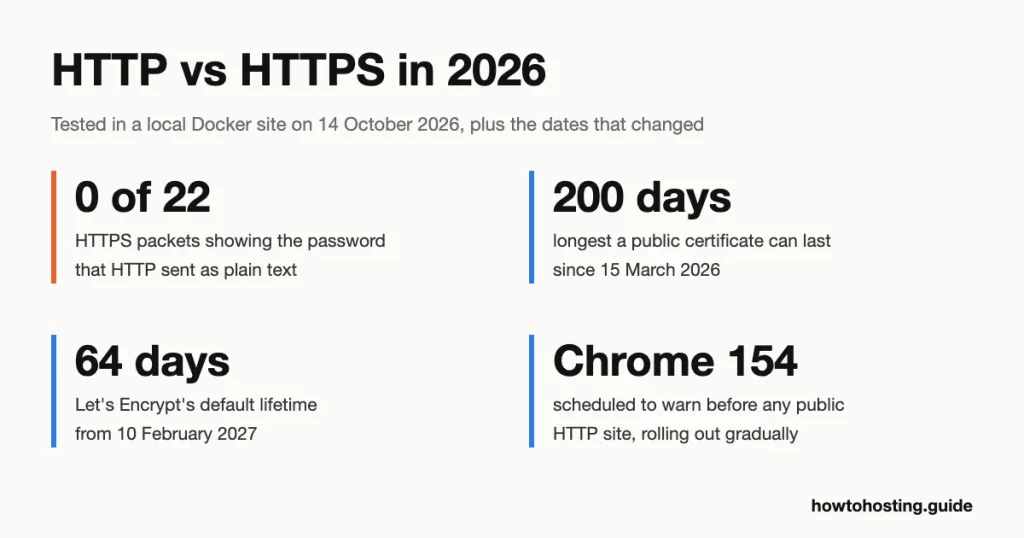
HTTP vs HTTPS at a Glance
| HTTP | HTTPS | |
|---|---|---|
| Default port | 80 | 443 |
| What someone on the network can read | Everything: URLs, cabeçalhos, form fields, senhas | The site name and the size and timing of traffic, but not paths or content |
| Protection against changes in transit | Nenhum | Any change breaks the connection |
| Proof of the server’s identity | Nenhum | A certificate from a trusted certificate authority |
| Protocol versions browsers will use | HTTP/1.1 only | HTTP/1.1, HTTP/2 and HTTP/3 |
| Chrome address bar | “Não é seguro” | A neutral icon Chrome’s help calls “Padrão (Seguro)”, not a padlock |
| Firefox address bar | Shield with a red strike | Shield |
| Geolocalização, service workers and similar browser features | Blocked | Disponível |
| Certificate cost | Not needed | Free from Let’s Encrypt and most hosts |
The rest of this guide shows each row with real output, then covers what it means for a site you own.
What Someone on the Network Actually Sees
This is the difference that matters most, so we tested it first. The test server sent the same login form two ways: plain.test over HTTP, e site.test over HTTPS. We posted a made-up username and password to each one with curl. Meanwhile tcpdump, a packet-capture tool, recorded the traffic on the server’s network interface.
Anyone between a visitor and your server sits in that position. That includes a coffee shop’s Wi-Fi owner, an internet provider, or an attacker on the same network. Here’s what the HTTP capture held:
$ curl -s -d "user=alice&password=Hunter2-secret" http://plain.test/login

$ grep -a -o -m1 "POST /login HTTP/1.1" cap-80.txt
POST /login HTTP/1.1
$ grep -a -E "^(Host:|Content-Type:|user=)" cap-80.txt
Host: plain.test
Content-Type: application/x-www-form-urlencoded
user=alice&password=Hunter2-secret
Content-Type: text/plain
The password sat in the capture as readable text, next to the page path and the site name. Now the same request over HTTPS:
$ curl -s --cacert /certs/ca.crt -d "user=alice&password=Hunter2-secret" https://site.test/login

$ grep -a -c "password" cap-443.txt
0
$ grep -a -c "alice" cap-443.txt
0
$ grep -a -c "/login" cap-443.txt
0
$ grep -a -c "site.test" cap-443.txt
1
Twenty-two packets crossed the wire, and none of them contained the password, the username or the page path. One thing still leaked: o nome do host site.test. The browser (ou enrolar) sends it unencrypted at the start of the TLS handshake, so the server knows which certificate to present. That field is called SNI (Server Name Indication). HTTPS hides what you do on a site. It doesn’t hide which site you visited.
Does this matter for a site with no logins? sim. Over HTTP, anyone on the path can also change the page in transit: inject ads, swap a download link or add a script. The Chrome security team gives that reason for its 2026 aviso, coberto abaixo.
Redirects and HSTS: How a Site Moves Visitors to HTTPS
Most visitors never type https://. So a site that has HTTPS still answers on port 80 and sends people across with a 301 (permanente) redirecionar. Here are the three responses from our test server: an HTTP-only site, the HTTP side of the HTTPS site, and the HTTPS site itself.
$ curl -sI http://plain.test/
HTTP/1.1 200 OK
Server: nginx
Date: Wed, 14 Oct 2026 11:07:01 GMT
Content-Type: text/html
Content-Length: 261
Last-Modified: Wed, 14 Oct 2026 11:06:40 GMT
Connection: keep-alive
ETag: "6acf6240-105"
Accept-Ranges: bytes

$ curl -sI http://site.test/
HTTP/1.1 301 Moved Permanently
Server: nginx
Date: Wed, 14 Oct 2026 11:07:01 GMT
Content-Type: text/html
Content-Length: 162
Connection: keep-alive
Location: https://site.test/

$ curl -sI --cacert /certs/ca.crt https://site.test/
HTTP/2 200
server: nginx
date: Wed, 14 Oct 2026 11:07:01 GMT
content-type: text/html
content-length: 261
last-modified: Wed, 14 Oct 2026 11:06:40 GMT
etag: "6acf6240-105"
strict-transport-security: max-age=31536000
alt-svc: h3=":443"; ma=86400
accept-ranges: bytes
Two lines in the last response do the real work. The first is strict-transport-security, the HSTS header (HTTP Strict Transport Security). It tells the browser to use HTTPS for this site for the next 31,536,000 segundos, um ano, without asking. The second is alt-svc, which advertises HTTP/3 on the same port.
The redirect alone leaves a gap. That first request to port 80 still travels unencrypted, and anyone on the path can answer it with a fake page before the redirect arrives. HSTS closes the gap from the second visit on. curl keeps an HSTS store just like a browser, so we could watch it work:
$ curl -s -o /dev/null --hsts hsts.txt --cacert /certs/ca.crt https://site.test/
$ grep site.test hsts.txt
site.test "20271014 11:07:11"

$ curl -sv --hsts hsts.txt --cacert /certs/ca.crt http://site.test/ -o /dev/null 2>&1 | grep -E "HSTS|^> GET|^> Host|^< HTTP"
* Switched from HTTP to HTTPS due to HSTS => https://site.test/
> GET / HTTP/2
> Host: site.test
< HTTP/2 200

$ curl -sv http://site.test/ -o /dev/null 2>&1 | grep -E "^> GET|^< HTTP|^< Location"
> GET / HTTP/1.1
< HTTP/1.1 301 Moved Permanently
< Location: https://site.test/
With the stored entry, the client typed http:// but never sent an HTTP request at all. It switched to HTTPS on its own and saved the redirect round trip. Without the entry, the request went out on port 80 primeiro.
The very first visit is still exposed. The fix for that is the HSTS preload list, a list of domains built into browsers. To join it, the HSTS header must carry max-age of at least one year, includeSubDomains e preload, de acordo com HSTS preload site. Don’t rush it. That site warns that new entries are hardcoded into Chrome and can take several months to reach the stable version.
HTTP/1.1, HTTP/2 and HTTP/3: Only HTTPS Gets the New Ones
An old line on many pages says “HTTP/2 only works over HTTPS”. It’s true in browsers, though the protocol itself doesn’t require encryption. The HTTP/2 standard, RFC 9113, still defines HTTP/2 over plain TCP. But the HTTP working group’s own FAQ says no browser supports HTTP/2 unencrypted. RFC 9113 also deprecated the upgrade header that would have switched an HTTP connection to HTTP/2, noting it was “never widely deployed”.
Our test server had HTTP/2 and HTTP/3 switched on. Here’s what each side negotiated:
$ curl -s -o /dev/null -w '%{http_version}\n' http://plain.test/
1.1

$ curl -s -o /dev/null --cacert /certs/ca.crt -w '%{http_version}\n' https://site.test/
2

$ curl -sv --cacert /certs/ca.crt https://site.test/ -o /dev/null 2>&1 | grep -E "ALPN|SSL connection|subject:|issuer:|expire date|verified"
* ALPN: curl offers h2,http/1.1
* SSL connection using TLSv1.3 / TLS_AES_256_GCM_SHA384 / X25519MLKEM768 / RSASSA-PSS
* ALPN: server accepted h2
*   subject: CN=site.test
*   expire date: Nov 13 11:14:46 2026 GMT
*   issuer: CN=HTH Test CA
* SSL certificate verified via OpenSSL.
Over HTTPS, the two sides agreed on HTTP/2 inside the TLS handshake. That agreement step is called ALPN (Application-Layer Protocol Negotiation). Over plain HTTP there’s no handshake to agree in. So we asked for HTTP/2 the two ways the standard allows:
$ curl --http2 -sv http://plain.test/ -o /dev/null 2>&1 | grep -E "^> (GET|Upgrade|Connection|HTTP2)|^< HTTP"
> GET / HTTP/1.1
> Upgrade: h2c
> HTTP2-Settings: AAMAAABkAAQAAQAAAAIAAAAA
> Connection: Upgrade, HTTP2-Settings
< HTTP/1.1 200 OK

$ curl --http2-prior-knowledge -sS http://plain.test/ -o /dev/null
curl: (16) Remote peer returned unexpected data while we expected SETTINGS frame.  Perhaps, peer does not support HTTP/2 properly.
The server ignored the upgrade request and answered in HTTP/1.1. Forcing HTTP/2 failed outright. The same nginx served HTTP/2 on its HTTPS side, but we left it off for plain HTTP, because browsers would never use it there.
HTTP/3 goes further. It runs on QUIC, and RFC 9114 states that QUIC version 1 uses TLS 1.3 or newer for its handshake. Unencrypted HTTP/3 doesn’t exist. Our curl build had no HTTP/3 support, so we pointed headless Chromium at the test site with QUIC forced on, and nginx logged the result:
"GET / HTTP/3.0" 200 scheme=https host=site.test proto=HTTP/3.0A site that stays on HTTP is stuck on HTTP/1.1. HTTP/2 lets one connection carry many files at once, and HTTP/3 also avoids TCP’s head-of-line delays on lossy networks. Neither is available without a certificate.
Is HTTPS Slower Than HTTP?
HTTPS costs something on each new connection. The question is how much. We timed 25 fresh connections to each test site, twice. The network distance inside Docker is close to zero, so the numbers show the computing cost of encryption with almost no travel time.
| Correr (25 new connections each) | HTTP: total per request | HTTPS: TLS handshake | HTTPS: total per request |
|---|---|---|---|
| Correr 1 | 0.712 em | 2.989 em | 3.977 em |
| Correr 2 | 0.838 em | 3.171 em | 4.076 em |
So the handshake added about 3 milliseconds of computing per new connection on our test machine. On a real network a TLS 1.3 handshake also adds one round trip. A visitor with a 100 ms round trip waits about 100 ms longer for the first byte. That’s the honest cost, and it applies once per connection, not once per file.
Here’s why HTTPS sites usually come out ahead anyway. HTTP/2 sends all of a site’s files over that one connection. Plain HTTP/1.1 browsers open several connections in parallel and queue requests on each. HTTP/3 merges the transport and encryption handshakes, which RFC 9000 describes as one combined negotiation. And HSTS saves the redirect round trip shown earlier.
One speed claim on older pages, including the version of this page it replaces, no longer holds. HTTP / 2 “server push” was supposed to send files before the browser asked. Chrome disabled it by default in Chrome 106, after finding that only 1.25% of HTTP/2 sites used it and the gains were unclear. Don’t plan around it.
Conteúdo Misto: The Half-HTTPS Page
A page can load over HTTPS and still pull files over HTTP. That’s mixed content, and it’s a common leftover after a move to HTTPS. We built a test page on https://site.test/ that loads one image and one script from http://assets.test/, then opened it in Chromium 156. Chromium’s console printed:
"Mixed Content: The page at 'https://site.test/mixed.html' was loaded over HTTPS, but requested an insecure element 'http://assets.test/pixel.png'. This request was automatically upgraded to HTTPS, For more information see https://blog.chromium.org/2019/10/no-more-mixed-messages-about-https.html"
"Mixed Content: The page at 'https://site.test/mixed.html' was loaded over HTTPS, but requested an insecure script 'http://assets.test/app.js'. This request has been blocked; the content must be served over HTTPS."
The server log confirmed both decisions:
"GET /mixed.html HTTP/2.0" 200 scheme=https host=site.test proto=HTTP/2.0
"GET /pixel.png HTTP/1.1" 200 scheme=https host=assets.test proto=HTTP/1.1
The image arrived over HTTPS, because the browser rewrote its address. The script never reached the server at all. That matches MDN’s description of how browsers treat mixed content: imagens, audio and video get upgraded, and every other type is blocked.
Na prática, this catches people out. Your images keep working, so the page looks fine, mas any script, stylesheet or iframe still on http:// silently stops loading. So if a menu or contact form breaks after the move, check for this first. Open the browser’s developer console and look for “Conteúdo Misto” linhas; each one names the file to fix.
What Browsers Do With an HTTP Site in 2026
Browser labels have moved several times, and many guides still describe the old ones. This is the current state, taken from the vendors’ own documentation rather than our screenshots.
cromada has labelled every HTTP page “Não é seguro” since Chrome 68 em julho 2018. Em maio 2023, Google said Chrome 117 would replace the padlock on HTTPS pages with a neutral “tune” icon that September. Its reason: só 11% of people in its 2021 study understood what the padlock meant. Chrome’s help page now calls the HTTPS icon “Padrão (Seguro)”, tão “look for the padlock” is outdated advice. o “Não é seguro” label for HTTP stayed.
The bigger change is a warning before the page loads. Google announced on 28 Outubro 2025 that Chrome 154 would turn on “Always Use Secure Connections” para todos os usuários. With it on, Chrome asks before opening any public site without HTTPS. The plan was to start with Enhanced Safe Browsing users in Chrome 147. Chrome’s enterprise release notes now list that first step as Chrome 150, desktop only, and both steps as rolling out gradually. Addresses on a private network, tal como 192.168.0.1, are exempt.
Chrome won’t nag repeatedly about a site a user visits often. But once the setting is on, a new visitor to an HTTP site sees “Your connection to this site is not secure” before your page. Google’s experiment found the typical user saw fewer than one warning a week. That’s not much for them, but it falls on exactly the sites still serving HTTP.
Raposa de fogo made HTTPS-First the default in Firefox 136, lançado em 4 marcha 2025. It tries https:// for every address and falls back to HTTP if that fails. For HTTP pages, Mozilla’s help page describes a shield with a red strike over it. Firefox uses the same icon for certificate errors.
Can you still run an HTTP-only site? Tecnicamente, sim. But here’s a quieter cost: under browsers’ default referrer policy, an HTTPS page that links to an HTTP site sends no referrer at all. Visitors from secure sites then show up in your analytics as direct traffic.
Does HTTPS Help Google Rankings?
Less than you’ve been told. em agosto 2014 Google announced HTTPS as a ranking signal, but called it “a very lightweight signal” affecting fewer than 1% of global queries. Em abril 2023 Google noted that its page experience signals had included HTTPS. It added that “not all of these may be directly used to inform ranking”.
The current wording is firmer. Google’s page experience documentation, continue lendo 14 Outubro 2026, says Core Web Vitals are used by its ranking systems. The same wording is still live in October 2026. It then says other page experience aspects “don’t directly help your website rank higher in search results”. HTTPS is one of those aspects: the same page asks “Are your pages served in a secure fashion?”
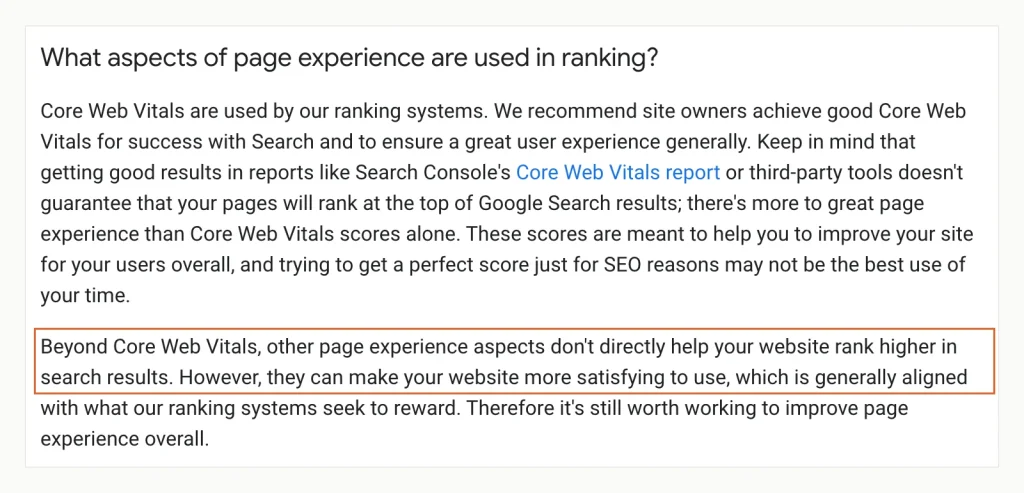
The outlined sentence is Google’s current answer on ranking, and HTTPS counts as one of those page experience aspects. Fonte: Google Search Central, Understanding page experience, capturado 14 Outubro 2026.
So switching to HTTPS won’t lift a page by itself. It still matters for search in two concrete ways. Primeiro, Google’s canonicalization guide names “whether the page is served over HTTP or HTTPS” as one factor in choosing which duplicate URL to index. Segundo, the Chrome warning above sits between a searcher and your page, and a visitor who backs out never sees your content. Search Console also has an HTTPS report that lists pages Google found served without it.
Worried about the move hurting rankings instead? Google treats a change from HTTP to HTTPS as a site move with URL changes. Its documentation tells you to expect temporary ranking fluctuation while it recrawls. If a drop lasts, check for redirect chains, mixed content and canonical tags still pointing at http://.
Certificados: The Running Cost of HTTPS
The certificate is free from Let’s Encrypt and from most hosts. The real cost of HTTPS in 2026 is renewal, because certificates now expire much faster than they used to.
The CA/Browser Forum sets the rules every public certificate authority follows. Its Baseline Requirements cut the maximum lifetime of a public TLS certificate in steps. It was 398 days until 15 marcha 2026, when it fell to 200 dias. The next cuts take it to 100 days from 15 marcha 2027, então 47 days from 15 marcha 2029. A certificate you buy as a “one-year” product is now reissued at least once inside that year.
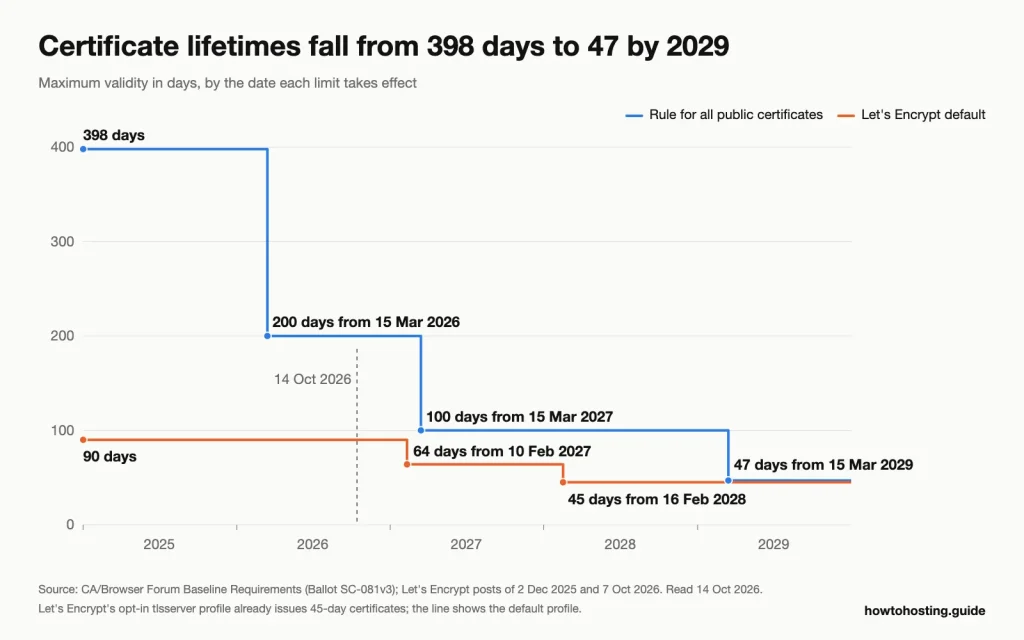
Both limits keep falling, and the Let’s Encrypt default stays below the industry cap at every step. Fonte: CA/Browser Forum Baseline Requirements and Let’s Encrypt, ler 14 Outubro 2026.
Let’s Encrypt moves faster than the rules require. Let’s Encrypt announced on 7 Outubro 2026 that from 10 fevereiro 2027 its certificates will last 64 days by default, para baixo de 90. It expects the last 90-day certificate to expire on 11 Maio 2027, and the default drops again to 45 days on 16 fevereiro 2028. Its advice to anyone with a hard-coded renewal schedule: search cron jobs and scripts for the numbers 83, 80 ou 60.
Two earlier Let’s Encrypt changes remove safety nets site owners used to rely on. Expiry warning emails ended on 4 Junho 2025, so nobody tells you a certificate is about to lapse. And its OCSP service, which answered whether a certificate had been revoked, shut down on 6 agosto 2025. If your setup depended on either, check it now. We work through the renewal arithmetic for 64-day certificates in our fix guide for expired and failing certificates.
For most sites the answer is simple. Let the host or an ACME client handle renewal: that’s the software that requests and renews certificates automatically. Then add monitoring that alerts you when expiry is less than two weeks away.
Moving a Site From HTTP to HTTPS: A versão curta
The move itself is routine on modern hosting. Do it in this order, because each step depends on the one before:
- Get a certificate for every hostname you serve, Incluindo
www. Most hosts issue a free one from the control panel. If you need organisation validation or a warranty, compare the options in our SSL certificate providers comparison. - Confirm the site loads on
https://before redirecting anyone to it. - Fix mixed content: substituir
http://in theme files, page content and settings, then check the browser console for “Conteúdo Misto” linhas. - Add a single 301 redirect from every HTTP URL to the same path on HTTPS. One hop, no chains.
- Update canonical tags, your XML sitemap and internal links to
https://, then add the HTTPS version as a property in Search Console. do Google site move documentation covers this step in full. - Add HSTS last, starting with a short
max-agetal como 300 segundos. Raise it to a year only once nothing breaks.
Keep the HTTP listener on port 80 running after the move. Old links and bookmarks still arrive there, and they need the redirect.
perguntas frequentes
Do I need HTTPS if my site has no logins or forms?
sim. Without HTTPS, anyone between your visitor and your server can change the page, for example to add a script or swap a link. Chrome’s new warning also appears before a first visit to any public HTTP site, whether it has forms or not.
My host wants a yearly fee to remove “Não é seguro”. Is there a free way?
Usualmente, sim. Let’s Encrypt certificates are free, and most hosts can install one from the control panel. A host that charges a yearly fee just to switch HTTPS on is a reason to move hosts. Paid certificates add identity checks and warranties, criptografia não mais forte.
Does it matter whether I type http:// or https:// for a site that has HTTPS?
Mostly not anymore. Firefox tries HTTPS first by default, and a site with HSTS makes the browser switch on its own. Without HSTS, typing http:// sends one unencrypted request before the redirect, which is the gap HSTS exists to close.
Why can’t my HTTPS page load a script from an http:// endereço?
Browsers block it as mixed content. In our Chromium test the script request never reached the server, while an image from the same address was upgraded to HTTPS. Change the script’s URL to https://, or host the file yourself.
Conclusão
HTTP and HTTPS carry the same requests. The difference is what everyone else on the network gets to see and change: with HTTP, tudo; with HTTPS, the site name and little else. No 2026 the gap reaches beyond security. Chrome is rolling out a warning before HTTP sites load, and HTTP rules out HTTP/2 and HTTP/3. Any file an HTTPS page pulls over HTTP gets upgraded or blocked. Switch, automate renewal, and don’t expect the move alone to lift your rankings.