
Nesta página: [ocultar]
Um VPS e um VDS com a mesma contagem de núcleos diferem em uma coisa: quem mais pode usar o tempo da CPU. Em um VDS está reservado para você, while a VPS shares it with other customers on the same host.
Memory isn’t always the dividing line. DigitalOcean’s docs say RAM, disk storage and network bandwidth are “always dedicated” on its shared and dedicated plans alike. Lá, the premium buys CPU time and nothing else.
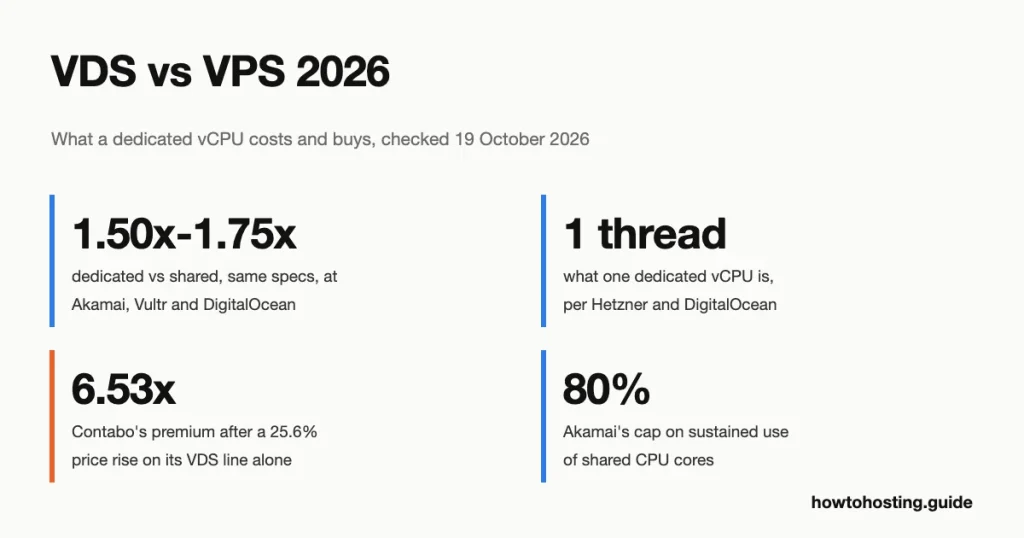
None of the top-ranking guides puts a number on that premium, and it varies a lot. We priced the closest same-core pair at five hosts that sell both kinds on 19 Outubro 2026. The dedicated version costs 1.50x to 1.75x as much at Akamai, Vultr and DigitalOcean, 2.21x at Hetzner and 6.53x at Contabo.

And a dedicated vCPU (CPU virtual, the unit hosts sell processor power in) usually isn’t a whole core. Hetzner and DigitalOcean both define it as one hardware thread, one of the two that a modern core runs at once.
One naming warning: a few sellers use “VDS” for an entire physical machine. Nosso comparação entre servidor dedicado vs VDS covers that other meaning.
Última revisão: Outubro 2026. Preços e recursos verificados.
Every price below comes from the provider’s own pricing page or docs. We opened no accounts and bought nothing. We ran the steal-time commands on 18 Outubro 2026 (UTC) in a local Docker container, using Ubuntu 24.04.5 with procps-ng 4.0.4 and sysstat 12.6.1.
What a Shared vCPU Lets You Use
Every plan in this guide is a virtual machine (VM) on a hypervisor, the software layer that splits one physical server between customers. The two plan types differ only in how that layer hands out processor time.
On a shared plan, your vCPUs get slices of time on cores that other VMs also use. When the host is quiet, you can run flat out. When neighbors get busy, you wait your turn. DigitalOcean is blunt about it: a shared Droplet “could receive fractions of hyper-threads” when the Droplets around it are under load.
Each seller words its rules differently, so here they are side by side, quoted from their own pages:
| Fornecedor | What shared vCPUs allow | What dedicated vCPUs promise |
|---|---|---|
| Hetzner | “a baseline CPU performance” with the option “to temporarily burst” acima dele (Perguntas frequentes, last changed 12 setembro 2024) | Recursos da CPU “exclusivamente”; “one vCPU equals one thread of a physical CPU core” |
| DigitalOcean | apps that “mostly run at low to medium load, and occasionally burst for brief periods” (documentos, verificado 1 Outubro 2026) | “guaranteed access to the full hyper-thread at all times” |
| Akamai (Linode) | 100% “for short bursts, but should remain below 80% sustained usage on average” (documentos, Atualizada 31 agosto 2026) | núcleos “reserved exclusively”; sustained use at “100% CPU all day, diariamente” |
| Vultr | “vCPUs compartilhadas” for low traffic websites, blogs, CMS and dev/test (página de preços, 19 Outubro 2026) | “fully dedicated, new generation AMD EPYC vCPUs” |
| Contabo | Core VPS: “Shared vCPUs” (publicação no blog, 29 Julho 2026) | Max Performance: “Dedicated CPU and RAM” |
| AWS Lightsail (no dedicated line) | uma 10% baseline on the USD 7 Linux plan, plus banked burst capacity | not sold |
Akamai’s 80% is the only hard limit any of these five publishes. It’s a fair rule for all of them: shared vCPUs are rented for bursts, not for a processor pinned at 100% all afternoon.
Lightsail shows what happens when you ignore that. Its docs warn about a server that stays in the “burstable zone” demasiado longo. Isto “will eventually use up all the CPU capacity until it operates in the sustainable zone again”. On the USD 7 Linux plan, that zone starts at 10% of the CPU. Hetzner “linha de base” wording points at the same model, though we found no figure in its docs.
Memory is where the sellers part ways. Contabo sells “Dedicated CPU and RAM” on its VDS line. Its VDS page also says a VPS “shares the physical server’s CPU, memória, armazenamento, e outros recursos”. So DigitalOcean’s reserved RAM holds for DigitalOcean. Don’t assume it everywhere.
Two older ideas don’t fit these plans either. Some guides tie VPS to OpenVZ containers and VDS to KVM virtual machines. At DigitalOcean, Hetzner, Akamai and Vultr, the providers’ own pages call both lines virtual machines, so the split is CPU scheduling, not the virtualization type.
“Gerenciou” is a separate axis too. It decides who patches and monitors the operating system, not how the CPU is shared. DigitalOcean, por exemplo, says its Droplets leave “managing the operating system, formulários, e dados” to you on every plan type.
Does a vCPU Equal a Core?
Geralmente não. A modern server core runs two instruction streams at once (Intel calls this Hyper-Threading, AMD calls it simultaneous multithreading, or SMT). Most hosts count each stream as one vCPU. Two vCPUs can therefore sit on one physical core.
Hetzner says so outright in its FAQ: em planos dedicados “one vCPU equals one thread of a physical CPU core”. DigitalOcean defines a vCPU as “a single hyper-thread on a processor core”. Its dedicated plans guarantee “the full hyper-thread”, not the full core.
Contabo’s own page confirms the pattern from the other side. The Cloud VDS S card lists “6 Virtual Cores” on an AMD EPYC 7282. The structured data in the same page’s code still describes the plan as “3 Physical CPU Cores, 24 GB de RAM, 180 GB NVMe SSD”. Em julho 2026 the visible card said 3 physical cores too. Same RAM, same disk, same port: six threads on three reserved cores.
Akamai is the outlier in wording. Its plan guide says Dedicated CPU Linodes “reserve full physical CPU cores”. We can’t check that from outside, and the guide doesn’t say how a vCPU maps onto a core’s two threads. Vultr’s pricing page says “fully dedicated” vCPUs and leaves the unit undefined.
Por que isso importa? Porque “6 núcleos dedicados” on one sales page and “6 vCPUs dedicadas” on another can mean three physical cores or six. Ask before you compare.
The Price of Isolation: Same Core Count, Two Prices
Here’s the number the ranking pages leave out. For each host that sells both kinds, we took the closest pair with the same vCPU count and divided each price by its vCPUs.
| Fornecedor (página, prazo) | Shared plan | Dedicated plan | Per vCPU, compartilhado | Per vCPU, dedicada | Multiplier |
|---|---|---|---|---|---|
| DigitalOcean (página de preços, por mês) | Basic Regular: 2 vCPU, 4 GiB, 80 GiB, USD 24.00 | CPU-Optimized Regular: 2 vCPU, 4 GiB, 25 GiB, USD 42.00 | USD 12.00 | USD 21.00 | 1.75x |
| Vultr (página de preços, por mês) | High Performance AMD: 2 vCPU, 4 GB, 100 GB, USD 24.00 | CPU Optimized: 2 vCPU, 4 GB, 50 GB, USD 40.00 | USD 12.00 | USD 20.00 | 1.67x |
| Akamai (North America prices, por mês) | Linode 4 GB: 2 CPU, 4 GB, 80 GB, USD 24.00 | G6 Dedicated 4 GB: 2 vCPU, 4 GB, 80 GB, USD 36.00 | USD 12.00 | USD 18.00 | 1.50x |
| Hetzner (Alemanha e Finlândia, por mês, excluindo. VAT and IPv4) | CPX22: 2 vCPU, 4 GB, 80 GB, EUR 19.49 | CCX13: 2 vCPU, 8 GB, 80 GB, EUR 42.99 | EUR 9.745 | EUR 21.495 | 2.21x |
| Contabo (contabo.com in EUR, 24-mandato do mês, excluindo. CUBA) | Cloud VPS 6: 6 vCPU, 12 GB, 100 GB NVMe, EUR 6.00 | Cloud VDS S: 6 vCPU, 24 GB, 180 GB NVMe, EUR 39.20 | EUR 1.00 | EUR 6.533 | 6.53x |
The per-vCPU columns are our calculation (plan price divided by vCPUs). DigitalOcean, Vultr and Akamai prices are as listed, sem nenhuma linha de imposto mostrada. Hetzner charges EUR 0.50 a month for an IPv4 address on top of both plans, which nudges its multiplier to 2.18x. Contabo’s month-to-month prices (EUR 7.50 e euros 49.00) give the same 6.53x.
Three patterns stand out. The US clouds sit in a tight band. All three charge USD 24.00 for the shared plan and USD 6.00 para USD 9.00 more per vCPU for dedicated. Akamai’s G6 pair is the cleanest test, because RAM, disk and transfer are identical. No papel, only the CPU type changes.
Hetzner and Contabo give the dedicated plan twice the RAM, so part of their gap pays for memory, not isolation. That extra RAM is also why Hetzner’s EUR 11.75 premium per vCPU is the largest step in the table.
Contabo is the odd one. Its multiplier is the biggest, yet its dedicated vCPU is the cheapest in the table, because its shared vCPU costs just EUR 1.00. Leia as letras pequenas, Apesar. That rate needs a 24-pré-pagamento mensal, the card says it holds “pela primeira vez 24 meses”, and the chip is a 2019-generation EPYC 7282.
Contabo also prices the trade at one exact figure. EUR 39.20 on the 24-month term buys either Cloud VPS 18 (18 vCPUs compartilhadas, 96 GB) or Cloud VDS S (6 vCPUs dedicadas, 24 GB). That tie is new, Apesar, as the next section shows.
Hardware isn’t always equal inside a pair either. DigitalOcean’s docs place CPU-Optimized on “Intel’s Ice Lake and older processors”. Regular Basic runs on “a mix of first generation or older Xeon Scalable processors and AMD EPYC processors”. Choosing between DigitalOcean, Vultr and Akamai on more than the CPU? Nosso resumo de hospedagem em nuvem compares the three on far more than this one trade.
Dois 2026 Price Changes That Widened the Gap
Em 15 Junho 2026, Hetzner raised the monthly price of its dedicated CCX13 from EUR 15.99 é EUR 42.99. The shared CPX22 went from EUR 7.99 é EUR 19.49, so the same-core premium grew from 2.00x to 2.21x. Hetzner’s docs say the new prices applied to new orders and rescales from 8 AM CEST that day.
Contabo’s change was quieter. Entre 31 August and 16 setembro 2026, Contabo raised Cloud VDS S from EUR 39.00 é EUR 49.00 um mês, excluindo. CUBA. Isso é um 25.6% ascender, and the 24-month rate moved from EUR 31.20 é EUR 39.20.
The shared side didn’t move. Cloud VPS 6 showed EUR 7.50 (EUR 6.00 em 24 meses) in every archived copy of Contabo’s VPS page from 29 Agosto a 11 Outubro. So Contabo’s same-core premium went from 5.20x to 6.53x, all of it from the dedicated side. The dates come from Wayback Machine copies of the page and our own record of it on 16 setembro.
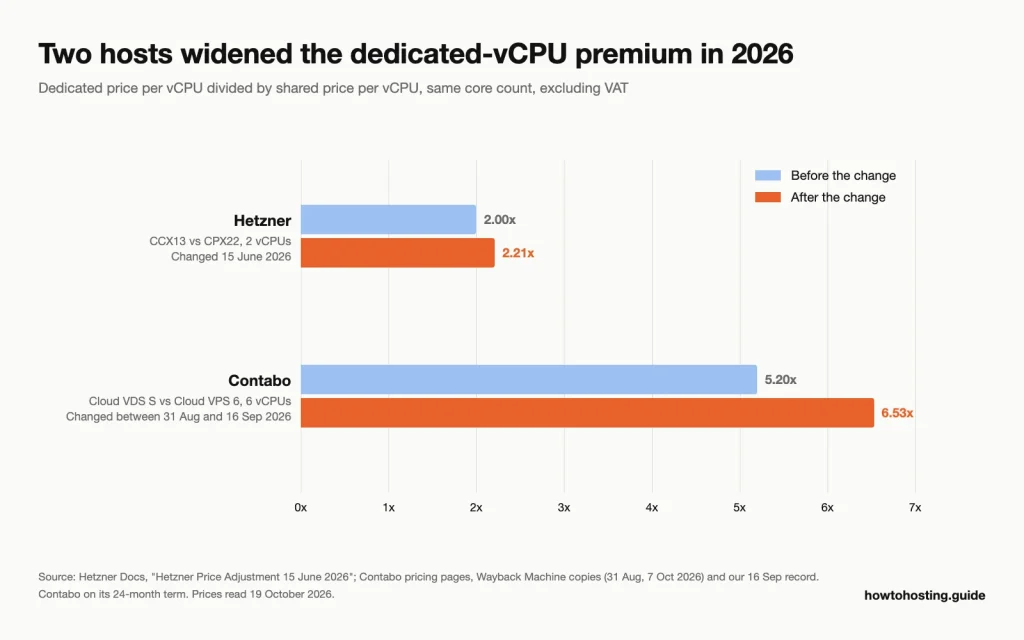
Only the dedicated side of Contabo’s pair moved, so its premium grew far more than Hetzner’s. Fonte: Hetzner Docs price-adjustment page; Contabo pricing pages and Wayback Machine copies, ler 19 Outubro 2026.
That rise also created the tie from the last section. Em 31 August the six-thread VDS cost EUR 31.20 em 24 meses, less than the EUR 39.20 Cloud VPS 18. Any guide still quoting the old VDS price understates today’s gap by about a fifth.
How to Check CPU Steal Time on Your Server
Steal time is the share of time a vCPU was ready to run while the hypervisor gave the physical CPU to another VM. The Linux kernel counts it, and the standard monitoring tools show it. If you’re on a shared plan and your site slows down, this is the first number to read.
We ran every command below in a fresh Ubuntu 24.04 container to capture real output. A container on a laptop has no paying neighbors, so every steal figure reads zero. The output shows you where to look, not what your server will say.
Degrau 1: Read the st value in top
top -bn1 | head -5top - 23:21:36 up 6 days, 23:57, 0 user, load average: 1.06, 1.01, 0.97
Tasks: 4 total, 1 running, 3 sleeping, 0 stopped, 0 zombie
%Cpu(s): 0.9 us, 0.9 sy, 0.0 ni, 97.2 id, 0.0 wa, 0.0 hi, 0.9 si, 0.0 st
MiB Mem : 7836.4 total, 507.1 free, 2576.4 used, 4952.1 buff/cache
MiB Swap: 1024.0 total, 1024.0 free, 0.0 used. 5260.0 avail Mem The last value on the %Cpu(s) linha, st, is steal. Two neighbors on the same line matter as well: us is your own programs, e wa is time spent waiting for the disk. Adicionar -1 (top -1 -bn1) to get one line per vCPU instead of an average. o top manual defines st Como “time stolen from this vm by the hypervisor”.
Degrau 2: Watch it over time with vmstat
vmstat 1 5procs -----------memory---------- ---swap-- -----io---- -system-- -------cpu-------
r b swpd free buff cache si so bi bo in cs us sy id wa st gu
1 0 0 519040 424136 4646784 0 0 2 21 732 0 0 0 100 0 0 0
0 0 0 519040 424136 4646784 0 0 0 0 1078 1382 0 0 99 0 0 0
0 0 0 519040 424136 4646784 0 0 0 0 975 1314 0 0 100 0 0 0
0 0 0 519040 424136 4646784 0 0 0 0 1284 1773 0 0 99 0 0 0
0 0 0 519368 424136 4646784 0 0 0 0 480 497 0 0 100 0 0 0Those two numbers mean “todo 1 segundo, 5 vezes”. Steal is the st coluna. Skip the first line, porque o vmstat manual says it “gives averages since the last reboot”. The procps-ng 4.0.4 we ran adds a gu coluna (guest time) depois de st, so don’t take the last column for steal.
Degrau 3: Get a cleaner percentage with mpstat and sar
Both come in the sysstat package. On Debian or Ubuntu, install it first (prefix the command with sudo if you aren’t root):
apt-get install -y sysstatmpstat 1 3Linux 6.12.76-linuxkit (c8bc221c6626) 10/18/26 _aarch64_ (10 CPU)
23:21:40 CPU %usr %nice %sys %iowait %irq %soft %steal %guest %gnice %idle
23:21:41 all 0.10 0.00 0.00 0.00 0.00 0.10 0.00 0.00 0.00 99.80
23:21:42 all 0.10 0.00 0.20 0.00 0.00 0.00 0.00 0.00 0.00 99.70
23:21:43 all 0.40 0.00 0.00 0.00 0.00 0.20 0.00 0.00 0.00 99.40
Average: all 0.20 0.00 0.07 0.00 0.00 0.10 0.00 0.00 0.00 99.63o mpstat manual describes %steal Como “involuntary wait by the virtual CPU or CPUs while the hypervisor was servicing another virtual processor”. Correr mpstat -P ALL 1 1 to see each vCPU separately, which catches one starved vCPU hiding inside a healthy average.
sar -u 1 3Linux 6.12.76-linuxkit (c8bc221c6626) 10/18/26 _aarch64_ (10 CPU)
23:22:03 CPU %user %nice %system %iowait %steal %idle
23:22:04 all 0.00 0.00 0.00 0.00 0.00 100.00
23:22:05 all 0.20 0.00 0.30 0.00 0.00 99.51
23:22:06 all 0.10 0.00 0.10 0.00 0.00 99.80
Average: all 0.10 0.00 0.13 0.00 0.00 99.77For a long record, sar is the handiest layout. Raise the two numbers (interval in seconds, then count) and leave it running in a terminal across your busiest hour.
Degrau 4: Read the raw counter
grep '^cpu ' /proc/statcpu 1363003 0 644389 601499642 17486 0 435816 0 0 0Steal is the eighth number, counted in clock ticks (USER_HZ) since boot (proc_stat manual). Ours is 0 after almost seven days of uptime, which is what a machine with no neighbors looks like. On a shared host, read it twice a few minutes apart: a number that keeps climbing means steal is happening now.
What the numbers mean
Contabo’s own benchmarking guide (23 Julho 2026) gives usable bands. It calls 0-1% “typical of a genuinely dedicated allocation” e 1-5% “in occasional spikes” usually fine. It calls 5-10% sustained “measurable contention worth investigating”, e acima 10% sustained a sign that “dedicada” CPU “isn’t behaving like one”. Contabo sells both lines, so read that as a seller’s yardstick, but it’s a sensible one.
Measure at your busy hour. A single quiet sample at 3 sou. proves nothing either way.
Steal isn’t the only reason a VPS feels slow, and buying dedicated vCPUs for the wrong cause wastes money. In one Reddit thread from May 2026, a user on a roughly EUR 5 Contabo plan reported steal at 0 por todo. The slowdowns came from the disk: “iowait around 50%” and a load average near 16 em 4 vCPUs. A reply in the thread says moving to another host fixed it. Match the symptom to the cause:
| What top shows while the server is slow | What it means | What helps |
|---|---|---|
st acima de 5% for minutes at a time |
Other VMs are taking your CPU time | vCPUs dedicadas, or a move to a quieter host |
wa alto, st aproximar 0 |
The CPU is waiting for the disk | Faster storage or a host move; dedicated vCPUs won’t fix it |
us mais sy aproximar 100%, st aproximar 0 |
Your own work fills every vCPU | More vCPUs; a dedicated plan with the same count won’t help |
What Is a VDS Used For? The Thresholds That Decide It
A VDS earns its premium when CPU demand is steady and delay costs you something. Short of that, a shared plan does the same work for less. These thresholds draw on the providers’ own rules above.
Shared vCPUs are enough when:
- Your CPU graph averages well under Akamai’s 80% linha, and peaks last minutes, não horas.
- The work is the kind every seller lists for shared plans: blogs, a CMS, sites de baixo tráfego, pequenos bancos de dados, staging and dev servers.
- Steal stays at or under 5% during your busy hour.
- Your slowdowns show up as
wa(disco) em vez dest(steal).
Dedicated vCPUs are worth the money when:
- A job holds the CPU near 100% for long stretches. Akamai names CI/CD builds (automated code builds and tests) and video transcoding, and Vultr lists video encoding and batch processing for its CPU Optimized line.
- Latency is the product: servidores de jogos (on Hetzner’s and Vultr’s dedicated lists), uma finalização da compra, or a real-time API.
- Steal sits above 5% at peak, or spikes past 10%, and the slow moments line up with it.
- Average CPU use runs above 80% em um plano compartilhado, which breaks Akamai’s stated rule and lives on borrowed burst time elsewhere.
Como escolher: Shared or Dedicated vCPU
Start from your workload and budget, then check one number on your current server. Five common cases:
- Despesas: a WordPress site or small store under USD 25/month, CPU averaging under 50% -> a USD 24.00 shared plan at Akamai, Vultr ou DigitalOcean. O mesmo 2 vCPUs e 4 GB on a dedicated plan cost USD 36.00 para USD 42.00, and steal won’t be your bottleneck.
- Carga de trabalho: CI runners or video encoding that hold 100% para 20 minutes or more a day -> Akamai G6 Dedicated 4 GB a USD 36.00. DigitalOcean’s same-spec CPU-Optimized plan costs USD 42.00 e vem com 25 GiB of disk instead of 80 GB.
- Latência: a game server or real-time API with steal above 5% at the evening peak -> a dedicated plan near your users. In Europe that’s Hetzner CCX13 at EUR 42.99 com 8 GB; em outro lugar, Vultr’s CPU Optimized 2 vCPU plan at USD 40.00.
- Memory first: Próxima nuvem, a big cache or dozens of small sites on about EUR 40/month -> Contabo Cloud VPS 18. Dá 18 shared vCPUs and 96 GB por EUR 39.20 em 24 meses. Cloud VDS S costs the same but gives 6 vCPUs dedicadas e 24 GB, so it only wins when the CPU is the bottleneck.
- Symptom: a slow server where
stis near 0 ewais high -> don’t buy dedicated vCPUs. Ask for a move to another host or upgrade the storage first.
Planning to start shared and upgrade later? Check the move first. Akamai lets you switch plan type when resizing, and Hetzner’s FAQ says you can rescale to and from shared plans. DigitalOcean only resizes to plans with equal or larger disk. Está 80 GiB Basic Droplet can’t move to the 25 GiB CPU-Optimized plan with the same cores.
perguntas frequentes
Is a VDS faster than a VPS?
Not on a quiet host. A dedicated vCPU runs on the same kind of silicon, and what you buy is the guarantee when neighbors get busy. Sometimes the dedicated line is even the older hardware: Contabo’s VDS runs an EPYC 7282, while its shared Performance VPS line uses newer EPYC chips.
Do I need a VDS for a WordPress site?
Raramente. DigitalOcean, Akamai and Vultr all list blogs and low-traffic sites as shared-plan work, and page caching keeps WordPress CPU use low. The exception is a busy WooCommerce checkout where top shows steal above 5% at peak. Lá, um dólar 6.00 para USD 9.00 premium per vCPU at the US clouds is worth testing.
São 2 dedicated vCPUs better than 4 shared ones?
For steady heavy load, geralmente sim; for bursty load, usually no. At DigitalOcean, USD 42.00 compra 2 dedicated vCPUs with 4 GiB, while USD 48.00 compra 4 shared vCPUs with 8 GiB. Short spikes favor the four shared vCPUs and double RAM. Hours at 100% favor the two guaranteed threads.
Why does top show steal on my dedicated vCPU plan?
Small spikes can appear even on reserved CPUs. Contabo’s guide calls occasional 1-5% “usually fine”, and sustained steal above 10% a CPU that isn’t behaving like a dedicated one. If you see that, registro mpstat -P ALL across a busy hour and send it to support. Akamai, para um, says its dedicated plans “remove CPU contention entirely”.
O resultado final
Buy a shared-vCPU VPS for blogs, stores with modest traffic, staging and anything that bursts. Em Akamai, Vultr e DigitalOcean the same USD 24.00 te pega 2 vCPUs e 4 GB, and steal is unlikely to be your limit.
Pay for dedicated vCPUs when the CPU sits high for long stretches or steal tops 5% at your peak. Akamai’s G6 pair is the cheapest isolation among the US clouds at 1.50x. Hetzner costs 2.21x since June but adds RAM.
Contabo is a special case. Its dedicated threads are the cheapest per vCPU here. But that price needs a 24-month prepay, runs on older chips and follows a 25.6% rise that hit the VDS line alone.
Whichever way you lean, correr vmstat 1 5 on your current server at its busiest hour before you spend anything. Weighing a whole physical machine instead? The dedicated server vs VDS comparison linked at the top covers that step.